
Chart standing · US
What changed · US
Listing changes AppTracker has observed for this app in this storefront — new versions, price moves, rating shifts, and store copy.
Performance Improvement and Bug Fix
Ratings breakdown · US
The star breakdown behind this app's rating in this storefront.
Screenshots




About
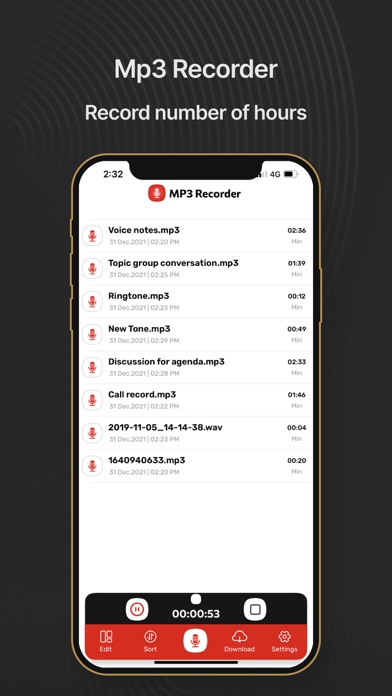
Record crystal-clear audio in MP3 format — perfect for meetings, lectures, interviews, and personal notes. Never miss a word again. Trusted by students, professionals, and journalists for reliable, high-quality voice recording on iPhone and iPad. ▸ STUDIO-QUALITY MP3 RECORDING Choose from 128 to 256 kbps bitrate for the perfect balance of clarity and file size. Record in mono, stereo, or joint stereo. ▸ MULTIPLE INPUT SOURCES Record using your built-in microphone, Bluetooth headset, or external microphone — whatever fits your setup. ▸ STAY ORGANIZED Sort recordings by date, name, or size. Rename files instantly. Find what you need in seconds. ▸ SHARE ANYWHERE Send recordings via email, messaging apps, or any sharing method on your device. One tap is all it takes. ▸ NEVER LOSE A RECORDING Accidentally deleted something important? Recover it from the built-in recovery feature. Your recordings are always safe. ▸ HOW IT WORKS 1. Tap record — choose your quality settings 2. Record your meeting, lecture, or note 3. Organize, rename, and share with one tap Download MP3 Voice Recorder today and start capturing every important moment in high-quality audio. Features Record • Record using the built-in microphone, a Bluetooth headset, or a compatible external microphone. • Automatically name recordings . • Download and upload Mp3 clips to File. Additional features • Organize recordings with sort by date ,name or size • Share recording or continue your previous recording. • Rename recordings. • Email your valuable Mp3 voice notes. •If you accidentally delete any voice record then get it back from settings deleted folder. Audio quality Functions Bitrate/kbps •128 •160 •192 •224 •256 Input Channel Mode •Stereo •jStereo •Mono Mp3 Recording Quality •Low •Medium •High Number of input Channels •One •Two Audio Player Setting •Fast forward and skip seconds •Rewind and skip to previous seconds Player speed adjust •0.5 (Slow) •1.0 (Medium as original) •2.0 (Fast) Why Choose Voice Recorder HD? • Record Anything, Anywhere: Perfect for recording lectures, meetings, interviews, podcasts, or voice memos. • Easy Sharing: Quickly send your recordings via email, AirDrop, or other messaging platforms. • User-Friendly Design: With its sleek and intuitive interface, Voice Recorder HD is simple to use and accessible for everyone. • Ideal for Professionals and Students: Whether you’re a busy professional or a student taking notes, this app makes it easier to capture and manage your audio recordings. • Get Started Today Download Voice Recorder HD: MP3 Memos and start recording in high-quality MP3 format with advanced features that cater to all your recording needs. • Feedback & Support Have questions or feedback? Contact us at info@swiftygarage.com. Read our privacy policy and terms of conditions at Privacy Policy: https://swiftygarage.com/privacy-policy.html Terms of Use: https://swiftygarage.com/terms-of-use.html
What's new · 2.28
Performance Improvement and Bug Fix
Details