

Chord Quiz: Learn Piano Chord
enoiu · Games
Independent analytics for this App Store listing. AppTracker is not affiliated with enoiu.
Chart standing · US
What changed · US
Listing changes AppTracker has observed for this app in this storefront — new versions, price moves, rating shifts, and store copy.
- Changed the default playback pitch for the keyboard display to one octave below Middle C. You can restore the previous pitch (Middle C) in Settings under "Keyboard Pitch".
Price & rating history · US
Reconstructed from the listing changes AppTracker has observed in this storefront. A field is charted once it has changed more than once, and each line starts at the value it moved from.
Average rating · ★ 4.76 now · 3 changes on record
Ratings breakdown · US
The star breakdown behind this app's rating in this storefront.
In-app purchases · US
What this app sells inside itself, grouped by kind and priced for this storefront.
Screenshots




About
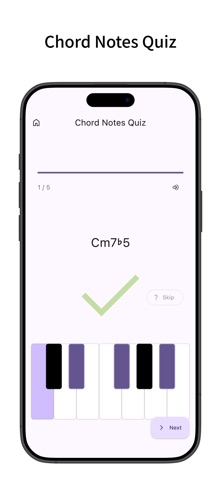
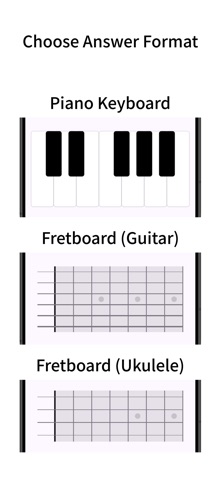
A chord practice app designed to learn chord names and chord tones through quizzes. Compatible with piano, guitar, and ukulele, allowing you to freely choose your question and answer formats to practice quizzes. Can also be used as a chord dictionary to search and look up chords by chord names or constituent notes. Chord Name Quiz - Quiz to identify chord names by looking at keyboards, staff notation, fretboards, or chord diagrams. - Question format can be selected from Piano Keyboard, Staff Notation (Treble Clef, Bass Clef), Fretboard (Guitar, Ukulele), and Chord Diagram (Guitar, Ukulele). - Answer by selecting the root note and chord type using buttons. - Supports inversions and alternative positions (different forms for guitar and ukulele). - Listen to the chord sound at any time during a quiz with the speaker button. Chords are also played automatically upon answering (sounds match the instrument: piano, guitar, or ukulele). Chord Notes Quiz - Quiz to identify constituent notes by looking at displayed chord names. - Answer format can be selected from Piano Keyboard, Fretboard (Guitar), and Fretboard (Ukulele). - Answer by tapping the keys or fretboard to select constituent notes. Tapped notes play immediately. - Check the full chord sound at any time with the speaker button, and hear it automatically played upon answering. - Supports up to 882 chords (21 root notes × 42 chord types). - Configurable Piano Starting Key (starting from C, root note, or random). Quiz Settings - Set time limit (none, or 5 to 30 seconds). - Set wait time after answering (none, or 1 to 10 seconds). - Set number of questions per quiz (5 to 100 questions). - Select root notes to be quizzed individually from all 21 notes. - Select chord types to be quizzed individually from all 42 types (Basic, Intermediate, Advanced, etc.). - Toggle inversions and alternative positions on/off. - Toggle allow duplicate questions (random mode) on/off. - Save your custom settings as presets to easily start a quiz anytime. Chord List & Search - Browse all included chords in a list. - Switch the list display format (Piano Keyboard, Staff Notation, Fretboard, Chord Diagram). - Filter chords by root note. - Search by chord name (symbols or formal names). - Reverse lookup by constituent notes: tap notes on a piano keyboard or fretboard (guitar, ukulele) to find chords containing those notes. - Play chord sounds (piano chords, guitar/ukulele strumming) with a single tap from the list. Chord Detail - Check chord types, constituent notes, and fingerings for each instrument. - Switch display format (Piano Keyboard, Staff Notation, Fretboard, Chord Diagram). - View root position, inversions (1st to 3rd inversions), and alternative positions (different forms for guitar and ukulele) in a list. - View all note positions across the entire fretboard. - Play individual chord sounds for each inversion and alternative form, or tap the keyboard/fretboard directly to play notes. - Switch between enharmonic spelling (# / b). Customize - Change notation style (Standard, German, Semi-German, Solfège / Latin). - Supports Lefty Mode to flip guitar and ukulele fretboards horizontally. - Toggle sound on/off. - Supports dark mode. - Change theme color. - Change in-app language (supports 20 languages). - Supports data backup and restore. - Simple design based on Material Design.
What's new · 8.1.0
- Changed the default playback pitch for the keyboard display to one octave below Middle C. You can restore the previous pitch (Middle C) in Settings under "Keyboard Pitch".
Details