

1Extn - Extensions & Shortcuts
Charles Kautsire · Utilities
Independent analytics for this App Store listing. AppTracker is not affiliated with Charles Kautsire.
Chart standing · US
What changed · US
Listing changes AppTracker has observed for this app in this storefront — new versions, price moves, rating shifts, and store copy.
Version 45.0 introduces the 1Extn Script Library. • Browse ready-made scripts and practical examples from the Scripts screen. • Download and review scripts before saving them to My Scripts. • Imported scripts start with Auto Run turned off so you stay in control. If you enjoy 1Extn, leaving a review helps support future updates.
Price & rating history · US
Reconstructed from the listing changes AppTracker has observed in this storefront. A field is charted once it has changed more than once, and each line starts at the value it moved from.
Average rating · ★ 4.57 now · 3 changes on record
Ratings breakdown · US
The star breakdown behind this app's rating in this storefront.
In-app purchases · US
What this app sells inside itself, grouped by kind and priced for this storefront.
Screenshots


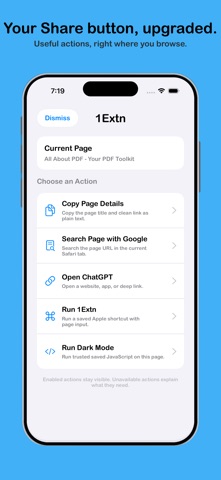


Keywords this app targets
Search terms AppTracker associates with this app — estimates, not search volume. ❝ = in the app's title; a highlighted number is its current position for that term.
Similar apps
Competitors and close alternatives, as estimated by AppTracker.





About
Make Safari work your way with fewer extensions. 1Extn brings useful Safari tools, keyword searches, Share actions, scripts, and website redirects together in one focused app. Start with ready-made features, then customize more when you need them. CHOOSE YOUR SAFARI TOOL Use 1Extn - Tools for the job you need. Read pages more comfortably, inspect page source, use Picture in Picture, create QR codes, translate pages, build YouTube playlists, find lyrics, or connect Safari to Apple Shortcuts and Scriptable. DO MORE FROM SAFARI’S SHARE BUTTON Use 1Extn Actions to: • Copy a page title and clean link • Search the current page • Find selected text or a page title on YouTube • Summarize a page • Open a website, installed app, or supported deep link • Run an Apple Shortcut with Safari content • Run a trusted saved script on the current page Choose which actions appear and arrange them around the way you browse. OPEN LINKS YOUR WAY Save an HTTPS website, app URL scheme, or deep link as an Open Link action. Dynamic variables can pass the current page URL, page title, selected text, or clipboard content to compatible websites and apps. Custom app links depend on the destination app being installed and supporting the URL scheme or deep link. SEARCH FROM SAFARI’S ADDRESS BAR Create your own keyword search engines for websites you use often. Type a short keyword followed by your search into Safari’s address bar, and 1Extn sends it to the search engine you selected. AUTOMATE YOUR BROWSING Save scripts that run automatically on matching pages or manually from Safari’s Share button. Only trusted local scripts with Auto Run turned off appear as manual Share actions, helping keep automatic and manual behavior separate. Ready-made scripts offer an easy starting point, while advanced users can add their own code or import scripts for review. SCRIPT LIBRARY Start faster with ready-made scripts and practical examples. Open the Script Library from inside 1Extn to discover scripts for common Safari tasks, download them, review the code, and save the ones you trust. Imported scripts start with Auto Run turned off, so you remain in control. Create redirects to send matching website links somewhere else automatically. Redirects can preserve the rest of the page address and optionally include subdomains or both HTTP and HTTPS links. RUN APPLE SHORTCUTS Launch a named Apple Shortcut directly from Safari. Pass the current page URL, selected text, clipboard content, or no input depending on your workflow. SIMPLE TO START, FLEXIBLE WHEN NEEDED A guided setup explains which extensions to enable and lets you choose your first Safari tool. Extras keeps scripts, searches, redirects, Share actions, Shortcuts, and Scriptable settings in one place. 1Extn’s ready-made features require no coding. For users who want more control, custom scripts, Apple Shortcuts, Scriptable workflows, backups, and sharing are available too. Safari extensions must be enabled in Settings. Some tools open third-party apps or websites and depend on those services being installed or available.
What's new · 45.0
Version 45.0 introduces the 1Extn Script Library. • Browse ready-made scripts and practical examples from the Scripts screen. • Download and review scripts before saving them to My Scripts. • Imported scripts start with Auto Run turned off so you stay in control. If you enjoy 1Extn, leaving a review helps support future updates.
Details