

Calendar for Lockscreen
Justin Heintz · Utilities
Independent analytics for this App Store listing. AppTracker is not affiliated with Justin Heintz.
Chart standing · US
What changed · US
Listing changes AppTracker has observed for this app in this storefront — new versions, price moves, rating shifts, and store copy.
NEW • More colors: eight new Home Screen widget themes (Cherry, Rose, Lavender, Aurora, Mint, Gold, Sky, and Graphite) and four new accent colors (Mint, Cyan, Brown, and Graphite). • A new Theme screen: choose Auto, Light, or Dark from preview tiles in Settings › Theme. Auto follows your iPhone's appearance, and every screen now switches with it. • Easier to find: the app now appears as "Calendar LS" on your Home Screen and in the widget gallery. The tutorial has been updated to match. FIXES • Changes to an existing event are now saved. Picking a new date or icon for an event you were editing could quietly revert to the old one when you saved. • Swiping to edit an event now always opens that event. The first edit could open an empty editor instead. • iCloud Sync now keeps your devices in step. Edits made on one device reach your others, deleted events stay deleted instead of coming back, and changes from other devices are picked up whenever you open the app. • Screens like Edit Event, Import from Calendar, and Premium now use the accent color you chose in Settings. IMPROVEMENTS • Ages now follow the date. Move a birthday like "Emma's 11th Birthday" to the year before, and it becomes her 10th. Works for anniversaries too. • New More Apps page in Settings, showing my other iPhone and iPad apps. • On iOS 26 and later, buttons use Liquid Glass to match the rest of your iPhone, and Save stands out as the main action when you edit an event. Buttons no longer swell when tapped.
Price & rating history · US
Reconstructed from the listing changes AppTracker has observed in this storefront. A field is charted once it has changed more than once, and each line starts at the value it moved from.
Average rating · ★ 2.33 now · 2 changes on record
Screenshots


About
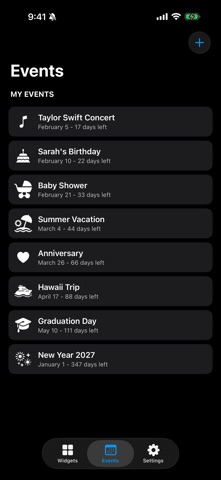
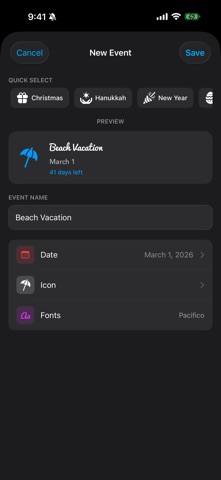
Calendar for Lockscreen - Lock Screen & Home Screen Widgets Transform your Lock Screen and Home Screen with beautiful calendar widgets and countdown timers. Calendar for Lockscreen brings powerful customization to your iPhone with 6 Lock Screen widget styles, 4 full color Home Screen styles, 50+ fonts, and unlimited custom events. POWERFUL LOCK SCREEN STYLES Choose from 6 beautifully designed widget styles, each available in small and large sizes: • Simple Date - Clean, minimalist date display • Date & Time - See the date and time at a glance • Calendar - A mini monthly calendar right on your lock screen • Countdown - Track days until your important events • Progress - Visualize how far along you are to your event • Week Strip - See your entire week at a glance NEW: HOME SCREEN WIDGETS (PREMIUM) Add up to four Home Screen widgets in Small, Medium, or Large, each one laid out for the size you choose: • Countdown - The days remaining until your chosen event • Progress - A ring that fills up as the event approaches • Month - This month at a glance, with your events marked • Up Next - A running list of the events coming up Dress them up with six color themes: Midnight, Ocean, Sunset, Forest, Orchid, and Snow. EDIT WIDGETS WITHOUT OPENING THE APP Touch and hold any Home Screen widget, tap Edit Widget, and change its event, style, or theme right there. Requires iOS 17 or later. UNLIMITED CUSTOM EVENTS Create as many countdown events as you want! Perfect for tracking: • Birthdays and anniversaries • Vacations and trips • Holidays and celebrations • Weddings and special occasions • Project deadlines • Any date that matters to you Each event includes a live preview so you can see exactly how it will look. NEW: IMPORT FROM YOUR CALENDAR (PREMIUM) Already have it in Calendar? Import it in a couple of taps. Calendar for Lockscreen shows your upcoming events, suggests a fitting icon for each one, and turns the ones you pick into countdowns. It only ever reads your calendar, and never changes it. QUICK SELECT HOLIDAYS Get started instantly with 11 pre-configured holidays: • Christmas • Hanukkah • New Year • Easter • Mother's Day • Father's Day • Diwali • Halloween • Thanksgiving • Valentine's Day • Independence Day PERSONALIZE WITH 50+ FONTS Make your widgets truly yours with our extensive font library: • System fonts (San Francisco, SF Rounded, New York, SF Mono) • Sans Serif (Arial, Avenir, Futura, Helvetica, and more) • Serif (Baskerville, Georgia, Palatino, Times New Roman, and more) • Display (American Typewriter, Chalkboard, Copperplate, and more) • Monospace (Courier, Menlo) • Premium custom fonts (Roboto, Pacifico, Lobster, and more) Set different fonts for your title and subtitle to create the perfect look. ICLOUD SYNC (PREMIUM) Your events sync across all your devices. Create an event on your iPhone and see it on your iPad. A sync status screen shows what is stored in iCloud and when your device last synced. DESIGNED FOR YOU • Separate Lockscreen and Homescreen tabs • Widget gallery to preview all styles before choosing • Live previews at every widget size • Full dark mode support • 12-hour or 24-hour time format option FREE FEATURES • 3 Lock Screen widget styles: Simple Date, Date & Time, and Countdown • Unlimited custom events • 40+ iOS system fonts • Dark mode support PREMIUM FEATURES Upgrade to unlock: • All 6 Lock Screen widget styles • 6 configurable Lock Screen widget slots • 4 Home Screen widgets with 4 styles, 6 themes, and 3 sizes • Import events from your calendar • iCloud sync across all your devices • 9 exclusive premium fonts • No ads • Support independent development Download Calendar for Lockscreen today and make your Lock Screen and Home Screen work for you!
What's new · 2.2.1
NEW • More colors: eight new Home Screen widget themes (Cherry, Rose, Lavender, Aurora, Mint, Gold, Sky, and Graphite) and four new accent colors (Mint, Cyan, Brown, and Graphite). • A new Theme screen: choose Auto, Light, or Dark from preview tiles in Settings › Theme. Auto follows your iPhone's appearance, and every screen now switches with it. • Easier to find: the app now appears as "Calendar LS" on your Home Screen and in the widget gallery. The tutorial has been updated to match. FIXES • Changes to an existing event are now saved. Picking a new date or icon for an event you were editing could quietly revert to the old one when you saved. • Swiping to edit an event now always opens that event. The first edit could open an empty editor instead. • iCloud Sync now keeps your devices in step. Edits made on one device reach your others, deleted events stay deleted instead of coming back, and changes from other devices are picked up whenever you open the app. • Screens like Edit Event, Import from Calendar, and Premium now use the accent color you chose in Settings. IMPROVEMENTS • Ages now follow the date. Move a birthday like "Emma's 11th Birthday" to the year before, and it becomes her 10th. Works for anniversaries too. • New More Apps page in Settings, showing my other iPhone and iPad apps. • On iOS 26 and later, buttons use Liquid Glass to match the rest of your iPhone, and Save stands out as the main action when you edit an event. Buttons no longer swell when tapped.
Details