

Stock Map: S&P 500 and More
Nazim Can Altinova · Finance
Independent analytics for this App Store listing. AppTracker is not affiliated with Nazim Can Altinova.
Chart standing · US
What changed · US
Listing changes AppTracker has observed for this app in this storefront — new versions, price moves, rating shifts, and store copy.
More ways to explore your stocks in 1.30: - Switch between map and list views in Favorites and Watchlists. Each tab remembers your choice. - Sort stock lists by market cap, best or worst performance, price, or symbol. Each tab remembers its sort order. - Choose a different category for each category widget. Long press it and choose Edit Widget. - Choose market-cap or equal stock sizes separately for the main map, favorites, and watchlists. - Fixed category widgets refreshing the wrong stock index. - Added help for widgets, iCloud sync, and subscriptions, and improved feedback links on devices without Mail configured. - Bug fixes and performance improvements.
Ratings breakdown · US
The star breakdown behind this app's rating in this storefront.
In-app purchases · US
What this app sells inside itself, grouped by kind and priced for this storefront.
Screenshots




Keywords this app targets
Search terms AppTracker associates with this app — estimates, not search volume. ❝ = in the app's title; a highlighted number is its current position for that term.
Similar apps
Competitors and close alternatives, as estimated by AppTracker.
 Stock Master: Investing Stocks
Apponance, Inc.
1 shared topic · 1 shared title word
Stock Master: Investing Stocks
Apponance, Inc.
1 shared topic · 1 shared title word
 Stocks Live + Stock Tracker
Cinnamon Mobile LLC
1 shared topic
Stocks Live + Stock Tracker
Cinnamon Mobile LLC
1 shared topic
 WorldStock
myINDEX
1 shared topic
WorldStock
myINDEX
1 shared topic
 Stocks+ app
Maple Media Apps, LLC
Stocks+ app
Maple Media Apps, LLC
 Stocks Advisor: Find Top Stock
KYOTO K.K.
1 shared title word
Stocks Advisor: Find Top Stock
KYOTO K.K.
1 shared title word
 Stocks Pro : Real-time stock
Dajax LLC
1 shared topic · 1 shared title word
Stocks Pro : Real-time stock
Dajax LLC
1 shared topic · 1 shared title word
 Trade Ideas & AI Stock Signals
SHAREIT WIDGET PTE. LTD.
1 shared topic · 1 shared title word
Trade Ideas & AI Stock Signals
SHAREIT WIDGET PTE. LTD.
1 shared topic · 1 shared title word
 Stocks Picker
SHAREIT WIDGET PTE. LTD.
1 shared topic
Stocks Picker
SHAREIT WIDGET PTE. LTD.
1 shared topic
About
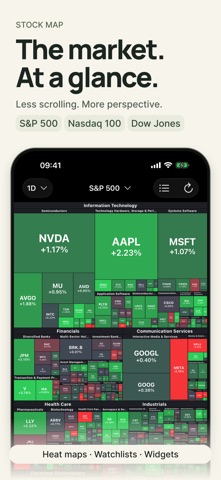
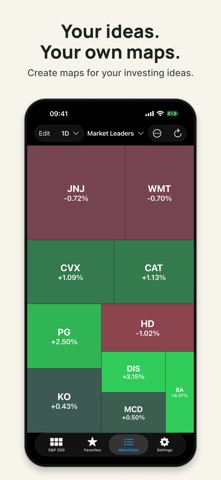
See the market at a glance. Stock Map turns the S&P 500, Nasdaq 100, and Dow Jones into heat maps, with tiles sized by market cap and colored by stock performance. EXPLORE THE MARKET - Switch between the S&P 500, Nasdaq 100, and Dow Jones - See a full index on one screen, then zoom into sectors, industries, and individual stocks - Switch between maps and sortable lists for the main index, favorites, and watchlists - Sort lists by market cap, best or worst performance, price, or symbol - View 1 day and 1 week free, or unlock 1 month, 3 months, and 1 year with Premium - Open stocks in Apple Stocks YOUR STOCKS, YOUR MAPS - Keep the stocks you follow together in Favorites - Create watchlists for your investing ideas and themes - Sync favorites, watchlists, and settings across iPhone, iPad, and Mac with iCloud (Premium) ON YOUR HOME SCREEN - Follow stocks with Category, Favorites, and Watchlist heat map widgets - Open the app quickly with the Lock Screen icon widget (iOS 16 or later) - Widget refresh interval: 30 minutes free, or choose 10–60 minutes with Premium. Actual timing depends on the system. CUSTOMIZATION - Use dark mode or choose a color-blind friendly palette - Choose market-cap or equal stock sizes, with separate settings for the main map, favorites, watchlists, and widgets - Choose a different category for each category widget - Open stocks in Yahoo Finance in-app or in your browser - Customize what a tap does when zoomed in or out Stock Map is free to download, with an optional monthly or annual Premium subscription for additional features and customization. No ads. Available on iPhone, iPad, and Mac. Stock Map is a visualization tool, not investment advice. Data is provided for informational purposes only. Privacy policy: https://stockmap.app/privacy-policy/ Terms and conditions: https://stockmap.app/terms-and-conditions/ Contact: https://stockmap.app/contact/
What's new · 1.30
More ways to explore your stocks in 1.30: - Switch between map and list views in Favorites and Watchlists. Each tab remembers your choice. - Sort stock lists by market cap, best or worst performance, price, or symbol. Each tab remembers its sort order. - Choose a different category for each category widget. Long press it and choose Edit Widget. - Choose market-cap or equal stock sizes separately for the main map, favorites, and watchlists. - Fixed category widgets refreshing the wrong stock index. - Added help for widgets, iCloud sync, and subscriptions, and improved feedback links on devices without Mail configured. - Bug fixes and performance improvements.
Details