

Burst Playlist
David Attias · Music
Independent analytics for this App Store listing. AppTracker is not affiliated with David Attias.
Chart standing · US
What changed · US
Listing changes AppTracker has observed for this app in this storefront — new versions, price moves, rating shifts, and store copy.
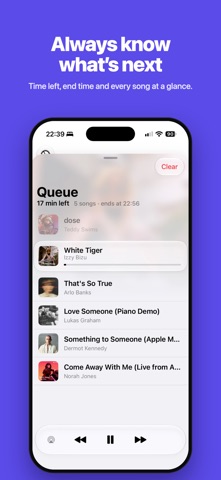
Burst 1.2 — a whole new look, and Burst comes to CarPlay • Redesigned for iOS 27. The Library and Queue are rebuilt with the new Liquid Glass look, cleaner layouts, and easier-to-read details. • Your queue, always at hand. A floating capsule at the bottom shows what’s playing, how many songs are up next, and the time left. Tap or pull it up to open your queue. • CarPlay. Browse your library, build your queue, and control playback from your car’s screen. • Smoother queuing. Adding a song now draws a checkmark, and the song count and time left update as you go. • A clearer queue. The song playing now gets its own card with a progress bar, and you can see at a glance how long your queue lasts and when it ends. • Quicker filters. Switch between Recently added, Played, and Most played in one tap. • Burst Unlimited, simplified. A redesigned upgrade screen, and your plan now shows in Settings, where you can manage your subscription.
Ratings breakdown · US
The star breakdown behind this app's rating in this storefront.
In-app purchases · US
What this app sells inside itself, grouped by kind and priced for this storefront.
Screenshots


About
Burst Playlist makes listening to your favorite "on-repeat" songs fast and easy. Browse recently played and recently added songs and create a playlist in seconds. The app is compatible with all the music added to your library on your phone's Music app. For example, all the songs added to your library from your Apple Music subscription will be available.
What's new · 1.2
Burst 1.2 — a whole new look, and Burst comes to CarPlay • Redesigned for iOS 27. The Library and Queue are rebuilt with the new Liquid Glass look, cleaner layouts, and easier-to-read details. • Your queue, always at hand. A floating capsule at the bottom shows what’s playing, how many songs are up next, and the time left. Tap or pull it up to open your queue. • CarPlay. Browse your library, build your queue, and control playback from your car’s screen. • Smoother queuing. Adding a song now draws a checkmark, and the song count and time left update as you go. • A clearer queue. The song playing now gets its own card with a progress bar, and you can see at a glance how long your queue lasts and when it ends. • Quicker filters. Switch between Recently added, Played, and Most played in one tap. • Burst Unlimited, simplified. A redesigned upgrade screen, and your plan now shows in Settings, where you can manage your subscription.
Details