

Pocketcard – Loyalty Cards
Chiu Fu Ngan · Utilities
Independent analytics for this App Store listing. AppTracker is not affiliated with Chiu Fu Ngan.
Chart standing · US
In-app purchases · US
No in-app purchases.
Screenshots


About
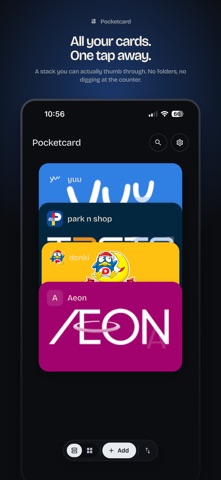
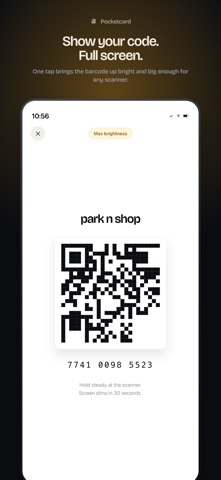
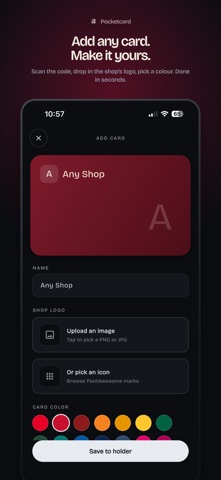
Pocketcard turns the loyalty cards cluttering your wallet into a tidy stack on your phone. Tap a card — its barcode or QR fills the screen at maximum brightness. The cashier scans. Done. Built for the cashier line, not for showing off. — What's inside — • Add a card in seconds from a screenshot, your camera, or just type the name and pick a color. • Pick your own swatch, icon, or background image for any card. Brand it to look like the real thing. • Categories to group cards however you like — Supermarkets, Coffee, Mom's cards… • Sort by manual order, recently used, or A–Z. • Light, dark, follow-system theme. Metal or flat card finish. • Max-brightness boost on by default for scanning under fluorescent light. • One-tap-to-scan: tap on the holder goes straight to the code. Long-press for detail. — Share with people you trust — • Generate a private link to lend a card. They get their own copy that stays in sync if you edit. • Optional 4-digit passphrase. 10 wrong attempts locks the share for an hour. • Deactivate to stop new joiners. Delete the card and every borrower sees a "removed by owner" placeholder. • Card image data is encrypted at rest on the share server. — What we don't do — • No accounts. No email. No tracking. No social graph. • Pocketcard never sees who you send cards to. • Loyalty card photos stay on your device unless you tap Share.
What's new · 2.0
Pocketcard 2.0 — full revamp. • Brand-new card stack. Tap to scan in one motion. • FontAwesome icon picker for cards without an uploaded logo. • Three-screen onboarding: from screenshot, camera, or blank. • Show Code: full-bleed photo viewer with brightness boost on by default. • Sort modes: manual, recently used, A–Z. • Metal or flat card finish. Light / dark / follow-system theme. NEW: Share a card with someone you trust. • A private link gives them their own copy that stays in sync. • Optional passphrase, deactivate/delete any time. • Encrypted at rest server-side.
Details