

Home Widget - for HomeKit
Clement Marty · Utilities
Independent analytics for this App Store listing. AppTracker is not affiliated with Clement Marty.
Chart standing · US
What changed · US
Listing changes AppTracker has observed for this app in this storefront — new versions, price moves, rating shifts, and store copy.
Home Widget 1.10.5 gives you even more ways to personalize your widgets and improves the Apple Watch experience. What’s new: • Choose separate backgrounds for Light and Dark appearances, and optionally link backgrounds to your Focus modes. • Camera mosaics come to Apple Watch: browse your cameras and open them fullscreen from your wrist. • Apple Watch states and complications sync much faster and more reliably with iPhone. • A new corner complication with text joins the existing Watch complications. • Icon search is improved in all 18 languages. • Help and FAQ have been completely refreshed, illustrated, and translated. Improvements: • Fixed an issue that could sometimes prevent a widget action from starting on the first tap. • Smoother app launch and lighter HomeKit loading. • More accurate widget layouts on recent devices and screen sizes. • Improved reliability for unreachable accessories, Shortcuts, backups, and widget rendering. • Numerous stability and performance improvements.
Price & rating history · US
Reconstructed from the listing changes AppTracker has observed in this storefront. A field is charted once it has changed more than once, and each line starts at the value it moved from.
Average rating · ★ 4.07 now · 5 changes on record
Ratings breakdown · US
The star breakdown behind this app's rating in this storefront.
In-app purchases · US
What this app sells inside itself, grouped by kind and priced for this storefront.
Screenshots



About
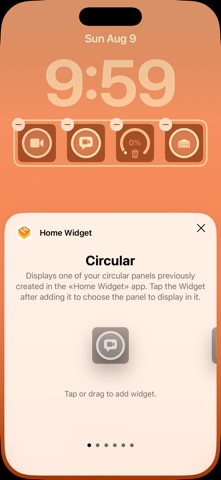
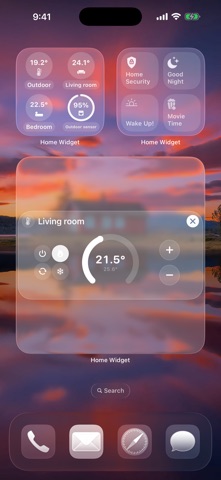
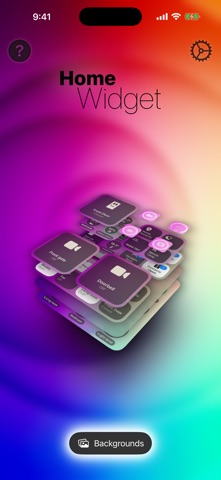
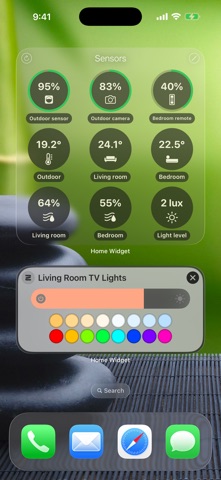
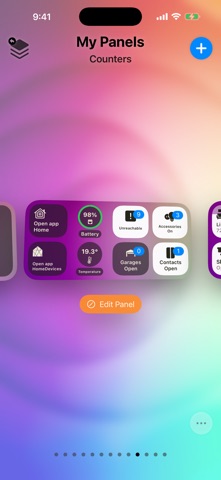
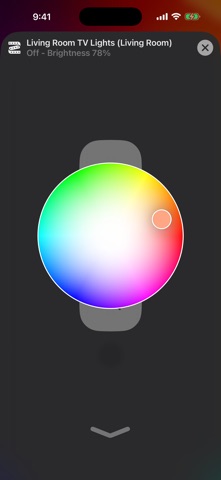
Control your HomeKit home faster with fully customizable widgets for your Home Screen, Lock Screen and Apple Watch. Home Widget brings accessories, scenes, groups, sensors, cameras and shortcuts together in panels built around your routines. LAUNCH HOMEKIT ACTIONS FROM YOUR LOCK SCREEN Open a compatible gate or garage when you arrive, turn on an accessory or run your Welcome Home scene with one tap on your configured widget. BUILD YOUR OWN HOME SCREEN CONTROL PANEL Create a panel, add accessories, scenes, sensors and shortcuts, then place the widget: your dashboard is ready in minutes. Turn a room's lights on or off together, run a shortcut or control several HomeKit homes. OPEN A CAMERA WITH ONE TAP See who is at the front door, check the driveway or look in on your pets. A Home Screen or Lock Screen widget opens the selected HomeKit camera or video doorbell in Home Widget. Audio options depend on your camera. OPEN YOUR CAMERA MOSAIC WITH ONE TAP Check several cameras on one screen instead of opening them individually. Launch the mosaic from your Home Screen, Lock Screen or Control Center, and choose which cameras to include. ADJUST LIGHT BRIGHTNESS AND COLOR Dim the living room for a movie or change the color of a lamp. Use interactive Home Screen controls or open the light control from a Lock Screen widget. Control one light or the lights in a room. SET BLINDS AND SHADES TO THE POSITION YOU WANT Let in the morning light or lower your blinds partway for privacy. Open the position control from your Home Screen or Lock Screen instead of settling for fully open or closed. ADJUST YOUR HOMEKIT THERMOSTAT Change the target temperature or a supported heating/cooling mode. Use interactive Home Screen controls or open the thermostat control from your Lock Screen. SEE THE READINGS THAT MATTER TO YOU Visual buttons help you tell which accessories are on or off. Display individual sensor values: temperature, humidity, CO₂, air quality and accessory batteries. Add counters for open doors, unsecured locks or unreachable accessories to spot what needs attention. KEEP YOUR HOME ON YOUR WRIST Use Apple Watch complications and Smart Stack widgets to reach your panels, cameras, lights and scenes. Keep your controls and readings on your wrist when your iPhone is out of reach. CUSTOMIZE EVERY DETAIL Choose icons, names, colors, backgrounds, transparency and blur. Use different panel sizes to build compact controls or a full smart home dashboard that feels truly yours. YOUR PANELS ACROSS YOUR DEVICES Sync your panels with iCloud. Add widgets to a stack or Today View on compatible devices to keep your home within reach. Home Widget goes beyond basic on/off widgets with adjustable controls, camera access and personal dashboards. A tap runs an action or opens its control, then you choose the setting. Security actions may require authentication or confirmation. Widget states update within system refresh limits. Works with accessories already configured in Apple's Home app. Some features require Home Widget Premium, available as a one-time purchase or a monthly or yearly subscription. Questions or ideas? Write to us at contact@vision-apps.com The Vision-Apps team HomeKit is a trademark of Apple Inc., registered in the U.S. and other countries and regions. Terms of Use: https://www.apple.com/legal/internet-services/itunes/dev/stdeula/ Privacy Policy: https://vision-apps.com/website/en/privacy/
What's new · 1.10.5
Home Widget 1.10.5 gives you even more ways to personalize your widgets and improves the Apple Watch experience. What’s new: • Choose separate backgrounds for Light and Dark appearances, and optionally link backgrounds to your Focus modes. • Camera mosaics come to Apple Watch: browse your cameras and open them fullscreen from your wrist. • Apple Watch states and complications sync much faster and more reliably with iPhone. • A new corner complication with text joins the existing Watch complications. • Icon search is improved in all 18 languages. • Help and FAQ have been completely refreshed, illustrated, and translated. Improvements: • Fixed an issue that could sometimes prevent a widget action from starting on the first tap. • Smoother app launch and lighter HomeKit loading. • More accurate widget layouts on recent devices and screen sizes. • Improved reliability for unreachable accessories, Shortcuts, backups, and widget rendering. • Numerous stability and performance improvements.
Details