

Light Scope - Lux Meter
Byungil Park · Graphics & Design
Independent analytics for this App Store listing. AppTracker is not affiliated with Byungil Park.
Chart standing · US
What changed · US
Listing changes AppTracker has observed for this app in this storefront — new versions, price moves, rating shifts, and store copy.
iPhone Duo support. • Unfold and the screen splits in two — camera preview on the left, readings on the right. The divider follows the hinge position the device reports • On the folded outer screen, all six readings (illuminance, exposure, luminous intensity, color temperature, contrast, noise) still fit without scrolling The metered area is now exact. • The rectangle on screen matches the region the camera actually measures, instead of an estimate that drifted with the screen's aspect ratio • When the metering point sits near an edge, the rectangle is clipped just as the sampling is • If the metered area ends up hidden behind a screen element, it turns red to tell you Also • Location and photo permission prompts are now translated into Korean and Japanese
Price & rating history · US
Reconstructed from the listing changes AppTracker has observed in this storefront. A field is charted once it has changed more than once, and each line starts at the value it moved from.
Price · 9.99 USD now · 2 changes on record
In-app purchases · US
What this app sells inside itself, grouped by kind and priced for this storefront.
Screenshots



Keywords this app targets
Search terms AppTracker associates with this app — estimates, not search volume. ❝ = in the app's title; a highlighted number is its current position for that term.
Similar apps
Competitors and close alternatives, as estimated by AppTracker.
 Light Meter Pro - Lux Measure
Guangzhou Ciyou Network Technology Co., Ltd.
2 shared topics · 3 shared title words
Light Meter Pro - Lux Measure
Guangzhou Ciyou Network Technology Co., Ltd.
2 shared topics · 3 shared title words
 Light Meter - Lux & EV Gauge
Vladislav Zhirnov
2 shared topics · 3 shared title words
Light Meter - Lux & EV Gauge
Vladislav Zhirnov
2 shared topics · 3 shared title words
 Light Meter - lux and foot candle measurement tool
Marina Polyanskaya
2 shared topics · 3 shared title words
Light Meter - lux and foot candle measurement tool
Marina Polyanskaya
2 shared topics · 3 shared title words
 LuxLab
泽涛 林
1 shared topic
LuxLab
泽涛 林
1 shared topic
 Lux Meter - light measurement tool for measuring lumens, foot candles, lx and light temperature
Pavel Bukhonov
1 shared topic · 4 shared title words
Lux Meter - light measurement tool for measuring lumens, foot candles, lx and light temperature
Pavel Bukhonov
1 shared topic · 4 shared title words
 Light Meter: LuxoMetric CCT EV
Hugo Pinon
1 shared topic · 2 shared title words
Light Meter: LuxoMetric CCT EV
Hugo Pinon
1 shared topic · 2 shared title words
 Light Meter by WBPhoto
William Blaschko
1 shared topic · 2 shared title words
Light Meter by WBPhoto
William Blaschko
1 shared topic · 2 shared title words
 Luxilux Light Meter
Christian Lobach
1 shared topic · 2 shared title words
Luxilux Light Meter
Christian Lobach
1 shared topic · 2 shared title words
About
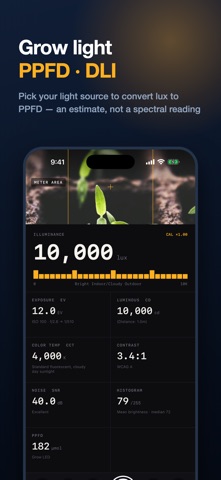
LightScope is a comprehensive solution providing professional light measurement and analysis using your iOS device's camera sensor. 【Key Measurement Features】 • Illuminance (lux) Measurement: Calculates accurate illuminance by analyzing EXIF data from the camera sensor. Illuminance is derived using the formula: (F-number² / (Exposure Time × ISO)) × Calibration Factor. • Exposure (EV) Calculator: Converts measured illuminance to EV and suggests proper exposure combinations in standard stops for your ISO and aperture (or shutter) settings. • Luminous Intensity (candela) Calculation: Automatically calculates the luminous intensity of a light source based on the set distance. Uses the formula: Illuminance (lux) × Distance². • Color Temperature (K) & Tint Analysis: Precisely measures the light source's color temperature (1500K~15000K) and tint (green-magenta bias) by analyzing the camera's white balance sensor data — useful for identifying fluorescent and LED lighting. • Real-time Histogram: Visualizes the balance of shadows, midtones, and highlights through 16-level brightness distribution analysis. • Contrast Ratio Measurement: Evaluates the brightness ratio between bright and dark areas of a scene (based on 10th/90th percentiles) according to WCAG accessibility standards. • Noise Measurement (SNR): Calculates the signal-to-noise ratio in dB to evaluate image quality in the shooting environment. 【Advanced Features】 • Image Capture and Storage: Captures camera images at the time of measurement and stores them with measurement data. • Full-screen Image View: Zoom, pan, and rotate captured images for detailed inspection. • Gallery Saving: Save captured images to your device's photo library. • Measurement History and Trends: Save all measurements chronologically and chart trends for lux, EV, color temperature, contrast, and SNR. • Continuous Logging: Automatically record measurements at a set interval (1-60s) — great for lighting design and site surveys. • Full-Resolution Image Storage: Keep captured images at original quality for detailed inspection and gallery saving. • Export All History: Export every measurement as a CSV file or a PDF report. • Notes & Location Tags: Attach notes to measurements and optionally save the measurement location. • Home Screen Widget: See your last measurement (lux, color temperature, contrast, SNR) right on the home screen. • Camera Full-screen Mode: Hide panels to focus on the camera view while checking key measurements via a mini info panel. • Measurement Lock: Freeze exposure and white balance for stable, steady readings. • Spot Metering: In full-screen mode, tap anywhere to meter around that point. • Perfect Dark/Light Mode Support: All UI elements automatically adapt to the system theme. 【User Settings】 • Calibration Wizard: Enter a reading from a reference lux meter and the calibration factor is calculated automatically. Manual slider adjustment is also available. • Distance Setting: Set the distance to the light source for precise luminous intensity (cd) calculations. • Front/Rear Camera Selection: Choose the appropriate camera for your measurement situation. 【Technical Features】 • Support for measuring various light source types: natural light, LED, fluorescent, incandescent, etc. • Color temperature and tint sourced directly from the camera ISP's white balance estimation for reliable readings • 10-frame moving average filter for measurement stabilization • Center-weighted or spot (tap-to-meter) analysis for accurate evaluation of the main subject • Automatic exposure quality assessment based on histogram analysis Perfect tool for photographers, videographers, lighting designers, UI/UX developers, and anyone who needs accurate light measurements.
What's new · 3.4
iPhone Duo support. • Unfold and the screen splits in two — camera preview on the left, readings on the right. The divider follows the hinge position the device reports • On the folded outer screen, all six readings (illuminance, exposure, luminous intensity, color temperature, contrast, noise) still fit without scrolling The metered area is now exact. • The rectangle on screen matches the region the camera actually measures, instead of an estimate that drifted with the screen's aspect ratio • When the metering point sits near an edge, the rectangle is clipped just as the sampling is • If the metered area ends up hidden behind a screen element, it turns red to tell you Also • Location and photo permission prompts are now translated into Korean and Japanese
Details