

QuickScan Book Leveler
If Then Dev, LLC · Education
Independent analytics for this App Store listing. AppTracker is not affiliated with If Then Dev, LLC.
Chart standing · US
What changed · US
Listing changes AppTracker has observed for this app in this storefront — new versions, price moves, rating shifts, and store copy.
Better book identification from the barcode, and more reading levels looked up rather than estimated. - Special editions and book-fair printings — A title that carries an edition note in parentheses, such as a movie tie-in or a cover variant, is now searched on the book's own title. A title that appears as the second half of an ARBookFind entry matches too, so a book that has a quiz no longer comes back with nothing. - Authors the catalogues spell differently — An ARBookFind entry credited surname-first, or under a shorter form of the first name, now matches the author your scan found. A book credited to more than one author is tried under each name, not only the first. - A second source when the first comes up empty — Scholastic Book Wizard is now consulted for a title and author after the other sources, and an entry that carries no real title, or that lists the publisher where the author belongs, is passed over rather than accepted. When Scholastic names a book ARBookFind missed, the reading level is looked up again under that title. - United States or United Kingdom — Settings now carries an ARBookFind site choice under Reading Levels. Pick United Kingdom if your school uses the UK catalogue, and the next scan searches it. - A cover for a book the barcode cannot place — When a lookup comes back with no cover, QuickScan looks one up by title and author. A book with no ISBN no longer takes its cover and levels from another book, and any book that already did has them cleared and looked up again.
In-app purchases · US
What this app sells inside itself, grouped by kind and priced for this storefront.
Screenshots

About
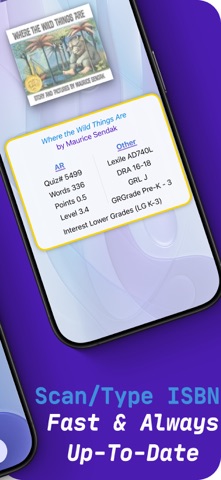
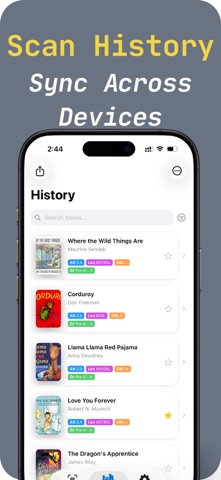
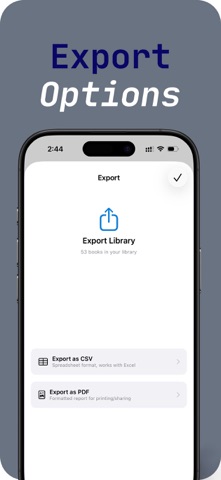
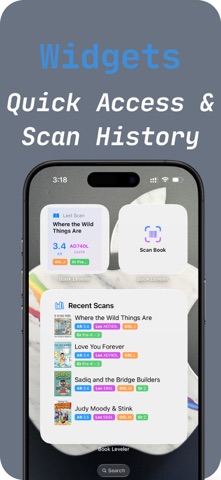
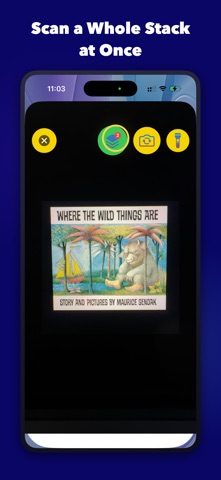
LEVEL YOUR CLASSROOM LIBRARY IN MINUTES, NOT HOURS QuickScan Book Leveler shows you a book's reading levels in seconds. Just scan the barcode with your camera to see AR, Lexile, Guided Reading, and more - and see which of them QuickScan looked up and which it estimated. PERFECT FOR TEACHERS AND PARENTS - Organize your classroom library by reading level - Match students with books at their just-right level - Check reading levels before buying books - Track books your students have read 5 READING LEVELS, PLUS AR POINTS AND INTEREST LEVEL No more hunting through multiple websites. QuickScan shows you where every level came from: - AR (Accelerated Reader) / ATOS levels - looked up, never estimated - Lexile measures - looked up, never estimated - Guided Reading Level (GRL) / F&P - looked up from Scholastic when Scholastic has it; otherwise QuickScan estimates it and marks it ≈ - DRA (Developmental Reading Assessment) - marked ≈ when QuickScan estimates it - Grade level equivalent - marked ≈ when QuickScan estimates it - Interest level (LG, MG, MG+, UG) - AR Points and Word Count Above P, QuickScan doesn't estimate a Guided Reading Level: where Scholastic has no level for a longer chapter book, QuickScan shows none rather than a letter it can't stand behind. SAVE YOUR SCAN HISTORY Never lose track of books you've scanned. QuickScan automatically saves every book with full reading level data. Search, filter, and sort your history to find books fast. Create professional book lists for your classroom: - Export to CSV for spreadsheets - Export to PDF for printing - Share individual books or your entire library - Auto-dated files keep you organized WORKS ON MAC, TOO Use QuickScan on your Mac with your webcam. Scan books right at your desk. Your scan history syncs automatically between iPhone, iPad, and Mac via iCloud. HOME SCREEN WIDGETS See your recently scanned books right on your Home Screen. Add the Quick Scan widget for one-tap access to the camera. BUILT FOR EDUCATORS - No ads - ever - No student data collection - Works offline after initial lookup - Fast, reliable scanning - Free to use with a daily scan limit - upgrade in the app for unlimited scanning Whether you're a teacher leveling a classroom library, a reading specialist matching students with books, or a parent finding appropriate reads - QuickScan Book Leveler makes reading level lookup effortless. Download now and level your first book in seconds. AR, Accelerated Reader and ATOS are trademarks of Renaissance Learning, Inc. Lexile is a trademark of MetaMetrics, Inc. Fountas & Pinnell, F&P and Guided Reading Level are trademarks of their respective owners. QuickScan is not affiliated with, endorsed by or sponsored by Renaissance Learning, MetaMetrics or Fountas & Pinnell.
What's new · 6.5
Better book identification from the barcode, and more reading levels looked up rather than estimated. - Special editions and book-fair printings — A title that carries an edition note in parentheses, such as a movie tie-in or a cover variant, is now searched on the book's own title. A title that appears as the second half of an ARBookFind entry matches too, so a book that has a quiz no longer comes back with nothing. - Authors the catalogues spell differently — An ARBookFind entry credited surname-first, or under a shorter form of the first name, now matches the author your scan found. A book credited to more than one author is tried under each name, not only the first. - A second source when the first comes up empty — Scholastic Book Wizard is now consulted for a title and author after the other sources, and an entry that carries no real title, or that lists the publisher where the author belongs, is passed over rather than accepted. When Scholastic names a book ARBookFind missed, the reading level is looked up again under that title. - United States or United Kingdom — Settings now carries an ARBookFind site choice under Reading Levels. Pick United Kingdom if your school uses the UK catalogue, and the next scan searches it. - A cover for a book the barcode cannot place — When a lookup comes back with no cover, QuickScan looks one up by title and author. A book with no ISBN no longer takes its cover and levels from another book, and any book that already did has them cleared and looked up again.
Details