

RecipeChef: Recipe Manager
Keo Magic · Food & Drink
Independent analytics for this App Store listing. AppTracker is not affiliated with Keo Magic.
Chart standing · US
What changed · US
Listing changes AppTracker has observed for this app in this storefront — new versions, price moves, rating shifts, and store copy.
Thanks for using RecipeChef! This update brings various minor improvements. You can open RecipeChef and tap the button in the top-right corner of the screen to customize the recipe list. If you are using an iPhone 18 Pro Max, you now have more options for adjusting thumbnail sizes.
Price & rating history · US
Reconstructed from the listing changes AppTracker has observed in this storefront. A field is charted once it has changed more than once, and each line starts at the value it moved from.
Average rating · ★ 4.94 now · 3 changes on record
Ratings breakdown · US
The star breakdown behind this app's rating in this storefront.
In-app purchases · US
What this app sells inside itself, grouped by kind and priced for this storefront.
Screenshots




Keywords this app targets
Search terms AppTracker associates with this app — estimates, not search volume. ❝ = in the app's title; a highlighted number is its current position for that term.
Similar apps
Competitors and close alternatives, as estimated by AppTracker.
 Recipe Keeper
Tudorspan Limited
1 shared topic · 1 shared title word
Recipe Keeper
Tudorspan Limited
1 shared topic · 1 shared title word
 CookZone: Recipe Manager
EichGnomies GmbH & Co. KG
1 shared topic · 3 shared title words
CookZone: Recipe Manager
EichGnomies GmbH & Co. KG
1 shared topic · 3 shared title words
 Cookbook Manage & save recipes
Paul Stelzer
2 shared topics
Cookbook Manage & save recipes
Paul Stelzer
2 shared topics
 Recipe Keeper & Saver - Recify
MIRO CONSULTING SRL
2 shared topics · 1 shared title word
Recipe Keeper & Saver - Recify
MIRO CONSULTING SRL
2 shared topics · 1 shared title word
 My Recipe Box: Cookbook & Menu
CmonApp
1 shared topic · 1 shared title word
My Recipe Box: Cookbook & Menu
CmonApp
1 shared topic · 1 shared title word
 Recipe Keeper - Mr. Cook
Flowsen Software UG (haftungsbeschraenkt)
1 shared topic · 1 shared title word
Recipe Keeper - Mr. Cook
Flowsen Software UG (haftungsbeschraenkt)
1 shared topic · 1 shared title word
 RecipeSnap: Recipe Saver
Appable Yazilim Hizmetleri Limited Sirketi
1 shared topic · 1 shared title word
RecipeSnap: Recipe Saver
Appable Yazilim Hizmetleri Limited Sirketi
1 shared topic · 1 shared title word
 WeChef - Recipe Organizer
Relentless
1 shared topic · 1 shared title word
WeChef - Recipe Organizer
Relentless
1 shared topic · 1 shared title word
About
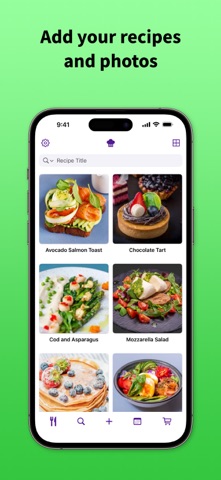
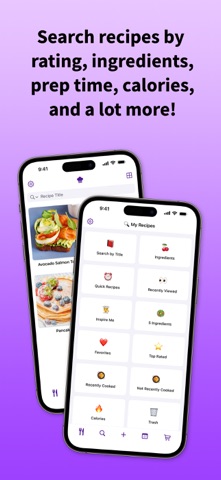
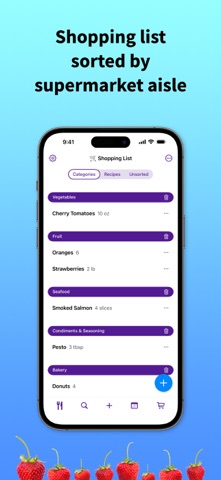
Store all your favorite recipes in one place! Add your own recipes and photos, find the perfect recipe, add ingredients to your shopping list, plan your meals for the week, and a lot more! ADD YOUR FAVORITE RECIPES RecipeChef is a recipe manager. It's a great way to organize your recipes. • Add your own recipes and photos. • Create your own categories (main dish, dessert, spicy, barbecue, vegan, and so on). • Search your recipes by ingredients, prep time, calories, and more. • All your recipes are stored in one place, easy to search and always available wherever you go! SHOPPING LIST • Add ingredients and other items to your shopping list. • Your shopping list is automatically sorted by category (fruit, vegetables, meat, seafood, condiments, and so on). • You can customize the order of the categories to put them in the same order as the aisles of your grocery store. This way, your grocery list will always be displayed in the correct order. FIND THE PERFECT RECIPE • Quick Recipes Are you in a rush? RecipeChef can filter your recipes to find recipes in 15 minutes or less. • Inspire Me Don't know what to eat today? Tap Inspire Me and RecipeChef will suggest random recipes from your collection. • Search by Ingredient Do you fancy a strawberry cake? Do you only have a few ingredients in your fridge? You can use RecipeChef to find recipes with specific ingredients. • Easy Recipes Are you looking for easy recipes? RecipeChef can search your recipe collection to find recipes with 5 ingredients or less. EVEN MORE FEATURES • Adjust ingredients and quantities It's easy to increase or decrease quantities. No need for a calculator. You can easily adjust quantities for 1, 2, 3, 4 people for example. • Meal planner Save time, plan your meals in advance! • iOS Widgets Add iOS widgets directly on your home screen to see your next meal at a glance and quickly access your recipes. • Import recipes from other apps If you currently use another recipe organizer and want to switch to RecipeChef, RecipeChef can import files from CookBook, Crouton, Mela, My Recipe Box, Paprika, Pestle and Recipe Keeper. FREE VERSION You can download RecipeChef for free. The free version lets you manage 20 recipes. RECIPECHEF PRO If you enjoy the app, you can buy RecipeChef Pro. With RecipeChef Pro: • You can save an unlimited number of recipes. • Backup & Sync your recipes to the cloud. • Access your recipes and shopping list on multiple iPhones and iPads in your household (with iOS 18 or higher). If you want to share your recipes with other people in your household, you can create a single account for your household. This way, everybody will have access to the same recipe collection, shopping list, and meal planner. CONTACT & HELP Do you have any questions or do you need some help? Feel free to contact us at contact@recipechef.app Terms of service: https://recipechef.app/terms Privacy policy: https://recipechef.app/privacy
What's new · 17.9
Thanks for using RecipeChef! This update brings various minor improvements. You can open RecipeChef and tap the button in the top-right corner of the screen to customize the recipe list. If you are using an iPhone 18 Pro Max, you now have more options for adjusting thumbnail sizes.
Details