

Folder-File Manager
荣 周 · Utilities
Independent analytics for this App Store listing. AppTracker is not affiliated with 荣 周.
Chart standing · US
What changed · US
Listing changes AppTracker has observed for this app in this storefront — new versions, price moves, rating shifts, and store copy.
• Restore access when both app lock credentials and the recovery record are missing: confirm recovery, then verify your device identity. • Your files are kept. Existing valid app passwords and recovery-code flows remain unchanged.
Ratings breakdown · US
The star breakdown behind this app's rating in this storefront.
In-app purchases · US
What this app sells inside itself, grouped by kind and priced for this storefront.
Screenshots



About
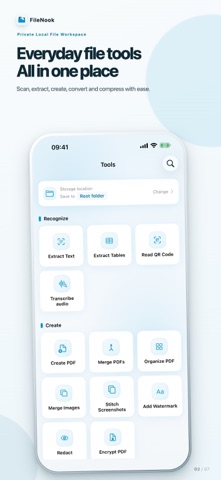
FileNook is a private local file workspace for iPhone and iPad. Organize files, read documents and prepare materials without a cloud-drive account. Files and document processing stay on your device unless you choose to share them. FILE WORKSPACE • Create folders; browse, rename, move, duplicate, sort and search files. • Use favorites, recent files and a recoverable trash. • Import from Files, Photos, AirDrop and the share sheet. • Transfer files from a computer over local Wi-Fi—no account or upload to a cloud service. • Search supported document content and inspect detailed file information. SCAN & RECOGNIZE • Scan ID cards with optional purpose watermarks and image enhancement. • Extract editable text from photos and PDFs. • Extract tables with cell review and export to Excel. • Recognize QR codes without automatically opening links. • Transcribe local audio with selectable ranges and TXT or SRT export. PDF TOOLS • Create searchable or standard PDFs from photos and document scans. • Merge PDFs; organize, reorder, rotate, insert, remove and extract pages. • Split PDFs by page, fixed groups or custom groups. • Crop page margins, compress PDFs and password-protect PDF copies. • Convert PDFs to images or editable Word documents. • Export TXT and Markdown to PDF; add optional covers, contents and page numbers. • Combine photos, scans and selected PDF pages; set a consistent A4 or Letter page size. PHOTO & PRIVACY TOOLS • Convert image formats, crop or resize to exact dimensions, and save reusable material presets. • Compress photos, combine images and stitch long screenshots. • Add text watermarks to images or PDFs. • Permanently redact selected areas of images and PDFs before sharing. VIDEO & AUDIO TOOLS • Compress compatible videos and preview the result before saving. • Extract an audio track or selected time range from a video. READ & PLAY • Read PDF, EPUB, DRM-free MOBI, TXT and Markdown files. • Play local video and audio, including supported HDR video, subtitles, picture in picture and seek-preview thumbnails. LOCAL PROTECTION • Protect app access with an independent passcode and optional biometrics. • Create password-encrypted backups and password-protected ZIP archives. • App Lock protects access to the app; it cannot protect copies after you export or share them. Basic file operations, reading and standard playback are free. Selected recognition, conversion and batch tools share one free use each day. Optional rewarded ads provide two extra uses. Pro is a one-time purchase that removes all ads and daily tool usage limits. File-size, page-count and batch safety limits still apply. No new monthly or annual subscription is offered. Privacy Policy: https://apps.vanto.space/en/app/folder/privacy/ Terms of Use: https://apps.vanto.space/en/app/folder/terms/
What's new · 3.0.6
• Restore access when both app lock credentials and the recovery record are missing: confirm recovery, then verify your device identity. • Your files are kept. Existing valid app passwords and recovery-code flows remain unchanged.
Details