

Pixel Art 2D to Voxel 3D
A5 Multimedia · Graphics & Design
Independent analytics for this App Store listing. AppTracker is not affiliated with A5 Multimedia.
Chart standing · US
What changed · US
Listing changes AppTracker has observed for this app in this storefront — new versions, price moves, rating shifts, and store copy.
Build your pixel art with layers, turn photos into editable designs, and refine every detail with new selection tools and live colour adjustments. What’s new: - Layers: add, rename, duplicate, move, hide, merge, and flatten your artwork. Copy or cut selected pixels to a new layer. - Photo imports: start from your camera or Photo Library and choose Pixelated, Sharp, Balanced, or Smooth conversion. - Freehand and rectangle selections, plus fill, erase, and select-all-active-pixels actions. - Live colour adjustments for RGB, brightness, contrast, saturation, warmth, and sharpness. - Larger Pro grids: 16x16, 32x32, and 64x64, plus 128x128 on iPad. - Pinch zoom up to 4x, two-finger panning, clockwise rotation, and new drawing background styles. - Apple Pencil hover, double-tap eraser switching, and squeeze palette controls on supported hardware. - Transparent PNG export and editable layered JSON import/export with Pro. Improved: - Refreshed toolbars, clearer first-run choices, canvas sizes in the gallery, and reopening your last drawing. - More responsive drawing, photo imports, and 3D viewing, with improved lighting and camera framing. - More reliable saving, up-to-date exports, and previous-purchase restoration.
In-app purchases · US
What this app sells inside itself, grouped by kind and priced for this storefront.
Screenshots


About
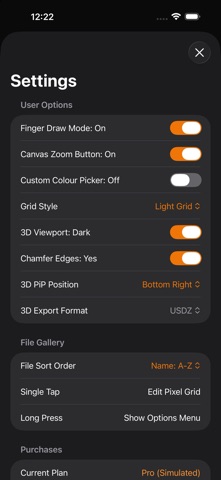
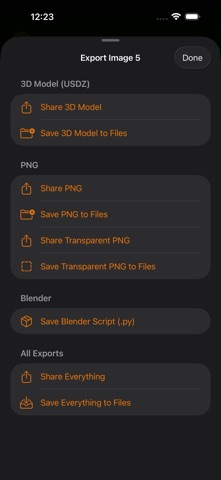
Turn your 2D pixel art ideas into shareable 3D creations in seconds. PixelToVoxel transforms 2D designs into clean voxel models, so you can sketch, preview, and export your work for games, scenes, and creative projects. Start with a blank canvas or turn a photo into pixel art, then build up your design with layers, selection tools, and live colour adjustments. Built for quick iteration on iPhone and iPad. Free version includes: - Create and edit pixel art on 10x10 grids - Up to 2 saved files and sample files to get started - 3D voxel previews to see your designs take shape - Brush, eraser, eyedropper, undo/redo, and finger-draw mode - Photo imports from your camera or Photo Library, with pixelated, sharp, balanced, and smooth styles - Layers to separate, move, duplicate, rename, hide, merge, and flatten parts of your artwork - Freehand and rectangle selection tools to fill, erase, or copy and cut pixels to a new layer - Live adjustments for colour, brightness, contrast, saturation, warmth, and sharpness - Pinch to zoom, two-finger panning, and clockwise artwork rotation - A choice of light, dark, white, and black drawing backgrounds - Apple Pencil hover, double-tap eraser switching, and squeeze palette controls on supported hardware Upgrade to PixelToVoxel Pro to unlock: - Unlimited files - Larger grids: 16x16, 20x20, 32x32, and 64x64, plus 128x128 on iPad - Custom colour picker - Advanced file tools: rename, duplicate, and delete - Full export workflow, including PNG pixel art and transparent PNGs, PixelToVoxel JSON with editable layers, 3D models in USD/USDZ, and Blender import scripts (.py) - Export all supported 3D formats at once Bring exported PixelToVoxel JSON artwork back into the editor to keep working with its layers. Use the full 3D viewer to inspect your models; the live drawing preview is available on grids up to 64x64. Choose the plan that fits your workflow: - Weekly Pro subscription - Lifetime Pro one-time unlock Already bought PixelToVoxel before it became free? Eligible previous purchases can unlock Pro automatically. You can also restore your purchase in the app. Terms of Use: https://a5multimedia.co.uk/apps/pixel2voxel-terms-of-use Apple Standard EULA: https://www.apple.com/legal/internet-services/itunes/dev/stdeula/
What's new · 2.1
Build your pixel art with layers, turn photos into editable designs, and refine every detail with new selection tools and live colour adjustments. What’s new: - Layers: add, rename, duplicate, move, hide, merge, and flatten your artwork. Copy or cut selected pixels to a new layer. - Photo imports: start from your camera or Photo Library and choose Pixelated, Sharp, Balanced, or Smooth conversion. - Freehand and rectangle selections, plus fill, erase, and select-all-active-pixels actions. - Live colour adjustments for RGB, brightness, contrast, saturation, warmth, and sharpness. - Larger Pro grids: 16x16, 32x32, and 64x64, plus 128x128 on iPad. - Pinch zoom up to 4x, two-finger panning, clockwise rotation, and new drawing background styles. - Apple Pencil hover, double-tap eraser switching, and squeeze palette controls on supported hardware. - Transparent PNG export and editable layered JSON import/export with Pro. Improved: - Refreshed toolbars, clearer first-run choices, canvas sizes in the gallery, and reopening your last drawing. - More responsive drawing, photo imports, and 3D viewing, with improved lighting and camera framing. - More reliable saving, up-to-date exports, and previous-purchase restoration.
Details