

Side Notes - Minded
Straw Technologies · Productivity
Independent analytics for this App Store listing. AppTracker is not affiliated with Straw Technologies.
Chart standing · US
What changed · US
Listing changes AppTracker has observed for this app in this storefront — new versions, price moves, rating shifts, and store copy.
New in 3.1 • Side Notes Plus, an optional upgrade: advanced templates (weighted decision matrix, OKR, weekly review, 5 whys). • Your own templates: save any board as a template. • Lock a board with Face ID or Touch ID. • All accent colors: Brick, Forest and Ocean. • Markdown export to Notion, Obsidian or any editor. • Every template now comes with a guide: when to use it, a filled-in example and a tip. • Try Plus free for 1 week with the yearly plan. Everything you already use stays free. • The iPad and Mac sidebar is now translated into your language. • Stability improvements. Thanks for using Side Notes! A quick rating on the App Store helps a lot.
Ratings breakdown · US
The star breakdown behind this app's rating in this storefront.
In-app purchases · US
What this app sells inside itself, grouped by kind and priced for this storefront.
Screenshots



About
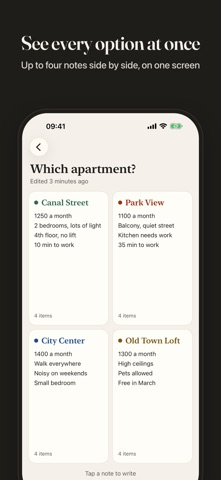
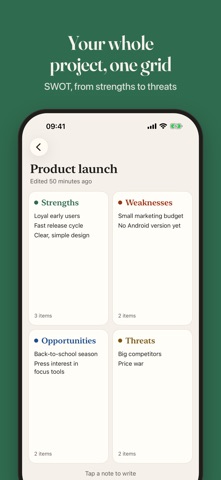
See both sides of every decision at once. Side Notes shows several notes on one screen, so your pros and cons, two options or a SWOT analysis sit side by side instead of hiding in separate lists. Pick a template, start typing, and compare at a glance. Free, with no ads and no account. START FAST WITH TEMPLATES • Pros & Cons: two columns, one clearer answer • Option A vs Option B: compare two choices side by side • SWOT analysis: strengths, weaknesses, opportunities and threats in one grid • Eisenhower matrix: sort tasks by urgent and important • Retrospective: went well, to improve, ideas, actions • Blank board: any layout, your own structure THREE LAYOUTS FOR THE WAY YOU THINK • Dual: two notes side by side • Four: a 2x2 grid for matrices and frameworks • Single: one full note when you need room to write Tap any note to edit it full screen, then swipe to move to the next one. MADE FOR REAL DECISIONS Should you take the job offer? Which apartment, which laptop, which city? Put every argument where you can see it. Run a SWOT on a business idea or a career move, plan your week with the Eisenhower matrix, and close a project or a sprint with a retrospective. ON ALL YOUR DEVICES, NO SIGN UP Your boards sync with iCloud across iPhone, iPad and Mac. There is no account to create and nothing to log in to. WRITE, THEN FIND IT AGAIN • Rich text formatting such as bold and italic (iOS 26 and later) • Word count on every note • Search board titles and note content, filter by Today or This week • Swipe to duplicate or delete a board, or long press for more options SHARE YOUR THINKING Export any board as a PDF or share it as text, ready for a meeting, a teammate or your future self. MAKE IT YOURS Light or dark mode and the Ink accent color, with Brick, Forest and Ocean in Side Notes Plus. A calm, paper-like design with serif titles. GREAT ON IPAD AND MAC More room to see every note at once, plus keyboard shortcuts on iPad and Mac (Apple silicon). Fully translated into 34 languages and redesigned for the latest iOS with Liquid Glass. GO FURTHER WITH SIDE NOTES PLUS Everything above stays free. Side Notes Plus is an optional upgrade for when you want more: • Advanced templates: weighted decision matrix, OKR, weekly review, 5 whys • Your own templates: save any board as a template • Lock a board with Face ID or Touch ID • All accent colors: Brick, Forest and Ocean • Markdown export to Notion, Obsidian or any editor Choose a yearly plan with a 1-week free trial, a monthly plan, or a one-time lifetime purchase. Side Notes is free, with no ads and no account. Just a clear space to think things through. Side Notes Plus is an optional auto-renewable subscription. Payment is charged to your Apple Account; it renews unless cancelled at least 24 hours before the end of the period. Terms of Use: https://www.apple.com/legal/internet-services/itunes/dev/stdeula/ Privacy Policy: https://side-notes.app/en/privacy
What's new · 3.1.0
New in 3.1 • Side Notes Plus, an optional upgrade: advanced templates (weighted decision matrix, OKR, weekly review, 5 whys). • Your own templates: save any board as a template. • Lock a board with Face ID or Touch ID. • All accent colors: Brick, Forest and Ocean. • Markdown export to Notion, Obsidian or any editor. • Every template now comes with a guide: when to use it, a filled-in example and a tip. • Try Plus free for 1 week with the yearly plan. Everything you already use stays free. • The iPad and Mac sidebar is now translated into your language. • Stability improvements. Thanks for using Side Notes! A quick rating on the App Store helps a lot.
Details