

Video Editor & Maker -Cup Cute
立瑗 胡 · Graphics & Design
Independent analytics for this App Store listing. AppTracker is not affiliated with 立瑗 胡.
Chart standing · US
What changed · US
Listing changes AppTracker has observed for this app in this storefront — new versions, price moves, rating shifts, and store copy.
Price & rating history · US
Reconstructed from the listing changes AppTracker has observed in this storefront. A field is charted once it has changed more than once, and each line starts at the value it moved from.
Average rating · ★ 4.61 now · 4 changes on record
In-app purchases · US
What this app sells inside itself, grouped by kind and priced for this storefront.
Screenshots




About
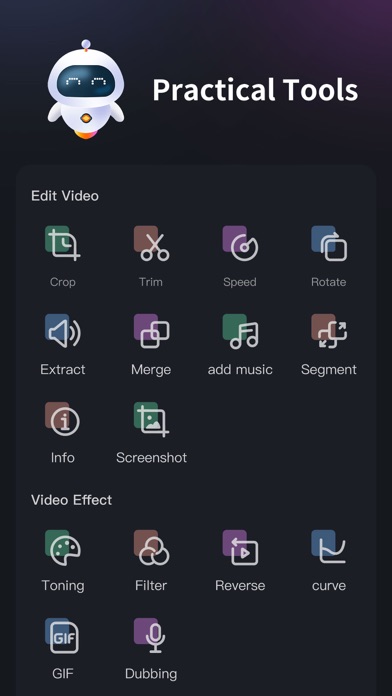
Video editing assistant is a full-format and full-featured video editing software. Compatible with mainstream audio and video formats, and integrates many common functions in the video production process. Set video editing, video format factory, video conversion Video compression in one video production tool software. Easy to operate, easily edit the video you want, it is a must-have video app for video makers [Supported audio and video media formats] •Supported video formats: mp4, mov, mkv, flv, avi, rm, rmvb, 3pg, gif, m4v, mpg, wmv, asf, etc. • Supported audio formats: mp3, wav, m4a, aac, ape, flac, wma, amr, etc. [Software Features] • Full media format support, non-mp4 format video on the computer can also be edited on the mobile phone. TV drama mkv , Avi and other formats can also be edited directly on the mobile phone, which is convenient and convenient • Precise video editing, so that a single frame of video can be adjusted • No video time limit, time is under your control • Multiple network-wide unique video editing functions to help video editing and production 【Function description】 1. Screen cut 2. Time Clip 3. Video speed adjustment 4. Direction rotation 5. Extract audio 6. Merge and merge 7. Replace music 8. Segment cutting 9. Video information 10. Single frame screenshot 11. Video toning 12. Video filters 13. Rewind video 14. Slope speed regulation 15.Video to gif 16. Convert to MP4 17. Video compression 18.Video duplication 19.Image Erase 20.Video Erase 【meidaLeap VIP subscription】 1. Subscribing to VIP members includes the following benefits: HD export, removing advertising and opening all functions. 2. According to your choice, VIP members offer two time period subscriptions: "Monthly Fee" and "Annual Fee”. 3. When purchase confirmed, your iTunes account will be charged. 4. Subscription will automatically renew unless auto-renew is turned off at least 24 hours before the end of the current period 5. Account will be charged for renewal within 24 hours before the end of the current period 6. Subscription can be managed by the user, and can be turned off in user's account settings after purchased. The specific steps are: "Settings"-> "iTunes Store and App Store"-> select "Apple ID" on the iOS device 』-> Click『 View Apple ID 』-> Click『 Subscribe 』-> Select 『meidaLeap 』 on the account settings page to cancel subscription. Privacy Policy: https://video-alum.oss-cn-hangzhou.aliyuncs.com/support/meidaLeap_privacyPolicy.html Terms of Service: https://video-alum.oss-cn-hangzhou.aliyuncs.com/support/meidaLeap_terms.html 【contact us】 •Official Weibo: http://weibo.com/shipinxiangce •User exchange qq group: 773291563
What's new · 4.6
1. Multi-track editing is now more convenient and easier to use. 2. More video transition effects added. 3. Optimized processing speed for video conversion, video compression, video cropping, and video merging. 4. Fixed software bugs. 5. Fix the bug of black screen in video transition
Details