

The Smart Coach
Omar Al Homaidi · Productivity
Independent analytics for this App Store listing. AppTracker is not affiliated with Omar Al Homaidi.
Chart standing · US
What changed · US
Listing changes AppTracker has observed for this app in this storefront — new versions, price moves, rating shifts, and store copy.
Ready for iPhone Duo Smart Coach fills the cover and the large inner display, and keeps your place when you open or close it.
Screenshots


About
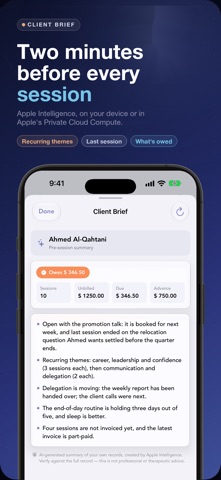
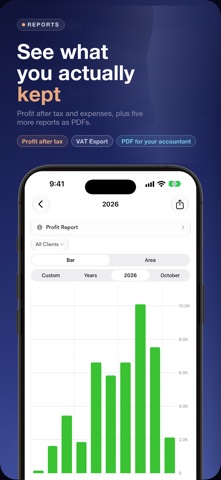
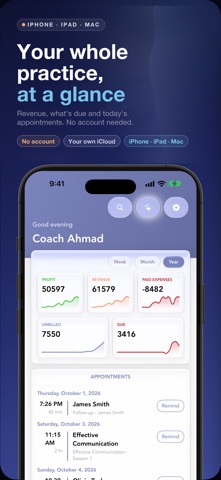
Know where you left off with every client, and who still owes you. Before a session, open the client: the last session's notes, the #themes that keep coming up and what is still unbilled. After it, tick the sessions, create the invoice and record the payment, in full, in part or in advance. For coaches and independent practitioners on iPhone, iPad and Mac. No account, no client logins; your records sync through your own iCloud. MANAGE YOUR CLIENTS Detailed client profiles with contact details, photos and notes. Reach clients via phone, SMS, WhatsApp or email. Track advance payments, attach documents and import contacts in one tap. TRACK SESSIONS WITH SMART KEYWORDS Log every session with custom types, pricing and notes. #hashtags track themes across sessions and highlight as you type. Export one session's notes or all of them as formatted PDFs. PROFESSIONAL INVOICING & BILLING Every client shows what is unbilled, billed and due. Tick the unbilled sessions, see the running total, tap Create Bill. Auto-numbered invoices with discounts and tax/VAT (titled Tax Invoice), marked overdue once past their due date. Record partial payments. Invoices, receipts and advance-payment receipts are branded PDFs with your logo. APPLE INTELLIGENCE, KEPT BETWEEN YOU AND APPLE A Client Brief before every session: recurring themes, what the last session dealt with and what is still owed. A read-only Practice Assistant that answers from your own records: who owes you, what you haven't invoiced. Scan a receipt and the expense fills itself in. All three use Apple Intelligence, on your device or in Apple's Private Cloud Compute, never a third-party AI. The Brief and the Assistant need an Apple Intelligence-capable device (iOS 26 or later); without it, Apple's text recognition reads receipts. EXPENSE TRACKING Record expenses with categories, receipt images, and paid/unpaid status. Link each one to a client or a workshop. POWERFUL REPORTS & ANALYTICS Six report types: Revenue, Profit, Expenses, Activity, Clients and VAT Export. Charts filter by period, client or custom dates. Export every report to PDF for your accountant. APPOINTMENT SCHEDULING Appointments with time zones, repeats and calendar sync. See what's coming on the dashboard and send SMS or WhatsApp reminders in one tap. ORGANIZE WORKSHOPS Group workshops with notes, expenses, appointments and attachments. See each workshop's earnings. CLIENT ONBOARDING One onboarding document with your agreement, session format, fees and confidentiality policy, personalized per client and shared as a branded PDF with a signature field. SMART NOTIFICATIONS A morning briefing of your day, reminders the evening before appointments, and a weekly alert for overdue payments. SEARCH AND WIDGET Search clients, workshops, sessions, notes, expenses and appointments from one bar. Home Screen widgets show today's schedule, the month's revenue and what is due. YOUR DATA, YOUR PRIVACY Your clients, notes and amounts stay on your devices and in your own iCloud. On iPhone and iPad the app shares limited usage information, such as which features you use (never client names, notes, amounts or anything you type); switch it off in Settings → Privacy. Works offline, apart from Apple Intelligence. PLANS Free for your first 2 clients, with unlimited sessions, appointments, expenses and reports. All Access: unlimited clients and workshops on all your devices for $2.99/month, $29.99/year or $79.99 once (Lifetime). One flat price, never per client. US prices; other App Stores show local prices. Lifetime never renews. --- Payment is charged to your Apple Account at purchase. Subscriptions renew automatically unless cancelled at least 24 hours before the end of the current period. Manage or cancel in your Apple Account settings under Subscriptions. --- Privacy policy: https://www.zaatarlabs.com/privacy-policy Terms of use: https://www.zaatarlabs.com/terms
What's new · 4.0.2
Ready for iPhone Duo Smart Coach fills the cover and the large inner display, and keeps your place when you open or close it.
Details