

Tally Counter - Score Tracker
Andrei Vakulski · Utilities
Independent analytics for this App Store listing. AppTracker is not affiliated with Andrei Vakulski.
Chart standing · US
What changed · US
Listing changes AppTracker has observed for this app in this storefront — new versions, price moves, rating shifts, and store copy.
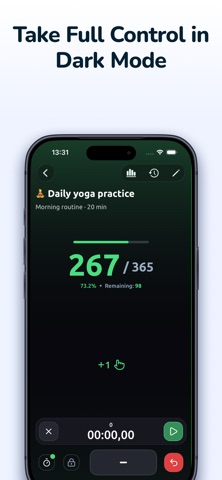
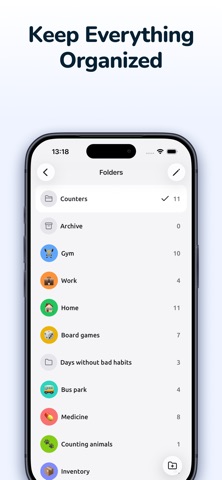
• Browse your folders in a new card view, with clearer icons and counter counts. • Add a true black background to dark mode. • Filter history faster with preset date ranges and easily clear your selection. • Choose the language for CSV and PDF exports. • Reset all counters in a folder directly from the counter list menu. • Enjoy faster startup, smoother counting, and quicker statistics loading. • Counter names containing numbers now sort naturally. • Improved reliability of counter and backup reminders. • Fixed decimal values and step sizes in iOS widgets. • Added Georgian, Kazakh, Kyrgyz, Traditional Chinese, and European Portuguese. • Improved translations, number formatting, accessibility, and light and dark theme styling.
Ratings breakdown · US
The star breakdown behind this app's rating in this storefront.
In-app purchases · US
What this app sells inside itself, grouped by kind and priced for this storefront.
Screenshots




About
Need to keep score, track reps, log inventory or measure habits? Tally Counter turns your phone into an ultra-fast, ultra-reliable click counter that never loses a tap. Why users love it: - Lightning-fast tap response with optional haptic feedback & crisp click sounds - Unlimited counters: track sets, laps, people, products - anything that can be counted - Folders & color labels keep big projects perfectly organized - Goal mode shows progress toward a target number with a progress ring and optional alert - Sort lists by name, color, total, last used or custom order - Clean design with automatic Dark & Light themes for day and night comfort - 20+ interface languages, including English, Español, Deutsch, Français, Português, العربية, 中文, 日本語 - Works offline - no account, no ads, no data collection Power features - One-hand thumb mode and large “+ / –” buttons for error-free counting - Negative values & reset with undo safeguard - Per-counter sound packs and vibration strength - Home-screen widgets for instant access Perfect for: - Gym reps & sets - Attendance & headcounts - Knit or crochet rows - Habit tracking - Event ticketing - Inventory & stock - Board-game scoring - Prayer beads & mantra rounds Download Tally Counter now and never lose count again! https://www.apple.com/legal/internet-services/itunes/dev/stdeula/
What's new · 2.9.7
• Browse your folders in a new card view, with clearer icons and counter counts. • Add a true black background to dark mode. • Filter history faster with preset date ranges and easily clear your selection. • Choose the language for CSV and PDF exports. • Reset all counters in a folder directly from the counter list menu. • Enjoy faster startup, smoother counting, and quicker statistics loading. • Counter names containing numbers now sort naturally. • Improved reliability of counter and backup reminders. • Fixed decimal values and step sizes in iOS widgets. • Added Georgian, Kazakh, Kyrgyz, Traditional Chinese, and European Portuguese. • Improved translations, number formatting, accessibility, and light and dark theme styling.
Details