

WinPulse – Windows Admin
Signifium LLC · Business
Independent analytics for this App Store listing. AppTracker is not affiliated with Signifium LLC.
Chart standing · US
Ratings breakdown · US
The star breakdown behind this app's rating in this storefront.
In-app purchases · US
What this app sells inside itself, grouped by kind and priced for this storefront.
Screenshots





About
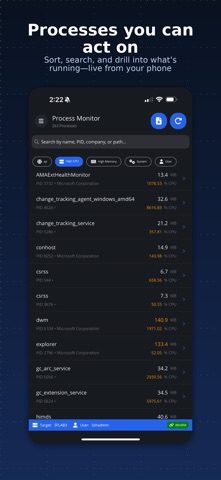
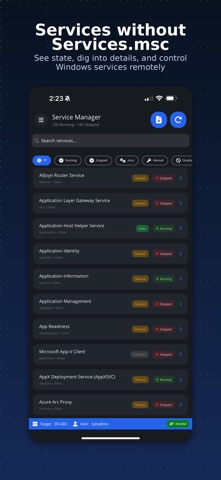
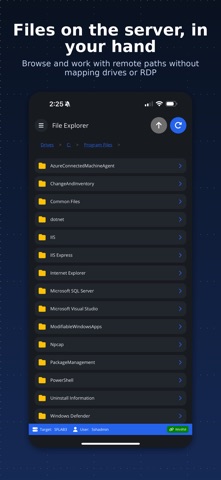
## WinPulse — Windows Server management from your iPhone ## Monitor, troubleshoot, and control Windows servers from anywhere — no RDP, no agents, no exposed ports. WinPulse brings processes, services, event logs, diagnostics, and reporting to your iPhone or iPad so you can triage, investigate, and act in seconds. ## How it works ## WinPulse connects to your Windows Gateway server over SSH (port 22). The Gateway communicates with all your target servers using WinRM, WMI, and CIM — native Windows protocols that are already in your environment. No separate agent product. No new attack surface. WinPulse connects your phone to a Windows Gateway over SSH. The Gateway communicates with all target servers using native Windows protocols — no agents required. ## Gateway setup ## Connect your Gateway server in minutes. Full setup documentation at signifium.com/winpulse. On Windows Server 2025, enabling SSH is as simple as ticking a checkbox in Server Manager — just like enabling RDP. No PowerShell required. For Windows Server 2022, 2019, 2016, and 2012 R2, a one-step PowerShell command handles the install. Step-by-step instructions at signifium.com/winpulse. Supported: Windows Server 2025, 2022, 2019, 2016, 2012 R2, and Server Core. ## Built for the moments between full sessions ## Full-screen RDP from a phone is clunky for quick checks. WinPulse surfaces the information you need in seconds — whether you are troubleshooting an outage, reviewing logs before a meeting, or responding to an alert at 2am. ## Complete server management ## Real-time monitoring • Activity dashboard with CPU, memory, and system vitals • Process monitor with resource usage, module details, and process control • Service status with start/stop/restart controls • Event log browser with advanced filtering (ID, level, timeframe, message search) System administration • System information, BIOS details, installed roles, and OS configuration • Network interfaces with IP configuration and adapter management • Disk management with capacity, health, and usage metrics • Local users and groups with membership details • Installed applications and Windows Updates (view and install) • Active RDP sessions and connection monitoring Operations & control • Power management (restart, shutdown, with optional delay) • Windows Update deployment and scheduling • Group Policy refresh and verification • Time synchronisation diagnostics and repair • Remote Desktop enable/disable • User session management and logoff • Recycle bin management Network diagnostics Run connectivity tests from your target servers: • Ping and traceroute • DNS resolution and lookup • Port connectivity checks • HTTP/HTTPS endpoint testing • Active Directory and Kerberos authentication verification File management & reporting • Browse, search, and manage remote files and folders • Security reports: RDP access history, privilege escalation tracking, account lockouts and password changes, failed login analysis • System health reports: uptime, performance baseline, scheduled tasks, Windows Updates • Backup status monitoring with VSS and restore points • Export reports to text/CSV for compliance and analysis ## Multi-target management ## Switch between servers quickly. Save connection profiles for one-tap access across environments — production, staging, DR. One Gateway login, many targets. ## Pricing ## Try free for up to 14 days with full access. After that, manage up to 3 servers forever at no charge. Subscribe when you need more than three targets. All features included — no tiered feature gates. Cancel anytime in your Apple account settings. ## Support ## Documentation: signifium.com/winpulse Direct support: support@signifium.com Privacy Policy: signifium.com/privacy Terms of Service: signifium.com/termsofuse
What's new · 2.2
Bug fixes
Details