

Video Saver & Player / iCap
Koichiro Umemiya · Photo & Video
Independent analytics for this App Store listing. AppTracker is not affiliated with Koichiro Umemiya.
Chart standing · US
What changed · US
Listing changes AppTracker has observed for this app in this storefront — new versions, price moves, rating shifts, and store copy.
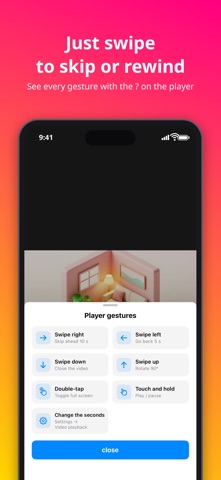
- Trimming is easier: set the start or end from the current playback position, fine-tune in 0.1-second steps, type a time, and play just the selected range. Also fixed trimmed videos starting slightly earlier than the chosen point. - You can now select multiple videos in the folder list and share them at once (for example, save them to Photos). The buttons shown while selecting are also clearer. - Player gestures are easier to discover: the screen now shows what a swipe or tap did, occasionally suggests gestures you have not tried, and the "?" next to the playback time lists every gesture with pictures. - Ads can no longer open another page or app on their own without being tapped. - Fixed some videos on a specific video site failing to save. - Folders sorted by name now follow the same order as the Files app (for example, "Episode 2" comes before "Episode 10"). - "Email bugs/requests" now automatically includes the site you tried to save from and recent save errors. - Added a new design for the Settings screen (switch from the top of Settings). - Fixed buttons at the bottom sometimes being hidden on narrow screens such as iPad Slide Over.
Price & rating history · US
Reconstructed from the listing changes AppTracker has observed in this storefront. A field is charted once it has changed more than once, and each line starts at the value it moved from.
Average rating · ★ 4.34 now · 8 changes on record
Ratings breakdown · US
The star breakdown behind this app's rating in this storefront.
In-app purchases · US
What this app sells inside itself, grouped by kind and priced for this storefront.
Screenshots


Keywords this app targets
Search terms AppTracker associates with this app — estimates, not search volume. ❝ = in the app's title; a highlighted number is its current position for that term.
Similar apps
Competitors and close alternatives, as estimated by AppTracker.
 Video Saver Offline - Clicha
Yuichi Matsuoka
3 shared title words
Video Saver Offline - Clicha
Yuichi Matsuoka
3 shared title words
 All Video Saver & Player
Dabhade Jagannath
1 shared topic · 4 shared title words
All Video Saver & Player
Dabhade Jagannath
1 shared topic · 4 shared title words
 ZOE - Video Player PRO
汝泉 张
1 shared topic · 2 shared title words
ZOE - Video Player PRO
汝泉 张
1 shared topic · 2 shared title words
 VidTube: All Videos Browser
waleed tahir
1 shared topic
VidTube: All Videos Browser
waleed tahir
1 shared topic
 Quick Player Pro - for Video Audio Media Player
Global Executive Consultants (Shanghai) Ltd
1 shared topic · 2 shared title words
Quick Player Pro - for Video Audio Media Player
Global Executive Consultants (Shanghai) Ltd
1 shared topic · 2 shared title words
 PulsePlayer - Video Player
辰光 张
1 shared topic · 2 shared title words
PulsePlayer - Video Player
辰光 张
1 shared topic · 2 shared title words
 FlarePlayer - Video Player
SCHWEHR ALEXA ROSE SCHWEHR
1 shared topic · 2 shared title words
FlarePlayer - Video Player
SCHWEHR ALEXA ROSE SCHWEHR
1 shared topic · 2 shared title words
 Video Saver Web Browser: iXpr
Masaharu Tsukamoto
Video Saver Web Browser: iXpr
Masaharu Tsukamoto
About
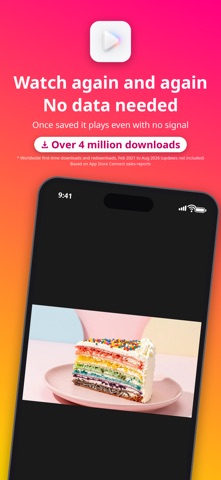
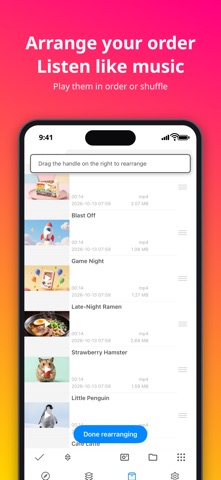
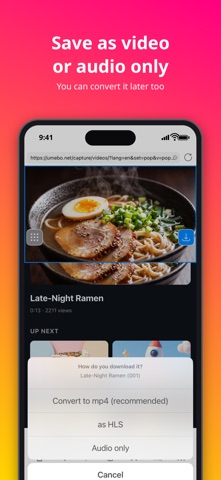
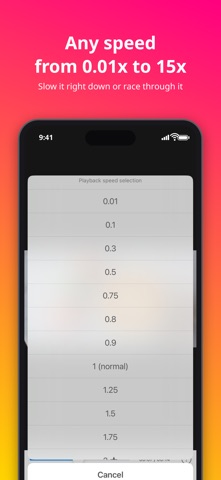
- A video saving & playback app built for ease of use — with a built-in ad-blocking browser, so you can browse and save videos without being bombarded by ads. - Save videos from the in-app browser, Files app, or Camera Roll — once saved, watch them anytime, even offline. - No daily limit on the number of videos you can save. - Supports background playback, so audio keeps playing when you switch apps. - Picture in Picture playback lets you keep watching in a small floating window while you do other things. - Videos are organized into folders, and can also be viewed or copied from the Files app. - Set a passcode to keep your saved videos private. - Change playback speed (2x, 0.5x, and more). - Browse websites in either mobile or desktop mode. - Saving, converting, and playing all happen in parallel — no waiting around. - Rotate the screen 90 degrees with a single tap. - Choose how playback repeats: loop one video, loop a playlist, or stop at the end. - Copy saved videos to your Camera Roll anytime. - Jump straight back to the original web page from any saved video. - While playing a video in the in-app browser, it shrinks into a small window so you can keep browsing at the same time. - Trim saved videos and choose a new thumbnail, right from the video list (Premium). - Search by video screenshot: find what appears in a scene, or the original video (Premium). - Dark mode supported. Terms of Use: https://www.apple.com/legal/internet-services/itunes/dev/stdeula/
What's new · 9.3
- Trimming is easier: set the start or end from the current playback position, fine-tune in 0.1-second steps, type a time, and play just the selected range. Also fixed trimmed videos starting slightly earlier than the chosen point. - You can now select multiple videos in the folder list and share them at once (for example, save them to Photos). The buttons shown while selecting are also clearer. - Player gestures are easier to discover: the screen now shows what a swipe or tap did, occasionally suggests gestures you have not tried, and the "?" next to the playback time lists every gesture with pictures. - Ads can no longer open another page or app on their own without being tapped. - Fixed some videos on a specific video site failing to save. - Folders sorted by name now follow the same order as the Files app (for example, "Episode 2" comes before "Episode 10"). - "Email bugs/requests" now automatically includes the site you tried to save from and recent save errors. - Added a new design for the Settings screen (switch from the top of Settings). - Fixed buttons at the bottom sometimes being hidden on narrow screens such as iPad Slide Over.
Details