

Voice Recorder for iPhones
Pro App Company Limited · Utilities
Independent analytics for this App Store listing. AppTracker is not affiliated with Pro App Company Limited.
Chart standing · US
What changed · US
Listing changes AppTracker has observed for this app in this storefront — new versions, price moves, rating shifts, and store copy.
In this version, we improved the app's performance and fixed bugs.
Ratings breakdown · US
The star breakdown behind this app's rating in this storefront.
In-app purchases · US
What this app sells inside itself, grouped by kind and priced for this storefront.
Screenshots




About
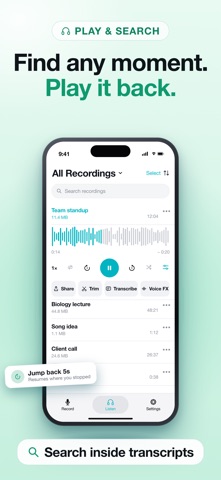
Voice Recorder turns your iPhone into a recorder you can trust for lectures, meetings, interviews, ideas and everyday notes. Tap once to start, and keep recording while the screen is off or while you use another app. There is no time limit — a take on your iPhone can run as long as your free storage allows. KEY FEATURES: ‣ One-Tap Recording: Start from the app, a Home Screen widget, Control Center, Siri or a long press on the app icon. Pause and resume whenever you need to. ‣ Apple Watch: Record straight from your wrist when your iPhone is not with you, and control a running take from the watch. What you record moves over to your iPhone library. ‣ Lock Screen and Dynamic Island: Watch the timer and stop the take without unlocking your iPhone. ‣ Markers: Flag the important moment while you are still recording, then jump straight back to it when you listen. ‣ Transcribe to Text: Turn a recording into text on your device, tap any word to jump to that second, and share the transcript as text or as an .srt subtitle file. ‣ Summary: Get the key points of a long recording in a few lines. ‣ Trim and Edit: Cut what you do not need, split a long take into pieces, or merge several recordings into one. Nothing is overwritten until you save. ‣ Voice Effects: Play a recording back as a different voice, with 16 presets or your own settings. ‣ A Player Built for Listening: Waveform, skip, repeat and shuffle, plus full control from the Lock Screen and your headphones. ‣ Find Anything: Search by name, sort by date, name or length, and open a recording straight from Spotlight. ‣ iCloud Sync: Keep your recordings on every iPhone and iPad you own. ‣ App Lock: Keep your recordings behind Face ID, Touch ID or a passcode. ‣ Import Your Own Audio: Bring in files from the Files app, another app or your computer — mp3, wav, m4a and more — then trim, transcribe and share them like your own recordings. ‣ Share and Export: Send a recording to Messages, Mail, WhatsApp or any app that takes audio files, or export it as MP3, WAV, AIFF or FLAC. ‣ Made for Everyone: Full VoiceOver support, Dynamic Type, and a layout built for iPad as well as iPhone. PRIVACY: Your recordings stay on your device and in your own iCloud. Transcription runs on the iPhone itself. Terms of Use: https://techsmart.bio/voicerecorder/terms-of-use.html Privacy Policy: https://techsmart.bio/voicerecorder/privacy-policy.html
What's new · 1.3.2
In this version, we improved the app's performance and fixed bugs.
Details