

Category Tabs for Google Keep
Carlos Jeurissen · Productivity
Independent analytics for this App Store listing. AppTracker is not affiliated with Carlos Jeurissen.
Chart standing · US
What changed · US
Listing changes AppTracker has observed for this app in this storefront — new versions, price moves, rating shifts, and store copy.
Redesigned options page with improved design and performance. Learn more: https://apps.jeurissen.co/category-tabs-for-google-keep/whatsnew
Screenshots
Similar apps
Competitors and close alternatives, as estimated by AppTracker.


About
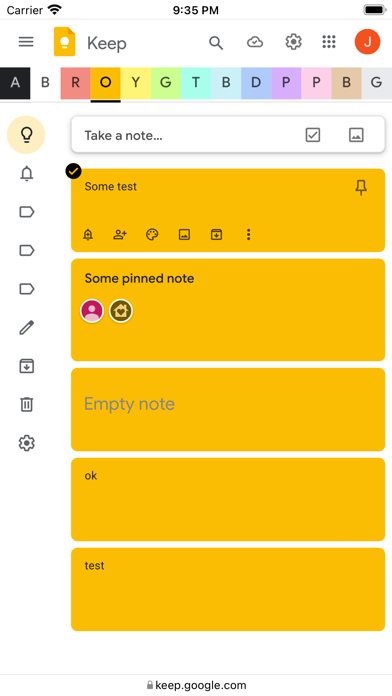
Tired of wasting time looking look through and re-sorting all of your notes on Google Keep? With Category Tabs for Google Keep™, you can now sort your new and existing notes by color. When you want to view the notes you have sorted by color, simply click on the note color you wish to view. If you would like to view your you entire collection of notes/checklists, there is an “All” option next to the color options (this option is set by default). Category Tabs for Google Keep™ seamlessly integrates into the page and the options to look at your notes/checklists in list view or gird view is still available. The ability to post a quick note/list/picture is still available as well and is still placed in the same spot as it usually is. This application supports all the colors offered by Google Keep. You can access the settings by opening the menu in google keep, and hit “Customize Categories”
What's new · 20.16.1
Redesigned options page with improved design and performance. Learn more: https://apps.jeurissen.co/category-tabs-for-google-keep/whatsnew
Details