

PSWD: Password Generator
AKE Software GmbH · Productivity
Independent analytics for this App Store listing. AppTracker is not affiliated with AKE Software GmbH.
Chart standing · US
What changed · US
Listing changes AppTracker has observed for this app in this storefront — new versions, price moves, rating shifts, and store copy.
PSWD 6.0 adds support for iPhone Duo and gives you more control over how passphrases are built. • iPhone Duo: the layout adapts when the device is unfolded • Use dictionaries in order: word 1 comes from the first dictionary, word 2 from the second, and so on, for patterns like Adjective.Noun.Verb. Rearrange them in the new Order card • Separate words with a random symbol from a set you choose • Import custom word lists of any size, and build passphrases of just one word; the strength meter shows what each choice is worth, with a new Very Weak level • Custom words that contain the separator (like curious.otter with a "." separator) now work • Shortcuts: clearer error messages, and PSWD can now be run from Siri and Spotlight • Fixed: in Shortcuts, iPhone and Mac presets were listed under each other's label
Price & rating history · US
Reconstructed from the listing changes AppTracker has observed in this storefront. A field is charted once it has changed more than once, and each line starts at the value it moved from.
Average rating · ★ 4.88 now · 2 changes on record
Ratings breakdown · US
The star breakdown behind this app's rating in this storefront.
Screenshots



About
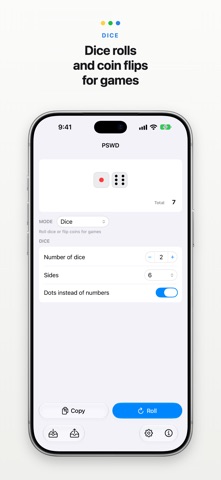
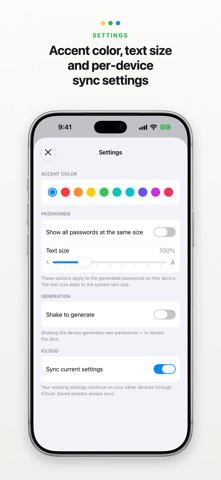
PSWD is a comprehensive strong password generator for Mac, iPhone and iPad. Features of PSWD: • Four generation modes: random characters, pronounceable passwords that follow a consonant–vowel pattern, passphrases built from dictionary words, and dice for games • Word passphrases in nine languages — English, German, Spanish, French, Italian, Japanese, Portuguese, Chinese and a hand-crafted Turkish list — mix several at once, or import your own word list synced through iCloud • Remove diacritics from a passphrase for sites that only accept plain ASCII letters • Passwords up to 128 characters, one or many at a time • Minimum or exact counts per character class — uppercase, lowercase, digits, symbols, and your own custom set • Exclude specific characters, or skip ambiguous look-alikes like 0 O o 1 l I • Group characters with a separator at regular intervals for readability • Entropy and strength calculated live as you configure • Save presets and load them anywhere — they sync between your devices through iCloud • Generate passwords from the Shortcuts app without opening PSWD • On the Mac: a menu bar panel, a system-wide global shortcut that generates and copies in one press, open at login, and an optional hidden Dock icon • On iPhone and iPad: a layout made for each device, with a choice of accent colors • Full VoiceOver support PSWD works completely locally on your device. It does not collect, store or transmit anything — not the settings you enter, not the passwords it generates. It is a sandboxed app that takes your privacy seriously.
What's new · 6.0
PSWD 6.0 adds support for iPhone Duo and gives you more control over how passphrases are built. • iPhone Duo: the layout adapts when the device is unfolded • Use dictionaries in order: word 1 comes from the first dictionary, word 2 from the second, and so on, for patterns like Adjective.Noun.Verb. Rearrange them in the new Order card • Separate words with a random symbol from a set you choose • Import custom word lists of any size, and build passphrases of just one word; the strength meter shows what each choice is worth, with a new Very Weak level • Custom words that contain the separator (like curious.otter with a "." separator) now work • Shortcuts: clearer error messages, and PSWD can now be run from Siri and Spotlight • Fixed: in Shortcuts, iPhone and Mac presets were listed under each other's label
Details