

BestTracker - 百事AA记账
Beijing BaiShiChuangYi Technology Co., Ltd. · Finance
Independent analytics for this App Store listing. AppTracker is not affiliated with Beijing BaiShiChuangYi Technology Co., Ltd.
Chart standing · US
What changed · US
Listing changes AppTracker has observed for this app in this storefront — new versions, price moves, rating shifts, and store copy.
[New] AI Trip Planning has been fully upgraded: generate visual, map-based itineraries directly in chat and see where to go and how much you'll spend each day at a glance [New] Not sure where to go? AI can suggest 2–3 trip options first. Swipe to compare, pick one, and expand it into a complete itinerary [New] Change your itinerary with a single sentence, such as "Visit West Lake on the afternoon of Day 2." Only that part will be updated, with every change clearly listed and the option to undo [New] Manually adjust itinerary details: drag to reorder, swipe left to delete, change times, move stops to another day, or search and add places [New] Route maps are now available in itinerary details. Stops are organized by day, and you can tap any stop to start navigation in your Maps app [New] On the day of your trip, automatically see which day you're on, your next stop, and the distance. Mark visited stops as completed with one tap [New] Track expenses while you travel: add an expense directly from an itinerary stop, with the amount, category, and location filled in automatically. Compare your daily budget with actual spending [New] After saving an itinerary, choose to keep expenses in your current ledger or create a new travel ledger and switch to it instantly [New] Trip Summary: review spending by category and date, and see whether you've gone over budget [New] Export itineraries to your phone calendar, sync automatically across devices, and keep your plans when switching phones [Improved] AI Agent now remembers more in long conversations, keeping track of earlier agreements and later changes more reliably [Improved] Agent mode now follows your customized categorization habits more consistently when automatically categorizing transactions [Improved] AI now shows its thinking status immediately after sending a message, with a more visible Stop button. It automatically retries when the network is unstable and clearly notifies you if something fails [Improved] Smoother preview experience when importing files with AI [Fixed] Fixed an issue where images were not attached to transactions after using AI image bookkeeping [Fixed] Fixed issues where personal transfers could not be searched and transfer amounts were incomplete in statistics [Fixed] Fixed an issue where the home screen widget still showed a logged-out state after signing in [Fixed] Fixed an issue where fully used AI quota records were not displayed in quota history
Price & rating history · US
Reconstructed from the listing changes AppTracker has observed in this storefront. A field is charted once it has changed more than once, and each line starts at the value it moved from.
Average rating · ★ 4.66 now · 6 changes on record
In-app purchases · US
What this app sells inside itself, grouped by kind and priced for this storefront.
Screenshots






Keywords this app targets
Search terms AppTracker associates with this app — estimates, not search volume. ❝ = in the app's title; a highlighted number is its current position for that term.
Similar apps
Competitors and close alternatives, as estimated by AppTracker.
 Personal Accounting - AI Money
Yunus Gulbuz
2 shared topics
Personal Accounting - AI Money
Yunus Gulbuz
2 shared topics
 ET - Expense Tracker
金 郭
2 shared topics
ET - Expense Tracker
金 郭
2 shared topics
 MoneyTrack: Expense Tracker
昱春 唐
1 shared topic
MoneyTrack: Expense Tracker
昱春 唐
1 shared topic
 Money+ Cute Expense Tracker
Chongqing Zhouhu Technology Co.,Ltd
2 shared topics
Money+ Cute Expense Tracker
Chongqing Zhouhu Technology Co.,Ltd
2 shared topics
 挖财记账-AI自动记账
Hangzhou Yuancai Technology Co.,Ltd.
2 shared topics
挖财记账-AI自动记账
Hangzhou Yuancai Technology Co.,Ltd.
2 shared topics
 Expense Tracker: Budget AI
Aleksandr Gostiuzhev
1 shared topic
Expense Tracker: Budget AI
Aleksandr Gostiuzhev
1 shared topic
 Account Tracker Pro
Graham Haley
2 shared topics
Account Tracker Pro
Graham Haley
2 shared topics
 Amigo AI - Expense Tracker
Tirupati Balan
Amigo AI - Expense Tracker
Tirupati Balan
About
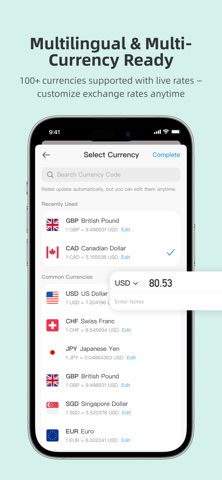
New Version Now Available! Bestrie AA Accounting is a free multi-person shared AI accounting app. This major upgrade enhances AI accounting, collaboration, financial analysis, themes, and dark mode — making accounting, expense splitting, and financial management easier and more efficient. It supports families, couples, friends, travel groups, and small businesses. Simply send voice, text, screenshots, or receipts, and AI recognizes and generates bills in batches, plus provides intelligent financial diagnosis. 【Free Multi-Ledger · Real-Time Sharing】 Create multiple ledgers and invite members to keep accounts together. Data syncs in real time for full transparency. Expense allocation and income distribution support equal split, percentage, shares, specified amounts, and itemized allocation, with auto-generated settlement plans. 【AI Auto Accounting】 Supports Shortcuts, screenshots, voice, text, and image recognition. AI auto-extracts amount, category, time, account, and notes, supports batch generation, and minimizes manual entry. 【AI Financial Analysis】 AI analyzes income, expenses, categories, budgets, and member data to reveal spending patterns, trends, risks, and discrepancies, delivering easy-to-understand insights. 【Multiple Ledger Modes】 Supports personal, shared, AA, and loan ledgers, plus templates for family, travel, business, and more. 【Team & Personal Reports】 View income/expenses by time, category, account, or member. Automatic reports clearly show each member's spending, reimbursements, and allocations for easy reconciliation. 【Calendar View】 · 【Recurring Accounting】 · 【Cloud Backup】 Browse daily records via calendar and backdate entries. Set fixed items like rent or subscriptions to auto-generate. All data is encrypted and cloud-stored — restore anytime by logging back in. 【Member Permissions】 · 【Multi-Person Budgeting】 Admins set view/edit permissions per role. Set budgets by ledger or category and track progress collaboratively in shared ledgers. 【Import & Export】 · 【Account Authorization】 · 【Reimbursement】 Import records from WeChat, Alipay, and more. Export as Excel, PDF, or images. Link bank/cash/wallet accounts or authorize specific members. Support full, partial, and batch reimbursement with clear tracking. 【Multi-Language & Multi-Currency】 · 【Privacy & Security】 Supports global currencies with system/custom rates. Offers password, fingerprint, and facial recognition for data protection. 【Reminders & Notifications】 · 【Dark Mode & Personalization】 Includes repayment, budget, and accounting reminders, plus member and bill change alerts. Dark mode auto-switches, and you can customize themes, cards, backgrounds, and shortcuts. --Term Of Use(EULA):https://www.bestrie.com/serviceInfo.html --Privacy:https://www.bestrie.com/privacy.html
What's new · 6.3.0
[New] AI Trip Planning has been fully upgraded: generate visual, map-based itineraries directly in chat and see where to go and how much you'll spend each day at a glance [New] Not sure where to go? AI can suggest 2–3 trip options first. Swipe to compare, pick one, and expand it into a complete itinerary [New] Change your itinerary with a single sentence, such as "Visit West Lake on the afternoon of Day 2." Only that part will be updated, with every change clearly listed and the option to undo [New] Manually adjust itinerary details: drag to reorder, swipe left to delete, change times, move stops to another day, or search and add places [New] Route maps are now available in itinerary details. Stops are organized by day, and you can tap any stop to start navigation in your Maps app [New] On the day of your trip, automatically see which day you're on, your next stop, and the distance. Mark visited stops as completed with one tap [New] Track expenses while you travel: add an expense directly from an itinerary stop, with the amount, category, and location filled in automatically. Compare your daily budget with actual spending [New] After saving an itinerary, choose to keep expenses in your current ledger or create a new travel ledger and switch to it instantly [New] Trip Summary: review spending by category and date, and see whether you've gone over budget [New] Export itineraries to your phone calendar, sync automatically across devices, and keep your plans when switching phones [Improved] AI Agent now remembers more in long conversations, keeping track of earlier agreements and later changes more reliably [Improved] Agent mode now follows your customized categorization habits more consistently when automatically categorizing transactions [Improved] AI now shows its thinking status immediately after sending a message, with a more visible Stop button. It automatically retries when the network is unstable and clearly notifies you if something fails [Improved] Smoother preview experience when importing files with AI [Fixed] Fixed an issue where images were not attached to transactions after using AI image bookkeeping [Fixed] Fixed issues where personal transfers could not be searched and transfer amounts were incomplete in statistics [Fixed] Fixed an issue where the home screen widget still showed a logged-out state after signing in [Fixed] Fixed an issue where fully used AI quota records were not displayed in quota history
Details