

Sticky Widgets
1881 Digital, LLC · Utilities
Independent analytics for this App Store listing. AppTracker is not affiliated with 1881 Digital, LLC.
Chart standing · US
What changed · US
Listing changes AppTracker has observed for this app in this storefront — new versions, price moves, rating shifts, and store copy.
Sticky Widgets is ready for iPhone Duo, with an expanded note library and side-by-side editing. Square previews keep your colors, gradients, and patterns clear as your screen changes size. Pick up unfinished notes, return to your place in a checklist, and open saved notes in another window where supported. We’ve also improved controls, dark-mode contrast, and saving across windows. Now available in 18 languages and regional variants, with nine new localizations.
Ratings breakdown · US
The star breakdown behind this app's rating in this storefront.
In-app purchases · US
What this app sells inside itself, grouped by kind and priced for this storefront.
Screenshots



About
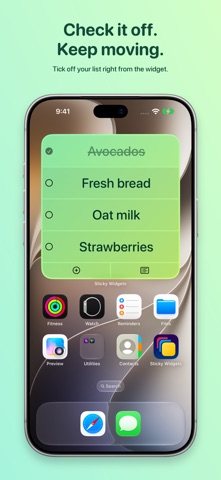
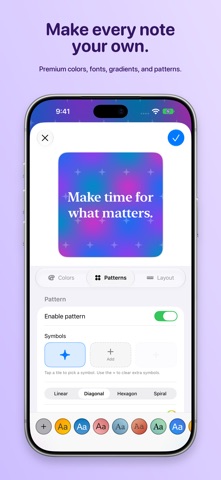
"It's perfect, honestly." - Myke Hurley, Connected "What makes Sticky Widgets great is the simplicity of the experience." - Ryan Christoffel, MacStories "This is a great concept." - Dave Mark, The Loop Welcome to Sticky Widgets, the absolute easiest way to put a sticky note on your home screen and edit it quickly. Add as many Sticky Widgets as you'd like, in every widget size. It's simple! It works on iPad! You can even pin notes to your Lock Screen with a premium subscription so they're visible even when your phone is locked! 1. Add a Sticky Widget to your home screen 2. Tap on the widget to edit it 3. That's about it! But that's not all. Once you have a widget in place, you can customize it: change color, background, font, alignment, size, even rotation! And your widgets now sync to your iCloud account, meaning you can put a note on multiple devices logged into the same Apple ID and they'll stay in sync. Sticky Widgets supports deep system integration with Siri, Shortcuts, the Dynamic Island, and more so there are even more ways to view and update your notes and lists. Sticky Widgets is free to download and use. You get unlimited widgets, three classic background colors, three fonts, iCloud sync, Siri and Shortcuts integration, and full control over alignment, size, and rotation: all without paying a thing. An optional upgrade unlocks everything else: the full color picker with any color you want, gradients and mesh gradients, hundreds of additional fonts, custom text colors, Lock Screen pinning, separate styling for light and dark mode, saved presets, the ability to restore archived notes, scheduled reminders, and no ads. Premium features can be accessed with a monthly, quarterly, or annual subscription, or with a one-time purchase. The Sticky Widgets Terms of Use and Privacy Policy can be found at https://www.tylerhillsman.com/privacy-sw/. The Apple EULA can be found at https://www.apple.com/legal/internet-services/itunes/dev/stdeula/
What's new · 5.4.0
Sticky Widgets is ready for iPhone Duo, with an expanded note library and side-by-side editing. Square previews keep your colors, gradients, and patterns clear as your screen changes size. Pick up unfinished notes, return to your place in a checklist, and open saved notes in another window where supported. We’ve also improved controls, dark-mode contrast, and saving across windows. Now available in 18 languages and regional variants, with nine new localizations.
Details