

lire: RSS Reader
Kunal Sood · News
Independent analytics for this App Store listing. AppTracker is not affiliated with Kunal Sood.
Chart standing · US
What changed · US
Listing changes AppTracker has observed for this app in this storefront — new versions, price moves, rating shifts, and store copy.
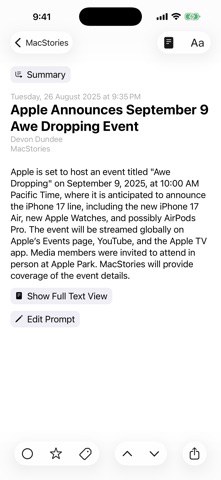
Version 7.1.0 NEW: - Support for iPhone Duo. - Extra Large Widgets (that occupy an entire page on the home screen) on iPhones running iOS 27 or later. - Resizing when running iPhone Mirroring on Mac, on devices running OS version 27 or later (available in supported countries and regions). - Modernised article filter control, that feels more at home with the newest version of iOS and iPadOS. - Tons of minor UI tweaks. FIXED: - A bug that could cause the app to crash during caching. - Other minor bug fixes. Previously in Version 7.0.0 NEW: - Updated for the iOS/iPadOS 27. - On iOS/iPadOS 27, Summarization of articles using Apple Intelligence now uses Private Cloud Compute if available. - On-device/Offline Translation of articles using Apple's translation models, available on iOS 18 and above. To translate an article you're reading, use the 'Aa' button on the top bar in the article reading view, and select 'Translate'. Tap & hold 'Translate' there to change the translation language. You can also change the translation language in Settings > Article > Translation Language. - Log in to walled sites to get full-text of walled articles. Log in/Manage in Settings > Caching > Manage/Log in. You can also login to walled a site from the article reading view, by using the View Mode button (i.e. the page icon in the top), and selecting 'Log in' (only available in Full Text View). - Overhauled text-extraction/caching engine. It should now work better on some sites where it previously failed. - New 'Modern' layout style for each item in article lists. Configure style in Settings > Article > Layout > Style. - Ability to disable swipe navigation in article reading view. You can set this up in Settings > Article > Navigation, there select 'Buttons only'. - 9 new modern app icons. Configure in Settings > Appearance > Icon. If you enjoy using lire, please leave a review, or tell a friend about it. That helps a lot!
Price & rating history · US
Reconstructed from the listing changes AppTracker has observed in this storefront. A field is charted once it has changed more than once, and each line starts at the value it moved from.
Average rating · ★ 4.37 now · 5 changes on record
Ratings breakdown · US
The star breakdown behind this app's rating in this storefront.
In-app purchases · US
What this app sells inside itself, grouped by kind and priced for this storefront.
Screenshots




Keywords this app targets
Search terms AppTracker associates with this app — estimates, not search volume. ❝ = in the app's title; a highlighted number is its current position for that term.
Similar apps
Competitors and close alternatives, as estimated by AppTracker.
 Minimal RSS Reader
Michiel Devliegere
2 shared topics · 3 shared title words
Minimal RSS Reader
Michiel Devliegere
2 shared topics · 3 shared title words
 FeedLizard
BRIAN THOMAS FAGIOLI
3 shared topics
FeedLizard
BRIAN THOMAS FAGIOLI
3 shared topics
 Newsify: RSS Reader
Ben Alexander
3 shared topics · 3 shared title words
Newsify: RSS Reader
Ben Alexander
3 shared topics · 3 shared title words
 RSS Reader for Safari
Pierre Stanislas
2 shared topics · 3 shared title words
RSS Reader for Safari
Pierre Stanislas
2 shared topics · 3 shared title words
 Feedster: RSS Reader
Nikolaj Jensen
2 shared topics · 3 shared title words
Feedster: RSS Reader
Nikolaj Jensen
2 shared topics · 3 shared title words
 Legi (RSS Feed Reader)
Alexander Clauss
2 shared topics · 2 shared title words
Legi (RSS Feed Reader)
Alexander Clauss
2 shared topics · 2 shared title words
 NetNewsWire: RSS Reader
Brent Simmons
1 shared topic · 3 shared title words
NetNewsWire: RSS Reader
Brent Simmons
1 shared topic · 3 shared title words
 PoweReader-AI RSS Reader
珂诚 许
2 shared topics · 3 shared title words
PoweReader-AI RSS Reader
珂诚 许
2 shared topics · 3 shared title words
About
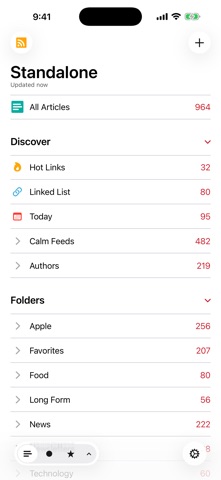
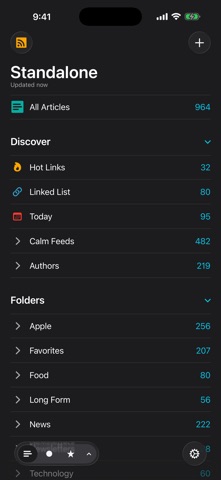
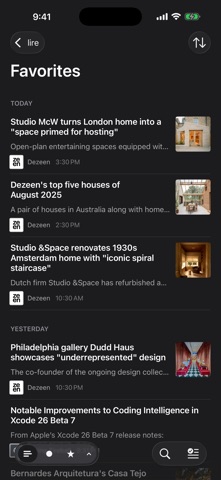
Love RSS feeds? So do we!! RSS feeds are a great way to follow updates on your favorite website. However, some sites set up their feeds to only show a portion of each entry, you know, to get you to click through to their actual website. We find that really annoying, and we're sure you do too. Which is why, unlike other RSS feed readers, that either push you into a browser (in-app or otherwise), or depend on third party text parsing services and require you to be online to fetch the full text of one article at a time (which makes it no different from having to click/tap through to a website), in lire, you get your favorite RSS feeds as they should've been. You don't need to click through to any website (though, you do still have the option to, if you really wanted). It takes your favorite partial feeds, does its magic, and converts them in to full feeds, so you don't have to click/tap on those annoying 'Read more' or 'Continue reading' links. Once they're cached, you don't even need to be connected to read your full-text feeds. Use as a standalone feed reader, sync with iCloud, or, sync with any of the several services: Feedly, Feedbin, FeedHQ, The Old Reader, Inoreader, BazQux Reader, Newsblur, Feed Wrangler, FreshRSS, Miniflux, Nextcloud News, Tiny Tiny RSS.
What's new · 7.1.0
Version 7.1.0 NEW: - Support for iPhone Duo. - Extra Large Widgets (that occupy an entire page on the home screen) on iPhones running iOS 27 or later. - Resizing when running iPhone Mirroring on Mac, on devices running OS version 27 or later (available in supported countries and regions). - Modernised article filter control, that feels more at home with the newest version of iOS and iPadOS. - Tons of minor UI tweaks. FIXED: - A bug that could cause the app to crash during caching. - Other minor bug fixes. Previously in Version 7.0.0 NEW: - Updated for the iOS/iPadOS 27. - On iOS/iPadOS 27, Summarization of articles using Apple Intelligence now uses Private Cloud Compute if available. - On-device/Offline Translation of articles using Apple's translation models, available on iOS 18 and above. To translate an article you're reading, use the 'Aa' button on the top bar in the article reading view, and select 'Translate'. Tap & hold 'Translate' there to change the translation language. You can also change the translation language in Settings > Article > Translation Language. - Log in to walled sites to get full-text of walled articles. Log in/Manage in Settings > Caching > Manage/Log in. You can also login to walled a site from the article reading view, by using the View Mode button (i.e. the page icon in the top), and selecting 'Log in' (only available in Full Text View). - Overhauled text-extraction/caching engine. It should now work better on some sites where it previously failed. - New 'Modern' layout style for each item in article lists. Configure style in Settings > Article > Layout > Style. - Ability to disable swipe navigation in article reading view. You can set this up in Settings > Article > Navigation, there select 'Buttons only'. - 9 new modern app icons. Configure in Settings > Appearance > Icon. If you enjoy using lire, please leave a review, or tell a friend about it. That helps a lot!
Details