

Drowsy Driving Alert
Trung Huynh · Navigation
Independent analytics for this App Store listing. AppTracker is not affiliated with Trung Huynh.
Chart standing · US
What changed · US
Listing changes AppTracker has observed for this app in this storefront — new versions, price moves, rating shifts, and store copy.
We continuously enhance our AI and detection technology to ensure the most accurate and reliable experience.
Price & rating history · US
Reconstructed from the listing changes AppTracker has observed in this storefront. A field is charted once it has changed more than once, and each line starts at the value it moved from.
Average rating · ★ 4.81 now · 3 changes on record
In-app purchases · US
What this app sells inside itself, grouped by kind and priced for this storefront.
Screenshots

Similar apps
Competitors and close alternatives, as estimated by AppTracker.
 WakeGuard: Drowsiness Alert
Metehan CANPOLAT
WakeGuard: Drowsiness Alert
Metehan CANPOLAT
 WatchDrive
Diego Anguita
WatchDrive
Diego Anguita
 Optidrive AI
OPTIZENCE LLC
Optidrive AI
OPTIZENCE LLC
 Nity: DashCam & AI Map
Nity Vision LLC
Nity: DashCam & AI Map
Nity Vision LLC
 Snore Alarm
Carlos Obando
Snore Alarm
Carlos Obando
 AYNI Cam
naoufel Bouazizi
AYNI Cam
naoufel Bouazizi
 RoadSentinel: Driver Safety
Vehicle Advanced Safety Systems LLC
RoadSentinel: Driver Safety
Vehicle Advanced Safety Systems LLC
 Awarner: Driver Safety Alerts
Vehicle Advanced Safety Systems LLC
Awarner: Driver Safety Alerts
Vehicle Advanced Safety Systems LLC
About
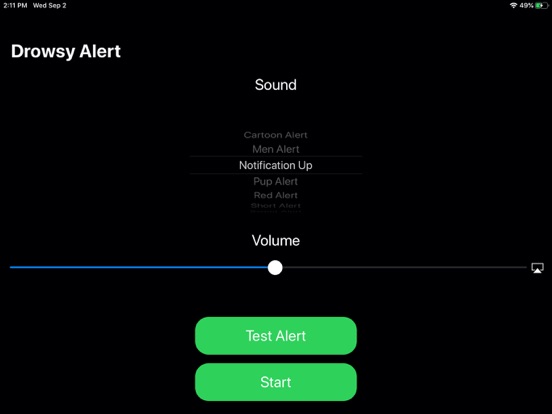
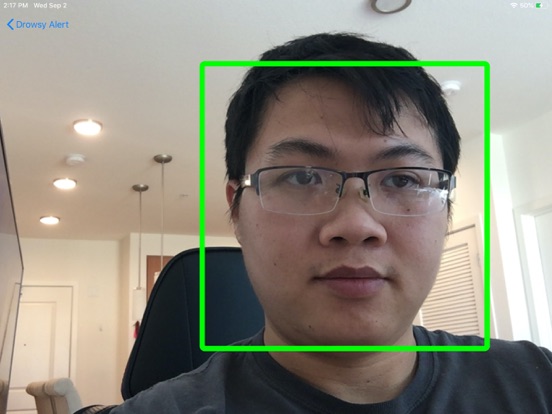
Stay awake, stay safe. Drowsy Driving Alert uses cutting-edge AI to monitor your face and eyes in real time—detecting signs of drowsiness, sleepiness, or fatigue before it’s too late. When the AI detects extended eye closure, it instantly plays a loud alert to help you stay focused and prevent accidents. How It Works Your phone’s front camera continuously tracks your face and eyes. The app’s intelligent AI distinguishes between normal blinks and prolonged eye closures—alerting you only when true drowsiness is detected. Key Features 1) Smart face & eye detection powered by AI 2) Blink-aware — minimizes false alarms 3) Multiple alert sounds for variety and impact 4) Adjustable sensitivity & alert volume 5) Works in the background or Picture-in-Picture (PiP) mode 6) Seamless integration with navigation apps (Maps, Waze, etc.) 7) Save and review drowsiness-detection images 8) Optimized for low battery and CPU usage 9) All data stays securely on your device — never uploaded or shared Quick Setup 1) Mount your phone at eye level with a clear view of your face. 2) Place your phone in landscape mode for the best detection and performance. 3) Drive — the app handles the rest. Safety First 1) If you feel sleepy or fatigued, pull over and rest. 2) Ensure the phone can clearly see your face. 3) This app is an assistive tool, not a substitute for safe driving or medical advice. Terms of Use (EULA): https://www.apple.com/legal/internet-services/itunes/dev/stdeula/
What's new · 1.2.14
We continuously enhance our AI and detection technology to ensure the most accurate and reliable experience.
Details