

CalCal - easy to use Calendar
Teruto Yamasaki · Productivity
Independent analytics for this App Store listing. AppTracker is not affiliated with Teruto Yamasaki.
Chart standing · US
What changed · US
Listing changes AppTracker has observed for this app in this storefront — new versions, price moves, rating shifts, and store copy.
CalCal 3.0 is our biggest update in a long time. ■ Move events with your finger In the week, 3-day, and day views, drag a timed event to another time or day. Carry it to the edge of the screen to move to the next page. All-day events can be moved too. ■ Drag & drop and copy & paste are now free Anyone can move and duplicate events. Basic repeats such as daily and weekly are free as well. ■ Now on iPad Use CalCal on iPad with the same gestures. ■ More useful weather (CalCal PRO) The timeline shows when rain is expected, plus sunrise and sunset. Choose the location for the forecast, and refresh the weather from Settings. ■ A redesigned day list Tap a date to see a large date header and a weather card, so the day's events are clear at a glance. Long-press the date to copy it. ■ Redesigned event editing and details Start and end times are easier to read, and you can pick a duration quickly. In event details, long-press the title or date to copy it. ■ Redesigned Settings Change the appearance while watching a live preview. You can also choose the event text size and notification sound. Event bar styles and text colors come with CalCal PRO. ■ Holidays and weekday colors Choose which holiday calendar to show. Weekend and holiday colors now also appear in the weekday row and the day view tabs. ■ A redesigned bottom bar Tap today's event count to open today's list. View switching is now in a single button. ■ Spotlight and Siri Type an event title in iPhone search to find your CalCal events. From Siri and Shortcuts, open today's events, search, or a new event. ■ Pinch between month, week & day (CalCal PRO) Turn it on in Settings > Appearance. ■ Also in this update ・"Enlarged view" is now called "Unfold" ・Some event colors are now easier to tell apart ・A new welcome guide ・Various improvements and bug fixes ■ CalCal PRO (one-time purchase) Unlock weather, sunrise and sunset, custom repeat rules, event bar styles, event order, pinch to switch views, Rokuyo, and no ads. One purchase also includes PRO features added in future updates.
Ratings breakdown · US
The star breakdown behind this app's rating in this storefront.
Screenshots


About
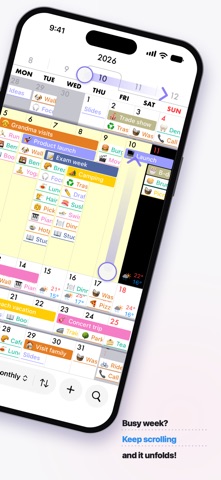
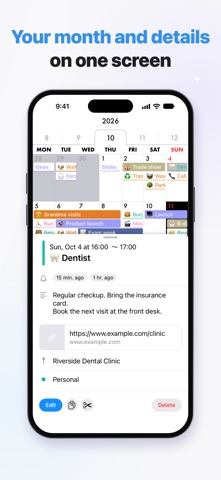
Tapping through a busy week one day at a time? In CalCal, keep scrolling a week and it expands right inside the month view. ■ A calendar built around scrolling Scroll the tabs at the top, scroll between months, and scroll each week in the month view. You can follow your plans just by scrolling, without jumping between screens. ■ Unfold When you reach the edge of a week, keep scrolling and that week expands inside the month view, so you can see the whole week at once. Keep scrolling at the edge again to close it. No jumping to another screen. ■ Works with your iPhone calendar CalCal uses the calendars already on your iPhone, so you can start right away. If you ever delete CalCal, your events stay in your calendar and open in other apps. ■ Move events with your finger (free) In the month view, use drag & drop or copy & paste. In the week, 3-day, and day views, pick up an event and move it to another day or time. All free. ■ See the day at a glance Tap a date to see its events under a large date header. Tap any event bar to see the details right away. ■ Quick entry Start and end times are easy to read, and you can pick a duration quickly. Suggestions as you type are available too. ■ Repeating events Daily, weekly and other basic repeats are free. Custom repeat rules come with PRO. ■ Weather forecast (PRO) See the weather and temperature next to your events, up to 10 days ahead, so you can plan around it. Also shows when rain is expected, plus sunrise and sunset. You can choose the location for the forecast. ■ Make it yours Change the event text size, weight, and alignment, and the weekend and holiday colors, while watching a live preview. Event bar styles (fill, left bar, outline, or underline) and text colors come with PRO. ■ Holidays Choose which holiday calendar to show. ■ Event order (PRO) Some days, timed events matter more than all-day ones. Switch the order with a single tap. ■ Pinch between month, week & day (PRO) Pinch out or in with two fingers to move between the month, week, and day views. ■ Rokuyo (PRO) Shows Rokuyo, the traditional Japanese six-day cycle of lucky and unlucky days (such as Taian). ■ Notifications Get a daily summary of your events at a time you choose, plus alerts for each event, all set up in detail. ■ Search Find any event among many and jump straight to it. You can also find events from iPhone search (Spotlight). ■ Siri and Shortcuts Open today's events, search, or a new event right from Siri and Shortcuts. ■ iPad CalCal also works on iPad. ■ Dark mode A calm look that's easy on the eyes at night. ■ Widgets Check today's events right from your Home Screen. ■ CalCal PRO (one-time purchase) One purchase unlocks these features for good: ・Weather forecast, sunrise and sunset on the calendar ・Custom repeat rules ・Event bar styles and text colors ・Event order ・Pinch between month, week & day ・Rokuyo ・No ads ・PRO features added in future updates The calendar that shows your plans. Make your days lighter with CalCal. 【Blog】: https://calcal-app.blogspot.com 【X】: https://twitter.com/calcal_app
What's new · 3.0.0
CalCal 3.0 is our biggest update in a long time. ■ Move events with your finger In the week, 3-day, and day views, drag a timed event to another time or day. Carry it to the edge of the screen to move to the next page. All-day events can be moved too. ■ Drag & drop and copy & paste are now free Anyone can move and duplicate events. Basic repeats such as daily and weekly are free as well. ■ Now on iPad Use CalCal on iPad with the same gestures. ■ More useful weather (CalCal PRO) The timeline shows when rain is expected, plus sunrise and sunset. Choose the location for the forecast, and refresh the weather from Settings. ■ A redesigned day list Tap a date to see a large date header and a weather card, so the day's events are clear at a glance. Long-press the date to copy it. ■ Redesigned event editing and details Start and end times are easier to read, and you can pick a duration quickly. In event details, long-press the title or date to copy it. ■ Redesigned Settings Change the appearance while watching a live preview. You can also choose the event text size and notification sound. Event bar styles and text colors come with CalCal PRO. ■ Holidays and weekday colors Choose which holiday calendar to show. Weekend and holiday colors now also appear in the weekday row and the day view tabs. ■ A redesigned bottom bar Tap today's event count to open today's list. View switching is now in a single button. ■ Spotlight and Siri Type an event title in iPhone search to find your CalCal events. From Siri and Shortcuts, open today's events, search, or a new event. ■ Pinch between month, week & day (CalCal PRO) Turn it on in Settings > Appearance. ■ Also in this update ・"Enlarged view" is now called "Unfold" ・Some event colors are now easier to tell apart ・A new welcome guide ・Various improvements and bug fixes ■ CalCal PRO (one-time purchase) Unlock weather, sunrise and sunset, custom repeat rules, event bar styles, event order, pinch to switch views, Rokuyo, and no ads. One purchase also includes PRO features added in future updates.
Details