

Mockup - UI/UX Design
Apprime Studio sarl · Graphics & Design
Independent analytics for this App Store listing. AppTracker is not affiliated with Apprime Studio sarl.
Chart standing · US
What changed · US
Listing changes AppTracker has observed for this app in this storefront — new versions, price moves, rating shifts, and store copy.
Design for the newest iPhones Create designs for iPhone Duo’s outer and inner displays, plus iPhone 18 Pro and iPhone 18 Pro Max. A new collection of Duo interface elements helps you explore layouts made for foldable experiences. Also new in 4.4: Mockup 4.4 brings a more adaptive design experience to iPhone and iPad, with a redesigned Library, new Apple Intelligence capabilities, and deeper integration with iOS 27. Designed Around You Mockup now adapts its interface and tools to your screen, orientation, and window size. Design in landscape on iPhone, reposition or hide drawing tools, and resize Mockup on your Mac with iPhone Mirroring. An All-New Library Access your Library from its own dedicated sidebar on the left, with a completely redesigned experience for finding and adding elements, shapes, symbols, text, and images. Smarter Element Naming Save custom elements with smarter name suggestions powered by Apple Intelligence. Create with Image Playground Generate images with Image Playground and add them directly to your designs or use them as image fills. Siri & Shortcuts Create, open, update, and search your designs with expanded support for Siri and Shortcuts. Update to Mockup 4.4 and enjoy a more flexible and connected way to design. We'd love to hear your feedback.
Price & rating history · US
Reconstructed from the listing changes AppTracker has observed in this storefront. A field is charted once it has changed more than once, and each line starts at the value it moved from.
Average rating · ★ 4.43 now · 6 changes on record
Ratings breakdown · US
The star breakdown behind this app's rating in this storefront.
In-app purchases · US
What this app sells inside itself, grouped by kind and priced for this storefront.
Screenshots




Keywords this app targets
Search terms AppTracker associates with this app — estimates, not search volume. ❝ = in the app's title; a highlighted number is its current position for that term.
Similar apps
Competitors and close alternatives, as estimated by AppTracker.
 MockApp Wireframe UI Mockup
Tana IntelSoft SRL
2 shared title words
MockApp Wireframe UI Mockup
Tana IntelSoft SRL
2 shared title words
 Mockuply
Elliot Nash
Mockuply
Elliot Nash
 Mockup Studio - Generator
Ronaldo Avalos de la Mora
Mockup Studio - Generator
Ronaldo Avalos de la Mora
 Mocketa: 3D Mockups
FURKAN KAFADAR
Mocketa: 3D Mockups
FURKAN KAFADAR
 Mockup & Demo Maker: Screeny
Lazare Kolebka
1 shared title word
Mockup & Demo Maker: Screeny
Lazare Kolebka
1 shared title word
 Frame Mockup Screen
Dywtal Digital
Frame Mockup Screen
Dywtal Digital
 Screenshot Studio - App Mockup
Sarun Wongpatcharapakorn
1 shared title word
Screenshot Studio - App Mockup
Sarun Wongpatcharapakorn
1 shared title word
 Protato: 3D Mockup Generator
Phuc Tran Bao
1 shared title word
Protato: 3D Mockup Generator
Phuc Tran Bao
1 shared title word
About
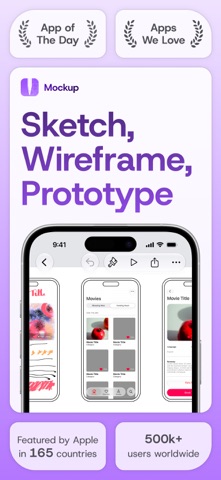
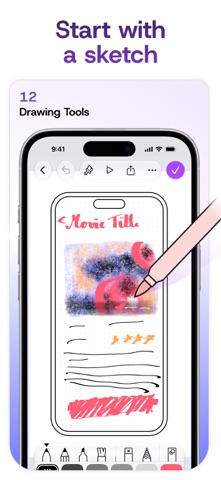
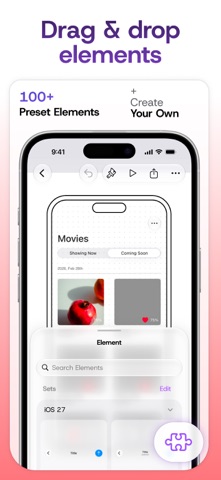
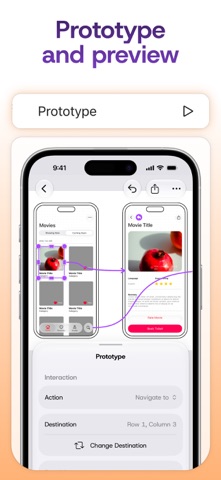
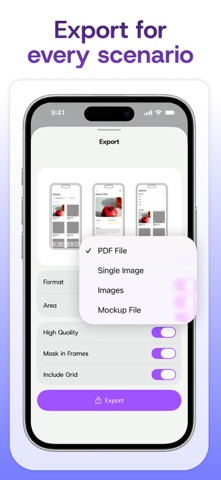
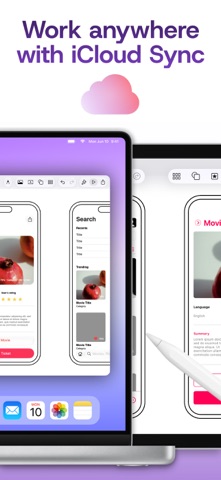
Mockup helps you sketch, wireframe, and prototype apps and websites across iPad, iPhone, and Mac. Built specifically for UI/UX design and Apple Pencil, Mockup combines a flexible canvas with reusable UI elements and interactive prototypes in one seamless workflow. Featured by Apple and recognized as App of the Day, Mockup is trusted by 500,000+ designers, developers, and product teams worldwide to sketch and wireframe interfaces faster. Design interfaces for mobile, tablet, desktop, watch, TV, and the web. - Sketch naturally with Apple Pencil using versatile drawing tools and a complete color palette. - Work with 45+ device frames in portrait and landscape. - Draw perfect shapes with Shape Detection and Snap to Grid for cleaner layouts. - Write and edit text directly on the canvas using Scribble. - Customize grids, frames, and backgrounds to match your workflow. Build Better Wireframes - Use ready-to-use UI elements or create, save, and reuse your own custom element sets. - Add text, images, shapes, and over 4,000 SF Symbols. - Save reusable text styles for a consistent design system. - Drag and drop text or images directly from other apps. Prototype User Flows - Connect screens to create interactive flows. - Preview prototypes in full-screen mode. - Validate navigation and user experience before development. Export, Share & Continue Anywhere - Export high-quality PDF and PNG files. - Share Mockup files with other users. - Collaborate in real time using SharePlay. - Sync sketches and projects across iPad, iPhone, and Mac with iCloud. - Access recent sketches and preview your work from Home Screen widgets. Optimized for Apple Pencil & iPad - Use Apple Pencil Hover to preview and switch drawing tools with greater precision and control. - Use Apple Pencil Pro squeeze to access canvas controls, adjust tools, select objects, or undo and redo actions. - Enjoy a desktop-class experience with external keyboard and trackpad support. - Work across multiple windows for greater productivity. Start creating for free with unlimited sketches and projects, or unlock the complete Mockup experience with Mockup Studio. Mockup Studio includes: - All device frames - Interactive prototypes - Unlimited custom element sets - Exclusive UI elements - Shape Detection - 4,000+ customizable SF Symbols - Watermark-free PDF export - PNG export - Nested projects - Priority support Terms of Service: https://apprime.studio/terms-of-service/ Privacy Policy: https://apprime.studio/privacy-policy/
What's new · 4.5.2
Design for the newest iPhones Create designs for iPhone Duo’s outer and inner displays, plus iPhone 18 Pro and iPhone 18 Pro Max. A new collection of Duo interface elements helps you explore layouts made for foldable experiences. Also new in 4.4: Mockup 4.4 brings a more adaptive design experience to iPhone and iPad, with a redesigned Library, new Apple Intelligence capabilities, and deeper integration with iOS 27. Designed Around You Mockup now adapts its interface and tools to your screen, orientation, and window size. Design in landscape on iPhone, reposition or hide drawing tools, and resize Mockup on your Mac with iPhone Mirroring. An All-New Library Access your Library from its own dedicated sidebar on the left, with a completely redesigned experience for finding and adding elements, shapes, symbols, text, and images. Smarter Element Naming Save custom elements with smarter name suggestions powered by Apple Intelligence. Create with Image Playground Generate images with Image Playground and add them directly to your designs or use them as image fills. Siri & Shortcuts Create, open, update, and search your designs with expanded support for Siri and Shortcuts. Update to Mockup 4.4 and enjoy a more flexible and connected way to design. We'd love to hear your feedback.
Details