

Bluetooth Lost BLE Finder
FuturaApp, Inc. · Utilities
Independent analytics for this App Store listing. AppTracker is not affiliated with FuturaApp, Inc.
Chart standing · US
What changed · US
Listing changes AppTracker has observed for this app in this storefront — new versions, price moves, rating shifts, and store copy.
NEW • Ask Siri: "Find my keys with BLE Finder" (use the name of any saved item). • Control Center: add buttons for Find Nearby and Safety Scan. • Widget: set it to follow the one item you lose most. FINDING • Find now lists all your saved items, even ones it can't hear right now, with when each was last seen. • Steadier guidance: "Getting warmer" flickers far less while you stand still. • Find Nearby keeps your screen on while you search, and lets it lock if you leave the phone untouched for a while. SAFETY SCAN • The scan keeps your screen on • A device flagged as possibly following you now stays on the results, even if it goes quiet. EVERYWHERE • Apple Watch: shows where an item was last seen, and lists missing items first in Before You Go. • iPad: resizing the window no longer closes what you had open. • Many fixes.
Ratings breakdown · US
The star breakdown behind this app's rating in this storefront.
In-app purchases · US
What this app sells inside itself, grouped by kind and priced for this storefront.
Screenshots


Keywords this app targets
Search terms AppTracker associates with this app — estimates, not search volume. ❝ = in the app's title; a highlighted number is its current position for that term.
Similar apps
Competitors and close alternatives, as estimated by AppTracker.





About
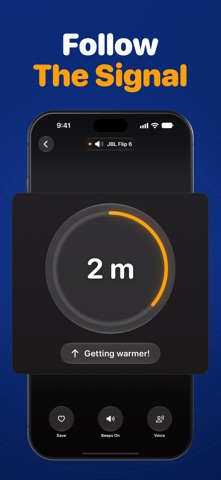
Lost your earbuds, keys or headphones? This app helps you find them, keep them with you, and check whether a hidden tracker is following you. FIND IT WHEN IT'S NEARBY 1. Open the app and tap your item. 2. Walk slowly one way. The app tells you how close you are: Far, In the room, Close, Within arm's reach. - Your phone beeps and vibrates faster as you get closer, so you can look around instead of at the screen. - It tells you when you're getting warmer or colder, and when you walked past it. - Camera view: see the room behind the screen while you search. - If it stops hearing your item, it says "Lost contact" instead of guessing. FIND WHERE YOU LEFT IT - Save your things. If one goes missing, see on a map where your iPhone last heard it. - Get walking directions there, and a street-level view of the spot where available. - Notify When Nearby: get a notification when it's back in range (for gear your iPhone has heard and can connect to; not Apple devices). - Pro: a 7-day trail of places it was with you while the app was open, and a plain-English answer to "where did I leave it?" DON'T LEAVE IT BEHIND - Left-Behind Alert: get a nudge when you walk away from something you saved. Free alerts work while the app is open. - Pro: Always-On Guard keeps those alerts working in the background and on a locked iPhone, for items your iPhone can connect to (not after you swipe the app away). - Pro: Before You Go. One tap before you head out shows what's with you and what's missing. Star your essentials and it checks for you when you leave home. - Pro: Safe Zones warn you if you leave a trusted place without it. CHECK FOR HIDDEN TRACKERS — FREE - Safety Scan looks for an unknown Bluetooth tracker traveling with you. - It flags a device that moves with you from place to place, or stays near you for 8 minutes. - Found one? Track it down with distance in feet or meters, free. - Every flag is saved for 60 days. Share a report as text. - Your own gear? Mark it "This is with me" to ignore it. - Keep the app on screen as you walk. If the screen locks, it can't hear every tracker, like AirTags. - It can miss a tracker that's silent or keeps changing its identity, so keep your iPhone's tracking notifications on. KEEP YOUR TAGS WORKING - A warning when a tag's battery is low (for tags that report it). - A heads-up when a saved tag has gone silent for days. USE IT YOUR WAY - iPhone, iPad and Apple Watch, synced with iCloud. - Home Screen and Lock Screen widgets show what's with you at a glance. - Ask Siri, or add Control Center buttons, to open Find Nearby or the Safety Scan. - Apple Watch: find from your wrist with warmer and colder hints, see what's nearby and where you last had it, plus a complication that shows what's with you. - Search any device by name or brand. GOOD TO KNOW - Works with Bluetooth earbuds, headphones, speakers, watches and key tags. - It only hears things that are switched on: earbuds closed in their case or a dead tag stay silent. - No name? It shows the brand, like "Sony device". Rename saved items and pick their icons. - Unnamed Apple devices show as "Apple device". The app can't make an item play a sound; for AirPods or an AirTag, use Apple's Find My. - Honest by design: if it can't check something, it tells you. FREE Everything above not marked Pro, including the whole Safety Scan, plus a one-minute preview of distance and voice. EXACTTRACK PRO - Estimated distance in feet or meters - Voice guidance, and wrist taps on Apple Watch that speed up as you get closer - Always-On Guard - Before You Go and the leaving-home check - Safe Zones, the 7-day trail and the plain-English answer Monthly or yearly, with a 7-day free trial for new subscribers. Cancel anytime. Already own ExactTrack (lifetime)? You keep distance, voice and wrist taps for life. Privacy: https://fierce-inlet-63133.herokuapp.com/find-airpords-privacy Terms of Use: https://www.apple.com/legal/internet-services/itunes/dev/stdeula/
What's new · 3.0
NEW • Ask Siri: "Find my keys with BLE Finder" (use the name of any saved item). • Control Center: add buttons for Find Nearby and Safety Scan. • Widget: set it to follow the one item you lose most. FINDING • Find now lists all your saved items, even ones it can't hear right now, with when each was last seen. • Steadier guidance: "Getting warmer" flickers far less while you stand still. • Find Nearby keeps your screen on while you search, and lets it lock if you leave the phone untouched for a while. SAFETY SCAN • The scan keeps your screen on • A device flagged as possibly following you now stays on the results, even if it goes quiet. EVERYWHERE • Apple Watch: shows where an item was last seen, and lists missing items first in Before You Go. • iPad: resizing the window no longer closes what you had open. • Many fixes.
Details