

Castto: TV Cast, Screen Share
tv remote screen mirroring llc · Utilities
Independent analytics for this App Store listing. AppTracker is not affiliated with tv remote screen mirroring llc.
Chart standing · US
What changed · US
Listing changes AppTracker has observed for this app in this storefront — new versions, price moves, rating shifts, and store copy.
Bug fixes and performance improvements.
Ratings breakdown · US
The star breakdown behind this app's rating in this storefront.
In-app purchases · US
What this app sells inside itself, grouped by kind and priced for this storefront.
Screenshots


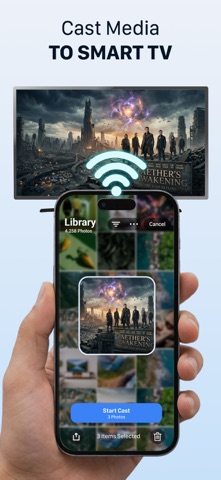


About
Mirror your iPhone to a Smart TV, cast supported web videos, and play your own compatible game files in one app. Castto: TV Cast & Screen Share makes it easy to mirror your screen, cast photos and videos, stream supported browser content, and enjoy a built-in retro game emulator. SCREEN MIRRORING & TV CASTING Mirror your iPhone screen to a compatible Smart TV or casting device over the same Wi-Fi network. Share photos, videos, websites, presentations, and supported app content on the big screen. BROWSER & YOUTUBE CASTING Open YouTube and browser videos, then cast them to your TV when permitted by the content provider. Playback availability depends on the video source and platform restrictions. VIDEO, PHOTO & MUSIC CASTING Cast personal media from your iPhone to your TV: • Photos from your camera roll • Local videos from your device • Music and audio files • Web videos from non-DRM supported pages • Continuous video playlists GAME EMULATOR Turn your iPhone into a portable retro game player. Import supported game files that you own or have the legal right to use, organize your game library, and play with on-screen controls. Emulator features include: • Import and manage supported game files • Organize your game library • Save your favorite games in one place • Custom controller skins • Adjustable controller opacity • Game audio settings • Haptic feedback support POPULAR DEVICE SUPPORT Castto works with many compatible TVs and casting devices, including: • Smart TVs • Chromecast and Google TV devices • Fire TV and FireStick • Roku devices • DLNA-compatible TVs FAST WIRELESS SETUP No cable or extra hardware required. Connect your iPhone and TV to the same Wi-Fi network, open Castto, choose your device, and start casting. PHONE AS TV REMOTE Once connected, use your iPhone to control supported playback — adjust volume, switch sources, and manage compatible content on screen without extra hardware. HOW IT WORKS 1. Connect your iPhone and TV to the same Wi-Fi network. 2. Choose Screen Mirror, Photos, Videos, Browser, or Emulator. 3. Start casting to TV or playing your imported game files. Important notes: • Casting and screen mirroring availability may vary by TV model, device, network condition, and content provider. • Some apps, websites, or streaming services may restrict protected content from being cast or mirrored. • The emulator feature is intended only for supported game files that you own or have the legal right to use. • Castto does not include copyrighted games, ROMs, or third-party game content. Download Castto today and enjoy casting, streaming, and retro gaming in one app. Privacy Policy: https://tvremotescreenmirroring.com/about/privacy/ Terms of Use: https://tvremotescreenmirroring.com/about/terms/
What's new · 68.1
Bug fixes and performance improvements.
Details