

IPTV+: My Smart IPTV Player
Mohamed Ali BEN YAAGOUB · Entertainment
Independent analytics for this App Store listing. AppTracker is not affiliated with Mohamed Ali BEN YAAGOUB.
Chart standing · US
What changed · US
Listing changes AppTracker has observed for this app in this storefront — new versions, price moves, rating shifts, and store copy.
IPTV+ 3.1 is built from your feedback: your 2.x data comes back, and Apple TV is simple again. • Restore: Import your favorites and watch history from IPTV+ 2.x, live channels included. Missed the offer? Settings → Restore Previous Data. • Clear errors: When a playlist or channel won't load, IPTV+ tells you where the problem is: your provider (account expired, too many screens, channel down), your internet connection, or the app. • More channels play: IPTV+ connects to providers the way 2.x did, a dead channel switches to its next version, and a channel that never starts retries on its own. • Stability: Fixes crashes in Live TV and on movie and series pages. • Lists: A new list manager to create and edit your lists, and add channels, movies and series to them from anywhere. • Faster: Home opens faster and switching playlists is quicker. • Parental Controls: A real profile PIN, with locked items and locked profiles. • Audio & Subtitles: Dolby Atmos goes to your TV or receiver, and your audio and subtitle picks stay the same across a series' episodes. • Rotation: Choose landscape per content type and hide the live list in portrait.
Price & rating history · US
Reconstructed from the listing changes AppTracker has observed in this storefront. A field is charted once it has changed more than once, and each line starts at the value it moved from.
Average rating · ★ 3.90 now · 10 changes on record
Ratings breakdown · US
The star breakdown behind this app's rating in this storefront.
In-app purchases · US
What this app sells inside itself, grouped by kind and priced for this storefront.
Screenshots




About
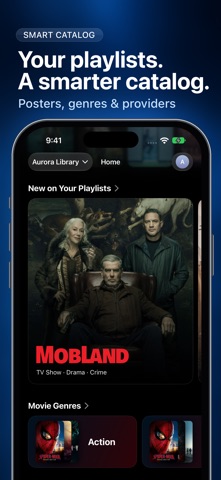
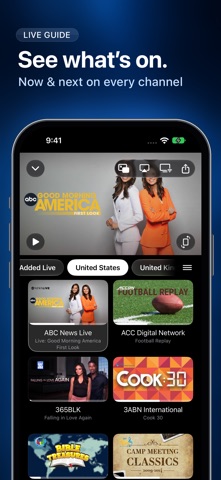
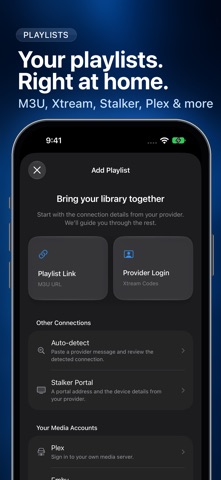
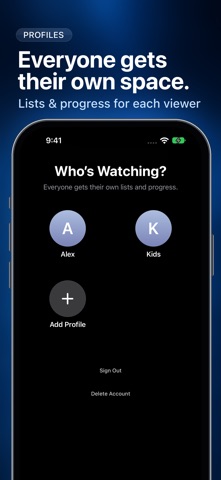
Your playlists. A smarter way to watch. IPTV+ turns your own M3U or Xtream playlist into a clean, organized library for live TV, movies, and series. Browse quickly, see what is on with EPG, resume watching, and move between channels without losing your place. BUILT FOR YOUR LIBRARY • Add and manage multiple M3U and Xtream playlists • Browse live channels, movies, and series in dedicated sections • Search across your library and save favorites • View EPG now/next data and supported catch-up programs • Keep playlists, profiles, favorites, and progress in sync • Use subtitles, alternate audio, Picture in Picture, AirPlay, and Chromecast • Continue watching and switch channels quickly • Enjoy a native interface designed for Apple devices IPTV+ is a media player. It does not provide channels, subscriptions, playlists, or other content. You must add content you are authorized to use. Availability of EPG, catch-up, subtitles, audio tracks, and stream quality depends on your provider and playlist. Terms of Use: https://www.iptvplus.app/terms Privacy Policy: https://www.iptvplus.app/privacy/
What's new · 3.1
IPTV+ 3.1 is built from your feedback: your 2.x data comes back, and Apple TV is simple again. • Restore: Import your favorites and watch history from IPTV+ 2.x, live channels included. Missed the offer? Settings → Restore Previous Data. • Clear errors: When a playlist or channel won't load, IPTV+ tells you where the problem is: your provider (account expired, too many screens, channel down), your internet connection, or the app. • More channels play: IPTV+ connects to providers the way 2.x did, a dead channel switches to its next version, and a channel that never starts retries on its own. • Stability: Fixes crashes in Live TV and on movie and series pages. • Lists: A new list manager to create and edit your lists, and add channels, movies and series to them from anywhere. • Faster: Home opens faster and switching playlists is quicker. • Parental Controls: A real profile PIN, with locked items and locked profiles. • Audio & Subtitles: Dolby Atmos goes to your TV or receiver, and your audio and subtitle picks stay the same across a series' episodes. • Rotation: Choose landscape per content type and hide the live list in portrait.
Details