

Lotus Vehicle Tracker
Scorpion Automotive Ltd · Utilities
Independent analytics for this App Store listing. AppTracker is not affiliated with Scorpion Automotive Ltd.
Chart standing · US
What changed · US
Listing changes AppTracker has observed for this app in this storefront — new versions, price moves, rating shifts, and store copy.
What's new - The Lotus app has been rebuilt on the ScorpionTrack platform, with a new look throughout and everything below. - Ready for iPhone Duo. The app now makes full use of the larger unfolded screen, so your vehicles, maps and journeys have room to breathe. - The vehicle list and vehicle details screens have a refreshed design: your car's photo, its current status at a glance, quick View and Trips buttons, MOT and tax dates, and a small map showing where the car is. - You can now add your own photo of your car: the background is removed for you, you can check how it looks before saving, and you can replace or remove it at any time. You can also tint the vehicle card to match your car's colour. - A redesigned Alerts screen: a cleaner overview of your alerts by severity, type and vehicle, quick filters above the list, and alert details on a single page with the camera footage just a tap away. - Crime stats near your vehicle: in the UK, open Crime Stats under its location on the vehicle's details to see a low, medium or high rating, the most common crimes nearby and the months they cover. - Manage your billing from the app: account owners can tap Billing on the Subscriptions screen to update their card, see invoices or change their plan without leaving the app. - Clearer immobiliser controls: on vehicles with a tag, the buttons now read Force arm, Force disarm and Auto, and each one explains what it does. - You can now change the app's language from Account Settings, and your choice is saved to your account so emails and notifications follow it too. - You can report a vehicle as sold from its details screen, using the full online form. - Movement and crash alerts are now a simple on/off switch, and use the same phone-number panel everywhere. - The Settings, App Settings and Account screens have been rebuilt and regrouped into clearer sections, including the user guides relevant to you, and you can now edit your mobile number there. The app version is shown at the bottom of Settings. Bug fixes - The app no longer signs you out at random intervals, or when it cannot read your saved profile: it fetches your details again and carries on, and waits with a Retry button if there is no connection. - Deleting and reinstalling the app no longer leaves it closing immediately every time you open it. - Phone tag is more reliable: it keeps working when you move to a new iPhone, no longer tries to connect to other Bluetooth devices nearby, recovers if unlocking stalls part-way, and tells you why if a tag can't be added. - Changing your payment card now actually changes the card your subscription renews on, and discounts now show and apply where you buy a subscription. - Defender Alarms and Groups now appear in Settings as soon as they apply to you, with no need to reinstall the app. - Accounts without vehicles now see just Vehicles and Settings until a vehicle is added, instead of empty tabs. - Screens no longer run underneath the clock, the back button or the tab bar, and swiping in from the left edge goes back everywhere. - Journeys are always listed newest first, and scrolling quickly through Alerts or Location Shares no longer repeats entries. - Garage, transport and no-alerts modes now save correctly. - Vehicle photos no longer come out sideways, fail to upload or upload twice, and no longer flicker when you open a vehicle. - Fuel economy on the vehicle details screen now follows your Units setting. - Phone number fields no longer drop a leading zero as you type, and country flags display correctly.
In-app purchases · US
No in-app purchases.
Screenshots


About
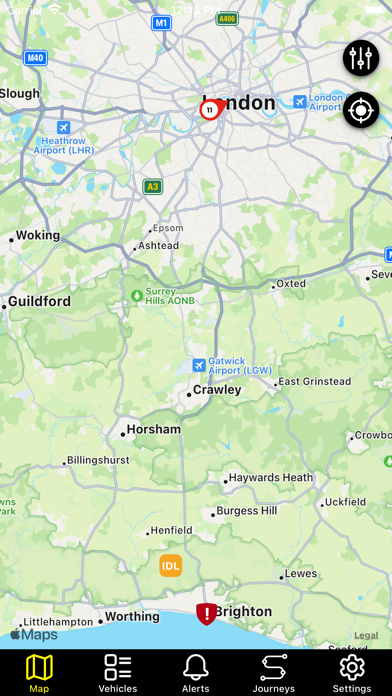
Lotus Track is a market leading GPS/GSM Tracking & Management System Lotus allows you to manage your vehicles and drivers with precision. Know their exact whereabouts whilst increasing productivity, saving time and money. The product is British designed and manufactured by Scorpion Automotive - a trusted brand established in vehicle security since 1973. Important Note: This mobile app is for the exclusive use of customers of the Lotus Tracking & Management System. Lotus Track tracker devices must be installed in your vehicle(s) in order for the app to operate and users to access the product’s many features and benefits available from both the app and a web-based portal. Lotus Track Benefits · Drastically reduce your fleet costs with savings potential on fuel usage, overtime claims, unauthorised use, vehicle wear & tear and insurance. · Improve productivity by managing your vehicles and drivers with precision using real time maps, dashboards and allocating work to drivers in closest proximity to your customer’s locations. · Satisfy HMRC Regulations supporting private and business mileage reporting. · Improve customer service by empowering a pro-active and immediate response to your customer’s needs. · Better fulfil Employer’s duty of care, regulatory and company policy compliance · Opt for Insurance Approved, Thatcham accredited 24/7/365 Theft Monitoring and suspicious activities including vehicle movement without ignition and battery disconnections generate alerts to our Monitoring Centre. Our trained monitoring staff will contact you with vehicle movement details in order to confirm a theft. In the event of a theft, the team closely co-ordinate with Police Forces throughout the country to track and secure the vehicle. Product Features · Live mapping & updates showing vehicle positions, speed, bearing and ignition state · Know Exact Vehicle Locations - Our system converts every vehicle location into a meaningful address · Full Google Maps & Street Integration · Customisable Dashboard and KPIs · Powerful Instant and Scheduled Reporting that can be viewed online or exported to PDF, Excel or HTML for further processing · Assign Vehicle Groups - Define, group and filter your fleet by depot, type or purpose. · 24/7/365 Email and/or text Message Alerts · Custom Geofences enabling you to designate specific areas where your vehicles are allowed, prohibited or a means of gauging arrival/departure times on your customer sites. · Business and Private Mileage - Easily save and retrieve business and private mileage reporting. · External Auxiliaries - Extend functionality by choosing from a range of custom controls and sensors for your specific business needs such as: door open/closed and panic buttons · Administration – Monitor and control exactly which actions each user of the system is allowed to perform through permission controlled access.
What's new · 1.1.1
What's new - The Lotus app has been rebuilt on the ScorpionTrack platform, with a new look throughout and everything below. - Ready for iPhone Duo. The app now makes full use of the larger unfolded screen, so your vehicles, maps and journeys have room to breathe. - The vehicle list and vehicle details screens have a refreshed design: your car's photo, its current status at a glance, quick View and Trips buttons, MOT and tax dates, and a small map showing where the car is. - You can now add your own photo of your car: the background is removed for you, you can check how it looks before saving, and you can replace or remove it at any time. You can also tint the vehicle card to match your car's colour. - A redesigned Alerts screen: a cleaner overview of your alerts by severity, type and vehicle, quick filters above the list, and alert details on a single page with the camera footage just a tap away. - Crime stats near your vehicle: in the UK, open Crime Stats under its location on the vehicle's details to see a low, medium or high rating, the most common crimes nearby and the months they cover. - Manage your billing from the app: account owners can tap Billing on the Subscriptions screen to update their card, see invoices or change their plan without leaving the app. - Clearer immobiliser controls: on vehicles with a tag, the buttons now read Force arm, Force disarm and Auto, and each one explains what it does. - You can now change the app's language from Account Settings, and your choice is saved to your account so emails and notifications follow it too. - You can report a vehicle as sold from its details screen, using the full online form. - Movement and crash alerts are now a simple on/off switch, and use the same phone-number panel everywhere. - The Settings, App Settings and Account screens have been rebuilt and regrouped into clearer sections, including the user guides relevant to you, and you can now edit your mobile number there. The app version is shown at the bottom of Settings. Bug fixes - The app no longer signs you out at random intervals, or when it cannot read your saved profile: it fetches your details again and carries on, and waits with a Retry button if there is no connection. - Deleting and reinstalling the app no longer leaves it closing immediately every time you open it. - Phone tag is more reliable: it keeps working when you move to a new iPhone, no longer tries to connect to other Bluetooth devices nearby, recovers if unlocking stalls part-way, and tells you why if a tag can't be added. - Changing your payment card now actually changes the card your subscription renews on, and discounts now show and apply where you buy a subscription. - Defender Alarms and Groups now appear in Settings as soon as they apply to you, with no need to reinstall the app. - Accounts without vehicles now see just Vehicles and Settings until a vehicle is added, instead of empty tabs. - Screens no longer run underneath the clock, the back button or the tab bar, and swiping in from the left edge goes back everywhere. - Journeys are always listed newest first, and scrolling quickly through Alerts or Location Shares no longer repeats entries. - Garage, transport and no-alerts modes now save correctly. - Vehicle photos no longer come out sideways, fail to upload or upload twice, and no longer flicker when you open a vehicle. - Fuel economy on the vehicle details screen now follows your Units setting. - Phone number fields no longer drop a leading zero as you type, and country flags display correctly.
Details