

Daily Journal: Everlog
Wessley Roche · Lifestyle
Independent analytics for this App Store listing. AppTracker is not affiliated with Wessley Roche.
Chart standing · US
What changed · US
Listing changes AppTracker has observed for this app in this storefront — new versions, price moves, rating shifts, and store copy.
- Paste a link over text. Select some words and paste a web address to turn them into a link - Editor settings. Tap the new settings button in the editor to change editor options without leaving your entry - A new share sheet. Sharing to Everlog looks like the editor, keeps everything you share in order, and saves only when you tap Done - See the entries behind your recap stats. Tap a top tag or place, or a day on a monthly recap's calendar, to see just those entries - Live Photos stay live when you share them to Everlog or drag them into an entry - When no entry is selected, the editor offers a New Entry button - Manage Templates opens right over the editor instead of taking you to Settings - The timeline no longer repeats the journal name on every entry when you only have one journal - Fixed faces getting cut off in recap slideshows - Fixed the confirmation for deleting a template appearing next to the wrong template on iPhone - Fixed the bottom of an entry with photos getting cut off when you reopen it - Fixed long entries opening scrolled down - Fixed entries saved from the share sheet, widgets or Shortcuts not showing in Everlog right away - Fixed the share sheet not showing the date and location of the photos and videos you share - Fixed a photo's location being replaced by your current location in a new entry - Fixed the editor jumping to the top after you insert a separator at the end of an entry - Fixed getting stuck on the subscription screen when plans couldn't load - Fixed a crash when importing a backup with entries in the Trash - Various bug fixes and improvements
Ratings breakdown · US
The star breakdown behind this app's rating in this storefront.
In-app purchases · US
What this app sells inside itself, grouped by kind and priced for this storefront.
Screenshots





About
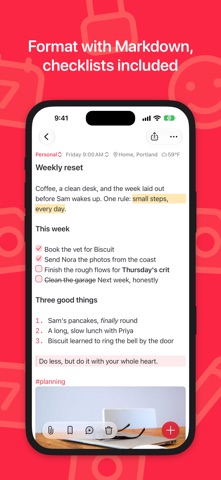
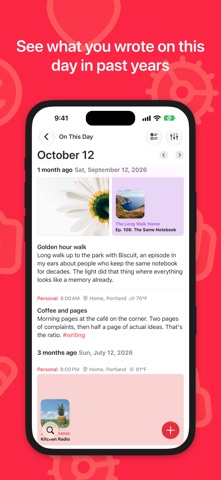
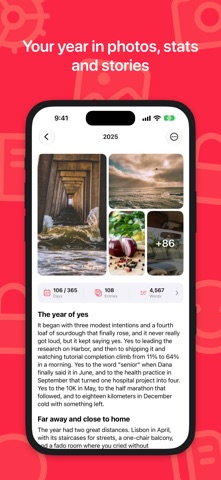
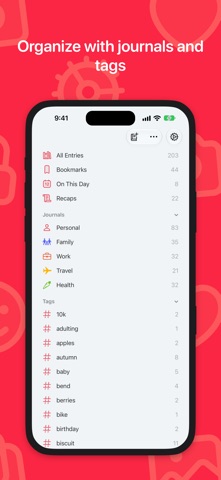
Everlog is a beautifully minimal daily journal designed to help you slow down and reflect. Whether you’re tracking your thoughts, documenting moments, or building a habit of mindfulness, Everlog makes it effortless to keep a daily journal that brings clarity to your life. Stay Focused Everlog removes distractions so you can focus on what matters: your thoughts. Just open the app, tap the quill, and start writing. Build a Daily Habit With journaling suggestions, widgets, and an elegant calendar view, Everlog gently encourages you to make writing in your daily journal a consistent and rewarding ritual. Remember More Add photos and videos to bring your entries to life. Whether it’s a memory, a mood, or a milestone, your daily journal becomes a vivid archive you’ll want to revisit. Reflect and Grow Use comments to revisit past entries and add new insights. A powerful way to turn your daily journal into a space for reflection and personal growth. Private and Secure Your thoughts stay yours. Lock your daily journal with a passcode and sync seamlessly across devices with iCloud (Premium required). Designed for Everyday Use • Unlimited journals (Premium) • Tags, bookmarks, and full search • Dark mode for night journaling • Fast Markdown editing Whether you’re starting your first daily journal or looking for a better way to keep one, Everlog makes it simple to stay present and connected with yourself—every day. — Privacy Policy: https://everlog.app/privacy Terms of Use: https://everlog.app/terms
What's new · 2.10.1
- Paste a link over text. Select some words and paste a web address to turn them into a link - Editor settings. Tap the new settings button in the editor to change editor options without leaving your entry - A new share sheet. Sharing to Everlog looks like the editor, keeps everything you share in order, and saves only when you tap Done - See the entries behind your recap stats. Tap a top tag or place, or a day on a monthly recap's calendar, to see just those entries - Live Photos stay live when you share them to Everlog or drag them into an entry - When no entry is selected, the editor offers a New Entry button - Manage Templates opens right over the editor instead of taking you to Settings - The timeline no longer repeats the journal name on every entry when you only have one journal - Fixed faces getting cut off in recap slideshows - Fixed the confirmation for deleting a template appearing next to the wrong template on iPhone - Fixed the bottom of an entry with photos getting cut off when you reopen it - Fixed long entries opening scrolled down - Fixed entries saved from the share sheet, widgets or Shortcuts not showing in Everlog right away - Fixed the share sheet not showing the date and location of the photos and videos you share - Fixed a photo's location being replaced by your current location in a new entry - Fixed the editor jumping to the top after you insert a separator at the end of an entry - Fixed getting stuck on the subscription screen when plans couldn't load - Fixed a crash when importing a backup with entries in the Trash - Various bug fixes and improvements
Details