

Hashtag Generator & Caption AI
FuturaApp, Inc. · Social Networking
Independent analytics for this App Store listing. AppTracker is not affiliated with FuturaApp, Inc.
Chart standing · US
What changed · US
Listing changes AppTracker has observed for this app in this storefront — new versions, price moves, rating shifts, and store copy.
• Coming up: Trending now starts with upcoming special days, with the ones that fit what you post about shown at the top. Copy a day's hashtag in one tap. • Instagram and TikTok allow only 5 hashtags per post, so the app now gives you your best 5. More suggestions are one tap away. • Safer for Instagram: the app now finishes its banned-hashtag check before you copy, and remembers any banned hashtag it finds for 24 hours, on every screen. • Improve Caption and Change Tone now keep your own hashtags and "link in bio", and a suggested hook no longer replaces the first line of your post. • Changed your mind about an AI rewrite on Create? Tap Undo under your caption to get your own words back, even after closing the app. • On supported devices with iOS 27, From Photo now looks at the photo itself to write a caption that fits it. • Dictation now works in many more languages and regions. • Leaving the app while your hashtags are being made no longer loses them. • Apple Watch: see today's or tomorrow's special day at a glance, trends refresh by themselves, and your pinned sets come first. • Plus: Trending now refreshes an old list by itself, and many fixes for iPad, dark mode, VoiceOver and larger text.
Ratings breakdown · US
The star breakdown behind this app's rating in this storefront.
In-app purchases · US
What this app sells inside itself, grouped by kind and priced for this storefront.
Screenshots

About
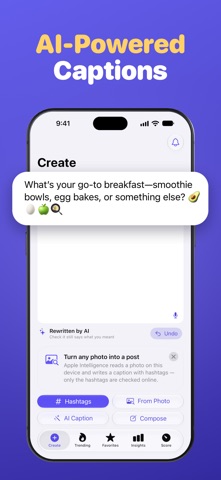
You wrote your caption. Now you need hashtags — fast, and safe to post. HOW IT WORKS 1. Copy your caption. 2. Open the app, tap Paste, then tap Hashtags. 3. Tap Copy, then paste into Instagram or TikTok. That's it. Your hashtags are ready in seconds. THE RIGHT HASHTAGS, THE RIGHT AMOUNT • Get a ready-to-post set from your caption or a few keywords, best tags first. • The right number for each app: 5 for Instagram and TikTok, 1 for Threads, and a suggested 2 for X and 5 for LinkedIn. • See each tag's estimated reach: roughly how many people could see it each hour. POST WITHOUT WORRYING • When you post to Instagram, the app checks your hashtags for banned ones before you copy. Banned tags are named and left out of your set. • Each tag gets a simple grade: Great, Good, Unused, Overused, IG-only or Banned. • Overused tags get your post lost in the crowd. Leave them out with one tap. • If a tag can't be checked right now, the app marks it "Not checked" instead of calling it safe. MORE WAYS TO START • From Photo — pick a photo and get a caption with matching hashtags. Your photo stays on your device; only the hashtags are sent, to be checked. • Compose — write your whole post and see how it looks on Instagram, TikTok, X, LinkedIn and Threads. Your draft saves itself. • Talk instead of typing: speak your caption and the app writes it down. BETTER CAPTIONS WITH AI • Improve your caption, change its tone (funny, professional, casual, inspirational or bold), make it shorter or longer, or add emojis. • My Voice — paste a few captions you wrote, and rewrites will sound like you. • Get catchy opening lines, and the words people type when they search. These AI tools run on your device and need Apple Intelligence. Nothing is sent, except when you choose Classic Emojify, which works online. KNOW WHAT'S HOT • Trending — see what's trending worldwide, what each tag is about, and how fresh the list is. Copy any tag with one tap; banned ones can't be copied. • Coming up — special days ahead, with the hashtag to use. • Score — paste the hashtags you always use and see which ones work, best first, with each tag's size in plain words: Niche, Medium, Big or Huge. Or tap "Check My Last Copy". POST AT THE RIGHT TIME • Reminders at the best times for each app, or at your own times. • If you allow alarms, a countdown appears on your Lock Screen 15 minutes before each reminder. Tap Get Hashtags to open your recent and pinned sets. • Widgets for your Home Screen, Lock Screen and Apple Watch show the next suggested time to post. KEEP YOUR BEST SETS • Favorites — save sets by category (Travel, Food, Fitness and more) and pin the ones you use most. • Copy History — your recent copies (up to 100), saved automatically. • Insights — your most-used hashtags and your last 7 days, in simple charts. • Come back anytime: your caption and hashtags are still there. ON ALL YOUR DEVICES iPhone, iPad, Mac and Apple Watch. Your Favorites and Copy History sync with iCloud. On Apple Watch, check what's trending and save a tag to Favorites. FREE TO START Try 5 hashtag sets, 5 AI captions and 5 scores for free. A free use only counts when you get a result. Then go unlimited with a weekly, monthly or yearly plan. New subscribers get a 3-day free trial. Cancel anytime. Making hashtags, Score, Trending, Coming up, Classic Emojify and the banned check need an internet connection. Terms of Use: https://www.apple.com/legal/internet-services/itunes/dev/stdeula/ Privacy: https://fierce-inlet-63133.herokuapp.com/insight-privacy-and-term
What's new · 3.6
• Coming up: Trending now starts with upcoming special days, with the ones that fit what you post about shown at the top. Copy a day's hashtag in one tap. • Instagram and TikTok allow only 5 hashtags per post, so the app now gives you your best 5. More suggestions are one tap away. • Safer for Instagram: the app now finishes its banned-hashtag check before you copy, and remembers any banned hashtag it finds for 24 hours, on every screen. • Improve Caption and Change Tone now keep your own hashtags and "link in bio", and a suggested hook no longer replaces the first line of your post. • Changed your mind about an AI rewrite on Create? Tap Undo under your caption to get your own words back, even after closing the app. • On supported devices with iOS 27, From Photo now looks at the photo itself to write a caption that fits it. • Dictation now works in many more languages and regions. • Leaving the app while your hashtags are being made no longer loses them. • Apple Watch: see today's or tomorrow's special day at a glance, trends refresh by themselves, and your pinned sets come first. • Plus: Trending now refreshes an old list by itself, and many fixes for iPad, dark mode, VoiceOver and larger text.
Details