

Calculator Keyboard - Faster
万庄 黄 · Productivity
Independent analytics for this App Store listing. AppTracker is not affiliated with 万庄 黄.
Chart standing · US
What changed · US
Listing changes AppTracker has observed for this app in this storefront — new versions, price moves, rating shifts, and store copy.
Improved: Keyboard appearance on iOS 26 Improved: Number, Space, and Globe key display Improved: Swipe-up input settings and stability
Ratings breakdown · US
The star breakdown behind this app's rating in this storefront.
In-app purchases · US
No in-app purchases.
Screenshots


Keywords this app targets
Search terms AppTracker associates with this app — estimates, not search volume. ❝ = in the app's title; a highlighted number is its current position for that term.
Similar apps
Competitors and close alternatives, as estimated by AppTracker.
 Calculator++P
YUTAKA KENJO
2 shared topics · 1 shared title word
Calculator++P
YUTAKA KENJO
2 shared topics · 1 shared title word
 Calculator with History +
Beijing Free Calculator Technology Co., Ltd.
1 shared topic · 1 shared title word
Calculator with History +
Beijing Free Calculator Technology Co., Ltd.
1 shared topic · 1 shared title word
 iCalculator - Keyboard Calc
Nan Chao
3 shared topics · 1 shared title word
iCalculator - Keyboard Calc
Nan Chao
3 shared topics · 1 shared title word
 Calculator Advance Pro
Takahiro Iwatani
2 shared topics · 1 shared title word
Calculator Advance Pro
Takahiro Iwatani
2 shared topics · 1 shared title word
 Rapid & Quick Calculator Pro
KinkumaDesign
1 shared topic · 1 shared title word
Rapid & Quick Calculator Pro
KinkumaDesign
1 shared topic · 1 shared title word
 Calculator PanecalST Plus
Noriyasu Kutsuzawa
2 shared topics · 1 shared title word
Calculator PanecalST Plus
Noriyasu Kutsuzawa
2 shared topics · 1 shared title word
 Easy Input Calculator
Yuta Kobayashi
2 shared topics · 1 shared title word
Easy Input Calculator
Yuta Kobayashi
2 shared topics · 1 shared title word
 Calculator Plus - PRO
DigitAlchemy LLC
2 shared topics · 1 shared title word
Calculator Plus - PRO
DigitAlchemy LLC
2 shared topics · 1 shared title word
About
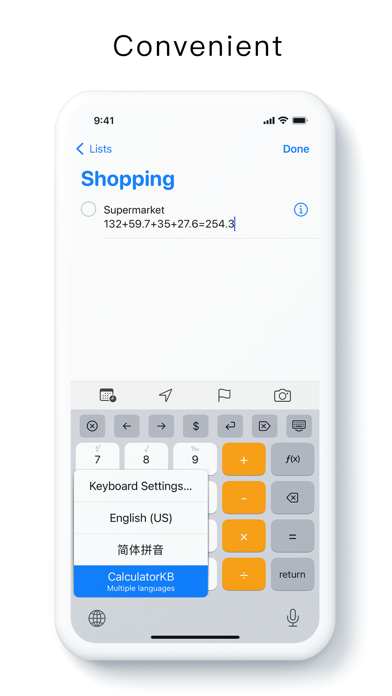
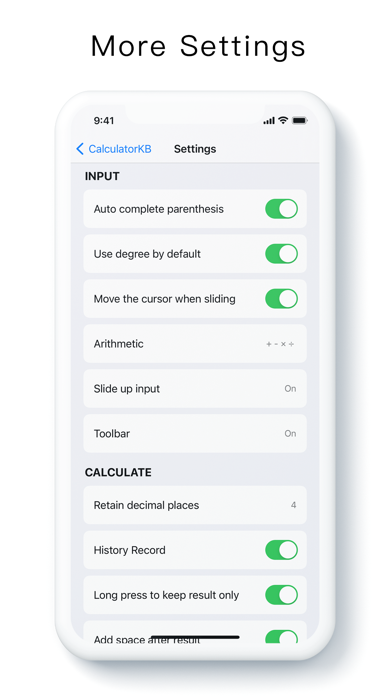
Calculator Keyboard - Faster Arithmetic, Advanced functions Use the "calculator keyboard" to retain the calculation process and quickly calculate the results. No need to switch between applications, no need to copy and paste, calculate anytime, anywhere, convenient and fast. [Small] Less than 10 trillion [Quick] Quick start, fast input, fast calculation [Strong] Four operations, advanced functions Arithmetic: 1-2 + 3 × 4 ÷ 5 = 1.4 Parentheses: 10 ÷ (1 + 2) = 3.3333 More: π-5% + e + 10 ^ 2 + sin (90 °) + ∛9 + ln (3) + 5! = 229.8815 1/5 + cos (45 °) = 0.9071 10 ÷ 4 = 2.5 Supported operations and functions: - Arithmetic - Brackets - Pi π, percentage%, golden ratio ϕ, natural constant e - Square x², cubic x³, y power x ^ y - Square root √, cubic root ∛ - Trigonometric functions sin, cos, tan - Inverse trigonometric functions asin, acos, atan - Hyperbolic functions sinh, cosh, tanh - Natural logarithm ln, constant logarithm log - Random number rand - e to the power of x e ^ x - Countdown 1 / x - Power of 10 x 10 ^ x other: - Custom slide up input - Custom toolbar - History record - Button sound effects - Key vibration - Cursor movement - Angles and radians - Implicit multiplication - Retain decimal places - Keep results only - Long press to delete continuously - Quick input by sliding up - Automatically complete brackets - Dark mode contact: If you have a feature you want, or other suggestions or comments, please leave a comment or email us. If you find it useful, I look forward to you taking a minute to rate it and write two comments, useful comments and five stars will make it a bit ahead of the list, thanks! Email: ppics@qq.com
What's new · 1.5.1
Improved: Keyboard appearance on iOS 26 Improved: Number, Space, and Globe key display Improved: Swipe-up input settings and stability
Details