

Knit2 - knitting counter
TORU YAMAGUCHI · Lifestyle
Independent analytics for this App Store listing. AppTracker is not affiliated with TORU YAMAGUCHI.
Chart standing · US
What changed · US
Listing changes AppTracker has observed for this app in this storefront — new versions, price moves, rating shifts, and store copy.
A completely refreshed design The counter screen, project list, start screen, title and image, settings and About screens have a new design that is easier to read and tap. The count buttons use the standard iOS look (Liquid Glass on iOS 26 and later), and there is a new green background color. Now supports iPhone Duo The layout adapts to every way you can use it: closed, opened in portrait or landscape, half-open, and in Split View. When opened in portrait, the counter sits on top with your image and notes below. When half-open, count with the big buttons on the lower half. Improved project names Long names shrink to fit in the project list and on the counter screen so you can read the whole name. The name field grows up to four lines. Other improvements • It is now easier to see how to add a new project in the project list. • Adjusted the layout so everything fits on small and large iPhones.
Ratings breakdown · US
The star breakdown behind this app's rating in this storefront.
In-app purchases · US
No in-app purchases.
Screenshots



About
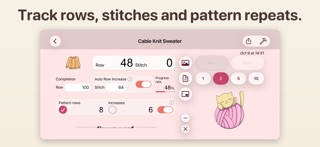
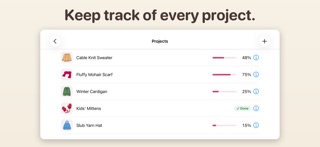
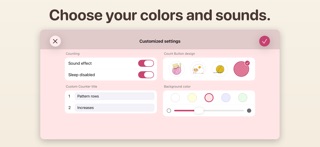
Knit2 is a row and stitch counter made for knitting. Just tap the big buttons to count, so you can keep your eyes on your work. Your pattern and notes can sit on the same screen, so there is no need to switch apps. Easy row and stitch counting • Count rows and stitches separately, up or down by 1, 2, 5 or 10. • Automatic row counting: set the number of stitches per row and turn it on. When your stitch count reaches the set number, the row count increases by one and the stitch count resets to zero. • Enter the total number of rows to see your progress, and get a message when you finish the last row. • Two custom counters. Give them names and use them for pattern repeats, increases, decreases and more. Your pattern and notes, always at hand • Choose a pattern image from your photo library and save it for each project, including screenshots saved to Photos. Pinch to zoom in on the details. • Write notes for each project, such as the yarn, needles and stitch instructions. • Picture-in-picture: show the image or note in a small window on the counter screen. Move and resize it with your finger. Made for iPhone Duo • The layout adapts when closed, opened in portrait or landscape, half-open, and in Split View. • Open it in portrait to see the counter on top and your image and notes below. When half-open, count with the big buttons on the lower half. Make it yours • Choose a count button design, or use your favorite photo as the button. • Five background colors, with adjustable depth. • Turn the count sound on or off. • Keep the screen awake while you knit. Manage several projects • Counts, images, notes and settings are saved for each project. Switch between them from the list. Available in English and Japanese. We'd love to hear from you. Please leave your thoughts in an App Store review; they help shape future updates.
What's new · 3.0.0
A completely refreshed design The counter screen, project list, start screen, title and image, settings and About screens have a new design that is easier to read and tap. The count buttons use the standard iOS look (Liquid Glass on iOS 26 and later), and there is a new green background color. Now supports iPhone Duo The layout adapts to every way you can use it: closed, opened in portrait or landscape, half-open, and in Split View. When opened in portrait, the counter sits on top with your image and notes below. When half-open, count with the big buttons on the lower half. Improved project names Long names shrink to fit in the project list and on the counter screen so you can read the whole name. The name field grows up to four lines. Other improvements • It is now easier to see how to add a new project in the project list. • Adjusted the layout so everything fits on small and large iPhones.
Details