

ScreenCoach - Parental Control
LifeTech Balance Pty Ltd · Lifestyle
Independent analytics for this App Store listing. AppTracker is not affiliated with LifeTech Balance Pty Ltd.
Chart standing · US
What changed · US
Listing changes AppTracker has observed for this app in this storefront — new versions, price moves, rating shifts, and store copy.
Parent App Improvements + Activities can now have zero Tokens and zero Gems (requested by user vote). + Scheduled activities with a time range will remain visible until they are completed if they have a consequence. + Added bulk actions for activity templates on Mac App and web portal. + Streamlined the new account creation process. Child App Improvements + Scheduled activities with a time range will remain visible until they are completed if they have a consequence. Plus, general improvements and minor bug fixes.
Price & rating history · US
Reconstructed from the listing changes AppTracker has observed in this storefront. A field is charted once it has changed more than once, and each line starts at the value it moved from.
Average rating · ★ 4.23 now · 3 changes on record
Ratings breakdown · US
The star breakdown behind this app's rating in this storefront.
In-app purchases · US
What this app sells inside itself, grouped by kind and priced for this storefront.
Screenshots




About
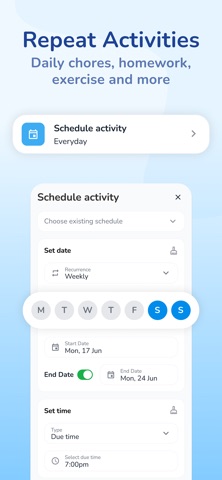
Introducing ScreenCoach - Your Ultimate Screen Time Manager for the Whole Family that Rewards Good Habits! Supports 5 languages, with more to come! Tired of the constant struggle to pry your kids away from their devices? Can't get them motivated to do homework or to ask for music or exercise? Use Screen Time and pocket money to motivate them to do other healthy activities and end daily battles. Discover ScreenCoach, the life-tech balance superhero that makes managing screen time a breeze for busy parents like you. Rewards your kids for non-screen activities Kids earn their screen time & allowance (optional) Includes a comprehensive allowance manager! Key Features: • Earn More Screen Time: Watch your kids eagerly complete chores, exercise, homework, and fun activities to earn extra screen time or pocket money (or both!). • Fun gamified approach with Screen Time Tokens & Gems that can be used for pocket money or goals. • Separate goals feature the kids can earn by saving their earned gems. • Multiple access times: You can have several access times per day. Eg., 7-8 am, 4-5 pm and 6- 7 pm. • Kids can earn additional rewards for your choice of bonuses such as: done with a good attitude, done on time, or done straight away! • Block kids instantly or give them a temporary access pass for extra flexibility. • Blocks Apps if an activity is not done by the due time! (option per activity) • Works across multiple platforms: When your child’s time is up on one device, they can’t simply pick up another - because it will also be blocked! • Works well together with Apple Screen Time • Supports shared devices • Works online and offline • Tamerproofing options, can't change the time or use a VPN to bypass! • Comprehensive rewards system: Create a tailored list of engaging activities to keep your kids active and entertained offline. Includes checklists, reminders & automated repeating activities - eg. brush teeth at 8 pm every night! or take the bins out every 2nd Wed + Optional consequences, where mode(s) are blocked if an activity is not done by the due time or they get zero rewards. • Create modes for School Time, Fun Time & Sleep: Switch to School mode to block games, social media, and streaming during study hours. At night, all Apps can be blocked, but you can allow audio app(s) for listening to music or bedtime stories. • Parent Dashboard: Keep tabs on your child's total device time, current pocket money, tokens & Gems they've earned by completing activities. • App Blocking: When screen time is up or during restricted hours. • Teaches delayed gratification; kids earn screen time tokens and gems that can be converted to allowance (or Goals); they can be saved for future use. • Full allowance system to track children's virtual bank account for expenses and deposits; also includes recurring debits or expenses It's really a digital personal trainer, teaching kids healthy new life-tech habits for life. Join the ScreenCoach family today & create a harmonious home where kids embrace a balanced tech lifestyle while still enjoying their screen time in a controlled, responsible way. Download ScreenCoach now and experience hassle-free screen time management with a touch of fun and empowerment for the entire family! The first 30 days are free on all plans; you have a choice of monthly, 6-monthly, and 12-month plans Cancel easily at any time. 3-day trial with no commitment is also available Live AI + Human Agent chat feature in the app and on the website to help you To provide a comprehensive experience, ScreenCoach may collect location data about the device in the background, enabling parents to track the device's location and usage history effectively. Note: ScreenCoach uses Apple's ScreenTime API to manage screen time and app access. Works best when an Apple Family is set up. Our terms of use and privacy policies are available at: https://www.myscreencoach.com/terms https://www.myscreencoach.com/privacy
What's new · 1.79.1 (858)
Parent App Improvements + Activities can now have zero Tokens and zero Gems (requested by user vote). + Scheduled activities with a time range will remain visible until they are completed if they have a consequence. + Added bulk actions for activity templates on Mac App and web portal. + Streamlined the new account creation process. Child App Improvements + Scheduled activities with a time range will remain visible until they are completed if they have a consequence. Plus, general improvements and minor bug fixes.
Details