

Speedster: speed cams
Kirill Konovalov · Navigation
Independent analytics for this App Store listing. AppTracker is not affiliated with Kirill Konovalov.
Chart standing · US
What changed · US
Listing changes AppTracker has observed for this app in this storefront — new versions, price moves, rating shifts, and store copy.
• CarPlay: turn-by-turn directions now also appear on your car's instrument cluster and head-up display, in cars that support it. • Anti-Jam mode: if the car on the map isn't where you are, long-press the map at your real position and the route is rebuilt from there. • Anti-Jam mode: pause the simulated car or move it 250 m back or forward — on your iPhone and on CarPlay.
Ratings breakdown · US
The star breakdown behind this app's rating in this storefront.
Screenshots



About
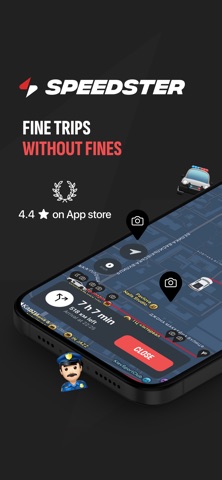
Tired of getting speeding tickets? Let's help you stay safe and avoid all the speed cameras on your way! In addition to a map with all the speed-cams, we have many useful features for you: ⁃ Early and convenient notifications that the radar is nearby - Apple Music integration - Warning about the maximum speed in the area - Dynamic map which supports Apple CarPlay - Skins of your favorite car brands to make your speedometer even more stylish - Reminder to open the application on the day and time you need - Constantly updated database of radars and speedcams - Compatible with Apple Watch Our app is your secret weapon for conquering thrilling road trips, all while keeping your wallet fine-free! Includes in-app purchases. The purchase will be applied to your iTunes account at the end of the trial period. Subscription will automatically renew unless canceled within 24 hours prior to the end of the current period. You can cancel your subscription at any time in your iTunes account settings. Any unused portion of a free trial will be forfeited if you purchase a subscription. For more information, see Terms of Use and Privacy Policy (https://speedster.app/policies/). Also check Apple's Terms of Use: https://www.apple.com/legal/internet-services/itunes/dev/stdeula/
What's new · 4.2.1
• CarPlay: turn-by-turn directions now also appear on your car's instrument cluster and head-up display, in cars that support it. • Anti-Jam mode: if the car on the map isn't where you are, long-press the map at your real position and the route is rebuilt from there. • Anti-Jam mode: pause the simulated car or move it 250 m back or forward — on your iPhone and on CarPlay.
Details