
Chart standing · US
Screenshots




About
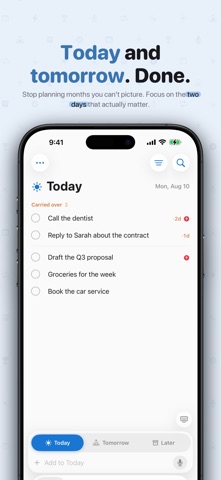
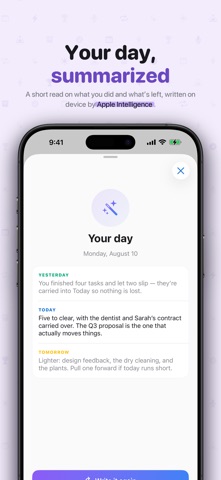
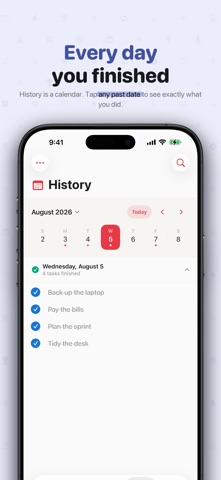
Most to-do apps are built to plan a year. 2Days List is built to get you through a day. The idea is deliberately small: you only ever look at Today and Tomorrow. Everything else waits in Later until it is close enough to matter. No projects to maintain, no priority levels to triage, no due dates scattered across a calendar you will never open. Two days is a window you can actually hold in your head, and small enough that finishing it feels within reach. That constraint is the whole point. When your list shows only what is in front of you, you stop managing a system and start doing the work. TALK, AND IT SORTS ITSELF OUT Hold the microphone and say what is on your mind, the way you would tell a friend: "Call the dentist, pick up the dry cleaning tomorrow, and sometime this month renew my passport." 2Days List hears three separate tasks, not one. Apple Intelligence reads what you said, splits it into individual to-dos, and files each on the day it belongs to: the dentist under Today, the dry cleaning under Tomorrow, the passport under Later. You review the result and can fix anything before a single task is saved. EVERYTHING HAPPENS ON DEVICE The transcription uses Apple's on-device speech recognition. The task splitting uses Apple Intelligence, on device. No audio, no transcript, and nothing you write is ever sent to a server, to us, or to anyone else. There is no account to create, because there is nothing to sync to. It also means it keeps working in airplane mode, in an elevator, and in a basement with no signal. A DAILY BRIEFING, WRITTEN FOR YOU Ask for a summary and Apple Intelligence writes a short, plain-language read on your day: what you finished yesterday, what is still open today, and what is worth pulling forward from tomorrow. It is generated on the device in about a second, from your own tasks, and can arrive as a notification each morning instead. MOVE THINGS WITH A GESTURE Swipe a task toward the day you want to send it. Swipe in from the screen edge to move yourself between Today, Tomorrow, and Later. Both gestures have weight, and both spring back if you did not mean it. NOTHING SLIPS THROUGH Whatever you do not get to stays in Today and starts counting, so a task that has been waiting three days says so. Flag the few things that truly matter and filter to just those when the list runs long. SEE WHAT YOU HAVE DONE History is a calendar of finished days. Tap any date to see exactly what you completed. Stats turns that record into streaks, a completion heatmap, and your most productive day of the week. ON YOUR HOME SCREEN A small widget for what is left today, and a wide one for today against tomorrow, both a glance away. ASK SIRI Add a task, mark one done, or have your day read back to you without touching the screen. 2Days List Pro unlocks everything paid: the Apple Intelligence day summary and day planner, the optional morning briefing, Stats and streaks, Home Screen widgets, and every app-icon theme. The AI writes fresh output from your own tasks every day, on device. Choose the plan that fits: - Monthly: $1.49 per month - Yearly: $9.99 per year, with a 7-day free trial - Lifetime: $14.99, a one-time purchase (not a subscription) Subscriptions renew automatically unless cancelled at least 24 hours before the end of the period. Manage or cancel anytime in your Apple Account settings. Payment is charged to your Apple Account at confirmation of purchase. Any unused portion of a free trial is forfeited when you buy Pro. Terms of Use (EULA): https://2dayslist.com/terms.html Privacy Policy: https://2dayslist.com/privacy.html Apple Intelligence features require a compatible iPhone. Everything else works on any supported iPhone.
Details