

Instrument Scales: Learn, Tune
Thiago Anderson Martins · Music
Independent analytics for this App Store listing. AppTracker is not affiliated with Thiago Anderson Martins.
Chart standing · US
What changed · US
Listing changes AppTracker has observed for this app in this storefront — new versions, price moves, rating shifts, and store copy.
New in this update: • Instrument-specific learning paths for guitar/acoustic guitar, bass, piano, high-G ukulele, and mandolin. • Guided stages to get oriented, listen, experiment, practice, transfer, and verify what you learned. • A study setup separate from Explore, with your instrument, tuning, register, and last step saved. • Core progress, optional extras, and earlier course history organized in the library. • One compatible core lesson free each day; unlimited lesson access with Premium (Pro or Max). Practice reports describe your own playing. The app does not assess your hands.
Ratings breakdown · US
The star breakdown behind this app's rating in this storefront.
In-app purchases · US
What this app sells inside itself, grouped by kind and priced for this storefront.
Screenshots



About
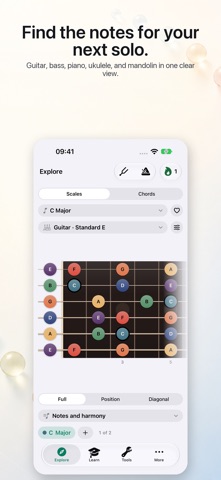
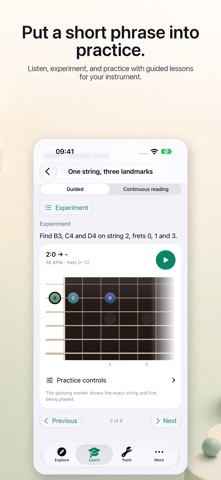
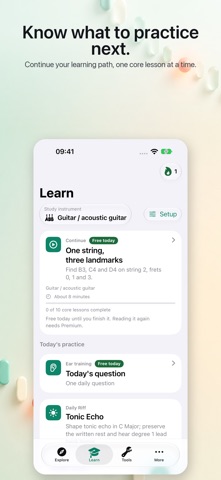
Turn music theory into something you can see, hear, and practice. Instrument Scales is a visual music-theory toolkit for guitar, bass, piano, ukulele, and mandolin. Explore scales and chords across the full instrument, hear each note, and understand how tones connect in every key. Pro unlocks all lessons and advanced tools with one permanent purchase — no subscription required. The Max subscription includes those capabilities plus a fresh Max Daily session every day, full ear-training sessions, and the Mastery Map. Eligible subscribers can try yearly Max free for 7 days. Premium access is provided by Pro or Max. EXPLORE SCALES AND CHORDS • Browse a complete catalog of scales. • View notes across guitar, bass, piano, ukulele, or mandolin. • Switch between note names, scale degrees, and intervals. • See key-aware note spelling and the chords that belong to each key. • Explore practical chord voicings and fingerboard patterns. • Tap notes to hear how they sound. LEARN AND PRACTICE • Choose a learning path for guitar, bass, piano, high-G ukulele, or mandolin. • Listen, experiment, practice a short phrase, and apply it in a new context through guided stages. • Keep your study instrument, tuning, and register separate from Explore, and return to your last step. • Follow your core progress, with optional extras and older course history in the library. • Study one compatible core lesson free each day; Premium gives unlimited lesson access. • Answer a free daily ear-training question and use practice reminders. • With Max, get a fresh Max Daily session, full ear-training sessions, and the Mastery Map. MUSIC TOOLS • Tune any note with the chromatic tuner. • Build steady time with the metronome. • Create, reorder, play, and loop chord progressions in any key. MAKE IT YOURS • Work with multiple scale setups at once. • Save favorites and reusable practice plans. • Create custom scales and tunings. • Personalize instrument necks and note colors. • Use left-handed layouts where supported. ON APPLE VISION PRO • Place the Practice Station beside your instrument once, and visionOS puts it back where you left it. • The Station shows the scale, chord, pattern or lesson exercise you picked, on the same fretboard or keyboard the app already draws, at a readable size or at a typical instrument's nominal size. • Reference keeps the shapes in your sightline. Play Along runs a timed example. Follow waits for each note and moves on when it hears or receives it. Harmony shows the next chord before it arrives. • Switch on Listen and the Station lights up the notes you play through the microphone; a MIDI keyboard works too. It never listens until you ask it to. • Keep the tuner in a panel beside the board, and reach Play, Pause, Repeat, Slower, Faster and Stop with Voice Control, without putting the instrument down. • Place the Scale of the Day and Practice Streak widgets in your surroundings. • Explore, Learn, Tools, your practice history and everything you have already bought are the same app, in its own window beside the Station. Instrument Scales is available on iPhone, iPad, Mac, and Apple Vision Pro, with a localized interface in English, Brazilian Portuguese, Japanese, Spanish, German, and Simplified Chinese. Start with the free essentials. Optional Pro and Max purchases unlock additional tools, lessons, and practice features. Terms of Use (Apple Standard EULA): https://www.apple.com/legal/internet-services/itunes/dev/stdeula/
What's new · 4.3.0
New in this update: • Instrument-specific learning paths for guitar/acoustic guitar, bass, piano, high-G ukulele, and mandolin. • Guided stages to get oriented, listen, experiment, practice, transfer, and verify what you learned. • A study setup separate from Explore, with your instrument, tuning, register, and last step saved. • Core progress, optional extras, and earlier course history organized in the library. • One compatible core lesson free each day; unlimited lesson access with Premium (Pro or Max). Practice reports describe your own playing. The app does not assess your hands.
Details