

MindPage
晓钧 黄 · Productivity
Independent analytics for this App Store listing. AppTracker is not affiliated with 晓钧 黄.
Chart standing · US
Ratings breakdown · US
The star breakdown behind this app's rating in this storefront.
In-app purchases · US
No in-app purchases.
Screenshots


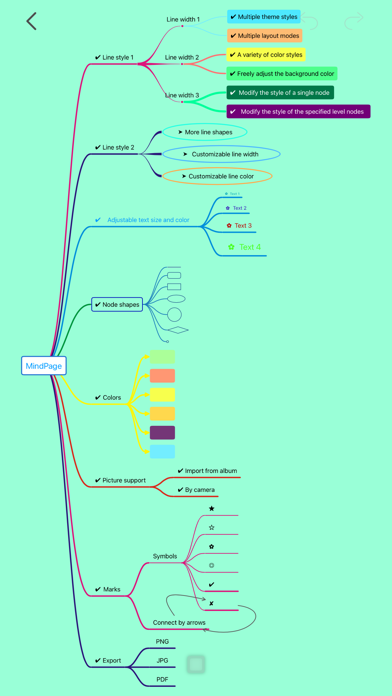


About
MindPage is an exquisite mind mapping application. You can use it to record ideas, write notes, and summarize knowledge. MindPage now supports dark mode, and supports split screen, drag and drop and other features on the iPad. ~~~~~~~~~~~~~~~~~~~~ Lightweight, Fast and Simple ∙ Minimal footprint ∙ Quickly launch and load files ∙ Efficient and simple operation and interface Quickly build mind maps ∙ Add nodes and branches quickly ∙ Supports inserting pictures, shooting with camera or selecting pictures from album ∙ Add symbol ∙ Add connections between nodes ∙ Drag nodes and branches to change their position Powerful Theme Attributes ∙ Global theme style: ∙ Preset multiple themes ∙ Preset multiple color schemes ∙ Support multiple layouts ∙ Quickly adjust background color ∙ Node and branch styles: ∙ Modify the style attributes of a single node ∙ Batch modify style attributes of specified level nodes ∙ Adjustable style attributes: ∙ Node shape ∙ Node color ∙ Border color ∙ Border width ∙ Line shape ∙ Line width ∙ Line style ∙ Line color ∙ Text size ∙ Text color Innovative document organization and management: ∙ Tile display in grid format ∙ Click to preview content ∙ Color folder ∙ Drag to change sort ∙ Folder content preview Export and share: ∙ PDF document ∙ PNG image ∙ JPG image ~~~~~~~~~~~~~~~~~~~~ Contact If you have any questions, suggestions or comments, please contact us at mindpage@outlook.com.
What's new · 1.2.0
This Update: Redesigned File Management Interface with New Features and Improvements: iCloud File Sync - Access and sync files stored in iCloud across devices, with support for local storage as well Split View Mode - A brand-new layout mode for the iPad interface or iPhone landscape mode Quick File Switching - Quickly switch between files for browsing or editing via Split View Mode Multi-level Folders - Supports creating subfolders within folders Recycle Bin - Deleted files will first be moved to the Recycle Bin, where they can be permanently deleted or restored Favorite Files - Mark files as favorites to easily find them Recently Used Files - Quickly view recently used files Automatic File Sorting - Replaces the manual sorting mode, offering various automatic sorting options Open File System - Files and folders you create within the app can be viewed and managed through the system "Files" app, making it easy to back up or transfer them Other - Supports iOS 18
Details