

ITS OnBoard Verify
Industrial Training Services, Inc. · Productivity
Independent analytics for this App Store listing. AppTracker is not affiliated with Industrial Training Services, Inc.
Chart standing · US
What changed · US
Listing changes AppTracker has observed for this app in this storefront — new versions, price moves, rating shifts, and store copy.
What's New • Crew-wide job coverage at a glance: a new coverage card above the Crew section shows how your whole crew covers each job, with expandable task detail on the Job Completion Summary. Improvements & Fixes • Each crew member's job status now reflects their own qualifications. A crew member who isn't qualified no longer shows green just because the crew as a whole covers the job. • Crew members who aren't qualified are no longer dropped when you submit a verification that contains only equivalency jobs. • When you resubmit a verification and add an equivalency job along with a new crew member, crew members who are already qualified now show the correct qualified icon. • Jobs are now listed alphabetically in the Crew section and on the Job Completion Summary. • Removing tasks from a job now fully clears them from every crew member. • New jobs are no longer automatically selected, which prevents mixing job types in one verification. • The Performance Mode pop-up is now a banner you can dismiss, so it no longer interrupts your work. • Fixed a loading spinner that could stay on screen indefinitely. • Fixed doubled screen dimming in the Verify Qualifications flow. • A clear message now appears if the company list fails to load. • The status bar and settings gear are now easy to read over your company's header image, including after submitting a Field Verification. • Home screen tabs are now evenly spaced, and spacing on the Add Crew screen is restored. • Security and stability improvements.
Ratings breakdown · US
The star breakdown behind this app's rating in this storefront.
In-app purchases · US
No in-app purchases.
Screenshots


About
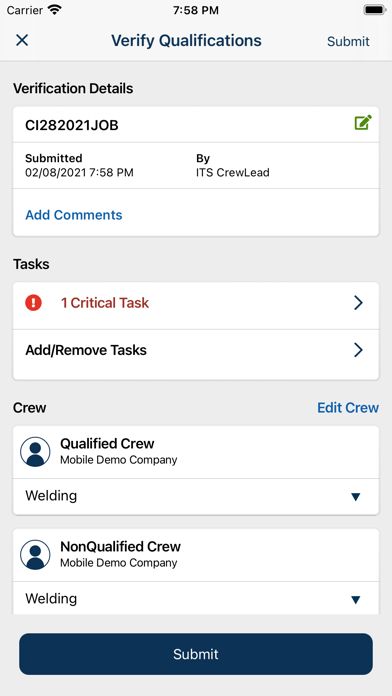
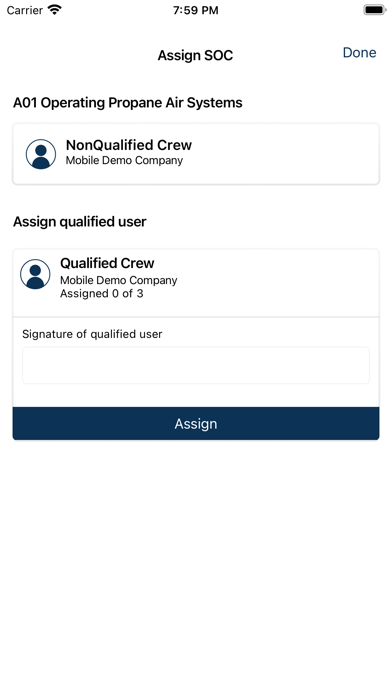
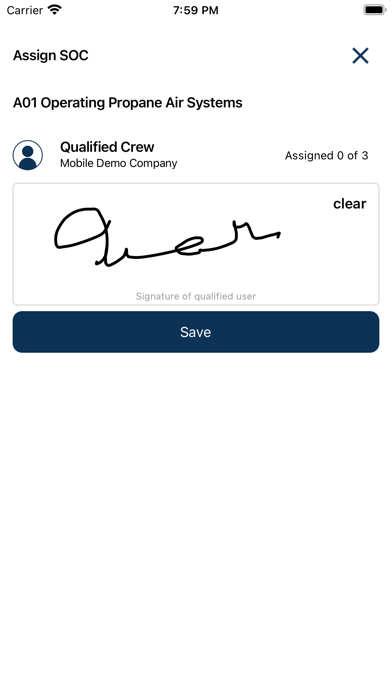
ITS Verify goes beyond the simple task-based verifications provided by ITS Go to enable verification of a worker’s qualifications against the more holistic requirements of a specific job, including requirements for span of control (SoC) and “critical” tasks, such as those for which records are required to be kept for the life of the pipeline. Key Features: • Scan worker’s eWallet card in the field to verify workers’ qualifications against custom jobs that were created in ITS platform • Assign workers to job crew based on qualifications, SoC requirements, and D&A status • Capture digital signature of assigned qualified individual for “critical” tasks • Identify and record non-qualified workers Benefits: • Simplifies and digitizes field verification reports (FVRs), while enforcing SoC • Eliminates the inefficiencies of previously paper-based processes • Centralizes critical OQ records in one system, streamlining reporting and auditing • Easily comply with regulatory and records retention requirements, including for critical tasks, safeguarding the defensibility of your OQ program.
What's new · 2.1.261005
What's New • Crew-wide job coverage at a glance: a new coverage card above the Crew section shows how your whole crew covers each job, with expandable task detail on the Job Completion Summary. Improvements & Fixes • Each crew member's job status now reflects their own qualifications. A crew member who isn't qualified no longer shows green just because the crew as a whole covers the job. • Crew members who aren't qualified are no longer dropped when you submit a verification that contains only equivalency jobs. • When you resubmit a verification and add an equivalency job along with a new crew member, crew members who are already qualified now show the correct qualified icon. • Jobs are now listed alphabetically in the Crew section and on the Job Completion Summary. • Removing tasks from a job now fully clears them from every crew member. • New jobs are no longer automatically selected, which prevents mixing job types in one verification. • The Performance Mode pop-up is now a banner you can dismiss, so it no longer interrupts your work. • Fixed a loading spinner that could stay on screen indefinitely. • Fixed doubled screen dimming in the Verify Qualifications flow. • A clear message now appears if the company list fails to load. • The status bar and settings gear are now easy to read over your company's header image, including after submitting a Field Verification. • Home screen tabs are now evenly spaced, and spacing on the Add Crew screen is restored. • Security and stability improvements.
Details