

StrymTV
iTelli Apps LLC · Entertainment
Independent analytics for this App Store listing. AppTracker is not affiliated with iTelli Apps LLC.
Chart standing · US
What changed · US
Listing changes AppTracker has observed for this app in this storefront — new versions, price moves, rating shifts, and store copy.
We're back with our biggest update yet — StrymTV has been redesigned from the ground up. - A fresh new look — a cleaner, faster interface rebuilt to feel right at home on iOS. - Import local playlists from Files & iCloud Drive — add your own M3U files straight from the Files app or iCloud. - Share your playlists — send a playlist to a friend or to your other devices in a tap. - Smarter M3U parsing — playlists load faster and more reliably, even large ones. - Bug fixes and performance improvements — smoother, more stable playback throughout. Thanks for using StrymTV!
Price & rating history · US
Reconstructed from the listing changes AppTracker has observed in this storefront. A field is charted once it has changed more than once, and each line starts at the value it moved from.
Average rating · ★ 3.64 now · 11 changes on record
Ratings breakdown · US
The star breakdown behind this app's rating in this storefront.
In-app purchases · US
No in-app purchases.
Screenshots



Keywords this app targets
Search terms AppTracker associates with this app — estimates, not search volume. ❝ = in the app's title; a highlighted number is its current position for that term.
Similar apps
Competitors and close alternatives, as estimated by AppTracker.
 Pure IPTV Player
PABLO FIGUEROA LORENZO
2 shared topics
Pure IPTV Player
PABLO FIGUEROA LORENZO
2 shared topics
 IPTV Xtream: TV Stream Player
Keyur Kyada
2 shared topics
IPTV Xtream: TV Stream Player
Keyur Kyada
2 shared topics
 Streamly IPTV
SIDE QUESTS DIGITAL
1 shared topic
Streamly IPTV
SIDE QUESTS DIGITAL
1 shared topic
 YouTivi Smarter - IPTV Player
Morakinyo Kasumu
2 shared topics
YouTivi Smarter - IPTV Player
Morakinyo Kasumu
2 shared topics
 IPTV VisionX
Nemita Thapar
2 shared topics
IPTV VisionX
Nemita Thapar
2 shared topics
 TvMate - Smart IPTV Player
Mohanty Bhaskar
2 shared topics
TvMate - Smart IPTV Player
Mohanty Bhaskar
2 shared topics
 IP Television: IPTV Player
Paolo Rossignoli
IP Television: IPTV Player
Paolo Rossignoli
 IPTV Smart Pro - Live TV
Mehmet Akif Saroglu
1 shared topic
IPTV Smart Pro - Live TV
Mehmet Akif Saroglu
1 shared topic
About
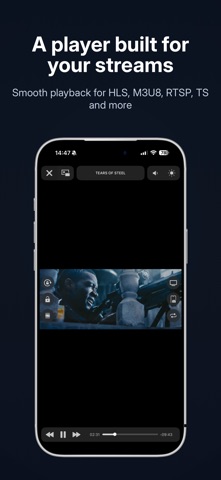
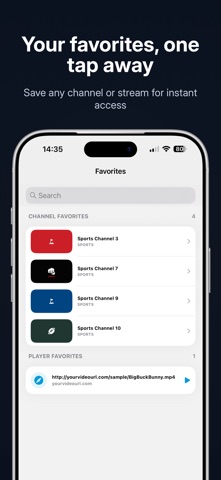
StrymTV turns your iPhone and iPad into a fast, elegant M3U playlist player — watch your own live TV and streams anytime, anywhere. Bring your own remote or local M3U playlists and play them in a clean, redesigned player built to feel right at home on iOS. WHAT YOU CAN DO Unlimited playlists - Import as many remote or local M3U playlists as you like. Powerful built-in player - Smooth playback for your own live and on-demand streams. - AirPlay to an external display in full screen. - Background playback — keep listening with the screen off or while using other apps. - in App - Picture in Picture — keep watching while you look for another channel. Broad format support - HTTP, HLS, M3U8, MMS, RTSP, TS, MPEG-TS and more. Auto-updating playlists - Keep your remote playlists fresh automatically. Playlist manager - Organize, edit and preview your local playlists with ease. Favorites - Save any channel or stream for one-tap access. History - Replay, copy or edit your recently played streams. Open and share with URL schemes - Open any stream instantly with strymtv://player/YOUR-STREAM-URL from a browser or shortcut. - Share your playlists with a tap. Fast, intelligent M3U parser - Large playlists load quickly and reliably. IMPORTANT — BRING YOUR OWN CONTENT StrymTV is a player only. It does not provide, include or host any channels, media or content, aside from a few royalty-free sample streams: - Big Buck Bunny — Creative Commons Attribution 3.0 - Sintel — Creative Commons Attribution 3.0 - Tears of Steel — Creative Commons Attribution 3.0 You must supply your own streams and playlists. StrymTV has no affiliation with any third-party provider. Please do not stream copyright-protected material without the copyright holder's permission. All content shown in the screenshots is for illustration only and is not included in the app. Privacy Policy: https://strymtv.com/privacy-policy/ Terms & Conditions: https://strymtv.com/conditions/
What's new · 1.1
We're back with our biggest update yet — StrymTV has been redesigned from the ground up. - A fresh new look — a cleaner, faster interface rebuilt to feel right at home on iOS. - Import local playlists from Files & iCloud Drive — add your own M3U files straight from the Files app or iCloud. - Share your playlists — send a playlist to a friend or to your other devices in a tap. - Smarter M3U parsing — playlists load faster and more reliably, even large ones. - Bug fixes and performance improvements — smoother, more stable playback throughout. Thanks for using StrymTV!
Details