

Incognito — Private Browser
Overdesigned, LLC · Utilities
Independent analytics for this App Store listing. AppTracker is not affiliated with Overdesigned, LLC.
Chart standing · US
What changed · US
Listing changes AppTracker has observed for this app in this storefront — new versions, price moves, rating shifts, and store copy.
Incognito’s design has been spruced up for iOS 27 and iPhone Duo. The app now requires iOS 27. Added "Disable JavaScript" action. Fixed a potential crash for new installs on iPad.
Price & rating history · US
Reconstructed from the listing changes AppTracker has observed in this storefront. A field is charted once it has changed more than once, and each line starts at the value it moved from.
Average rating · ★ 4.49 now · 7 changes on record
Ratings breakdown · US
The star breakdown behind this app's rating in this storefront.
In-app purchases · US
What this app sells inside itself, grouped by kind and priced for this storefront.
Screenshots





Keywords this app targets
Search terms AppTracker associates with this app — estimates, not search volume. ❝ = in the app's title; a highlighted number is its current position for that term.
Similar apps
Competitors and close alternatives, as estimated by AppTracker.
 Private Browser - dip
Manoj Kumar Sah
2 shared topics · 3 shared title words
Private Browser - dip
Manoj Kumar Sah
2 shared topics · 3 shared title words
 Firefox Fast & Private Browser
Mozilla
3 shared title words
Firefox Fast & Private Browser
Mozilla
3 shared title words
 SecurityHub - Private Browser
Beijing Elinasoft Technologies Company Limited
3 shared title words
SecurityHub - Private Browser
Beijing Elinasoft Technologies Company Limited
3 shared title words
 Aloha Browser – Private VPN
Aloha Mobile
2 shared title words
Aloha Browser – Private VPN
Aloha Mobile
2 shared title words
 X Browser : Private Browser
Krishna Chitaliya
3 shared title words
X Browser : Private Browser
Krishna Chitaliya
3 shared title words
 Private Browsing White
Savy Soda Pty Ltd
1 shared title word
Private Browsing White
Savy Soda Pty Ltd
1 shared title word
 Proxy: Anonymous web browser
Konstantinos Papadakis
1 shared title word
Proxy: Anonymous web browser
Konstantinos Papadakis
1 shared title word
 DuckDuckGo, optional Duck.ai
DuckDuckGo, Inc.
DuckDuckGo, optional Duck.ai
DuckDuckGo, Inc.
About
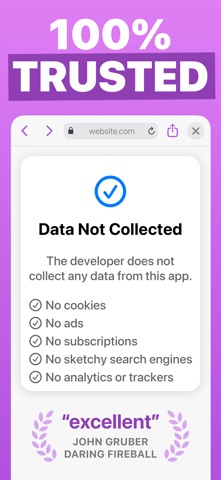
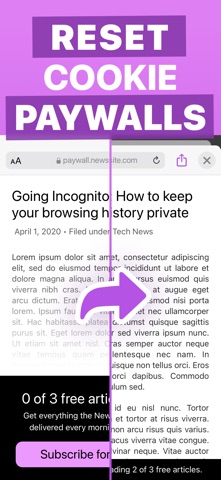
Incognito is a private web browser you can pull up anywhere. From any app: long-press a link or select text, tap Share, and then choose the Incognito action extension. Boom: instant web browser! Need to lock people out of your web history or bookmarks? Incognito can do that too! Incognito is great for: • Viewing a web page inside the current app without jumping to Safari. • Opening sketchy links without risking your privacy. • Reopening a web page with cookies disabled — and yes, that means Incognito lets you dodge most paywalls. • Searching Google from anywhere — just select the text you want to search, choose “Share” from the popup menu, and then choose the “Search in Incognito” action. • Searching with something besides Google: use Kagi, DuckDuckGo, Bing, Brave, Qwant, Yahoo, or whatever search engine you prefer. • Keeping your web history and bookmarks private and passcode-locked. Or you can disable browsing history and leave no trace! Incognito is also a Swiss Army Knife of web tools: • Open a page in another browser such as Safari, Chrome, Firefox, Opera, Brave, or DuckDuckGo. • Remove AMP so you can browse or share the original URL. • Translate the page using Google Translate (beta). • Open a web page with the archive.today service (Incognito is not affiliated with archive.today or archive.is). • Save a PDF of an entire web page. • Set Incognito as your default browser. • Clear your session history. Incognito is all about privacy: • All web browsing is in “private mode” by default, so all cookies and web data are discarded after each session. • Incognito has no ads, no third-party trackers, and does not send or re-route your web searches anywhere. • If you require extra privacy, Incognito has options to disable browsing history and/or exclude it from your iCloud Backups. Incognito is paid upfront with a small, one-time fee. There are no subscriptions, in-app purchases, ads, or deals with sketchy "search engines" like many of the "free" so-called private browser apps. You can trust me with your privacy because you know how I got paid: once, by you, that's it. Incognito was created by an independent developer living in California.
What's new · 1.3
Incognito’s design has been spruced up for iOS 27 and iPhone Duo. The app now requires iOS 27. Added "Disable JavaScript" action. Fixed a potential crash for new installs on iPad.
Details