

Pitch Checker: Chromatic Tuner
Shigeki Matsunaka · Music
Independent analytics for this App Store listing. AppTracker is not affiliated with Shigeki Matsunaka.
Chart standing · US
What changed · US
Listing changes AppTracker has observed for this app in this storefront — new versions, price moves, rating shifts, and store copy.
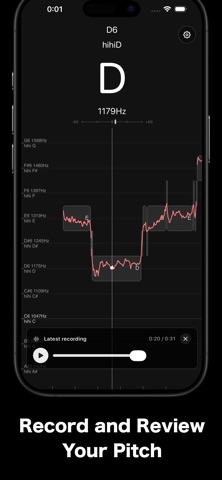
Added Recording Feature!
Price & rating history · US
Reconstructed from the listing changes AppTracker has observed in this storefront. A field is charted once it has changed more than once, and each line starts at the value it moved from.
Average rating · ★ 4.63 now · 10 changes on record
Ratings breakdown · US
The star breakdown behind this app's rating in this storefront.
In-app purchases · US
What this app sells inside itself, grouped by kind and priced for this storefront.
Screenshots



Keywords this app targets
Search terms AppTracker associates with this app — estimates, not search volume. ❝ = in the app's title; a highlighted number is its current position for that term.
Similar apps
Competitors and close alternatives, as estimated by AppTracker.
 Pitch - Chromatic Tuner
Frozen Ape Pte. Ltd.
1 shared topic · 4 shared title words
Pitch - Chromatic Tuner
Frozen Ape Pte. Ltd.
1 shared topic · 4 shared title words
 Tunable – Tuner & Metronome
AffinityBlue
2 shared topics · 1 shared title word
Tunable – Tuner & Metronome
AffinityBlue
2 shared topics · 1 shared title word
 VocalTuner - Pitch Training
Kiichi Ito
1 shared title word
VocalTuner - Pitch Training
Kiichi Ito
1 shared title word
 Vocal Pitch Monitor
Tadao Yamaoka
1 shared topic · 1 shared title word
Vocal Pitch Monitor
Tadao Yamaoka
1 shared topic · 1 shared title word
 Touch Tuner
Kawai Musical Instruments Manufacturing Co., Ltd.
1 shared title word
Touch Tuner
Kawai Musical Instruments Manufacturing Co., Ltd.
1 shared title word
 Vocal Analyzer Z
Masanori Katsuta
1 shared topic
Vocal Analyzer Z
Masanori Katsuta
1 shared topic
 Pitch Scoper: Tuner & Analyzer
朋亮 杨
Pitch Scoper: Tuner & Analyzer
朋亮 杨
 OnPitch - Vocal Pitch Monitor
Alena Kucharenka
1 shared title word
OnPitch - Vocal Pitch Monitor
Alena Kucharenka
1 shared title word
About
The app analyzes real-time audio from your microphone and displays musical note, pitch, octave, frequency, and waveform information. It also includes a Metronome feature (Beta), allowing you to set the tempo and practice with sound and vibration cues. ■ Usage Examples - Measure vocal range - Practice absolute pitch - Detect the musical notes of a song (pitch detection) - Vocal exercises - Karaoke practice - Improve pitch accuracy - Measure frequency - Voice training - Basic instrument tuning (use it as a tuner) - Do, Re, Mi note detection - Rhythm practice using the metronome You can pause the analysis with a tap, allowing you to review the results at your own pace. The display also supports notations such as low A, mid2 A, hihi A, etc. ■ How to Use Simply launch the app, and it will automatically measure the pitch of sounds captured by the microphone — whether voice or instruments. To avoid picking up small sounds and background noise, slide the “Microphone Sensitivity” bar in the upper-left corner upward. The metronome can be used by simply setting your desired tempo. ■ Settings Tap the gear icon in the top-right corner to access the following settings: - Toggle between sharp and flat notation - Change the large center display notation (Do, Re, Mi / C, D, E, F, G, A, B) - Set the reference pitch - Adjust pitch detection speed - Set the metronome tempo ■ FAQ Q. I want to measure my vocal range. A. The app displays extended ranges such as hihi A and lowlow A for your reference. Q. Pitch is displayed even when it’s quiet. A. Even in very quiet environments, tiny background noise may be detected. To prevent this, slide the “Microphone Sensitivity” bar upward to ignore softer sounds. Q. I want to use it as a tuner. A. No special settings are required. However, switching the large center display from "Do, Re, Mi" to "C, D, E, F, G, A, B" may be more convenient. Tap the gear icon and change the “Large Display Notation” setting. ■ Other Information Permissions: - Microphone: Used to analyze audio input - Siri & Search, Cellular Data: Used for AdMob advertisements Terms of use can be found here: https://shigeki.work/pitchchecker/termsofuse For bug reports or inquiries about the app, contact via the app's settings (bug report or inquiry) or email support (replace the at symbol with @): support at shigeki.work. Feel free to use this app on media platforms such as TV.
What's new · 12.3.0
Added Recording Feature!
Details