

Pulsómetro - Medir pulsaciones
Manuel Luis Ortiz Rojas · Health & Fitness
Independent analytics for this App Store listing. AppTracker is not affiliated with Manuel Luis Ortiz Rojas.
Chart standing · US
What changed · US
Listing changes AppTracker has observed for this app in this storefront — new versions, price moves, rating shifts, and store copy.
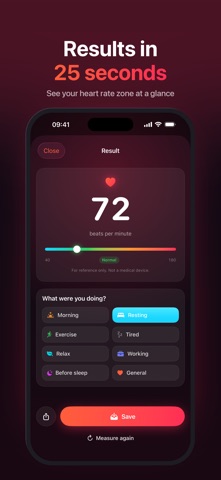
• New guide that shows exactly where to place your finger on your iPhone model. • Live camera view while measuring: the circle turns red when your finger is in the right place. • The flash now turns on only when you tap Start measurement, and turns off automatically when it finishes. • New “Measure again” button on the result screen. • Fixed an issue where the flash turned off right after opening the app on some iPhone models.
Screenshots




About
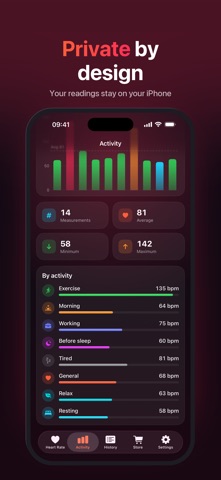
Measure your heart rate in seconds, with no wearables and no extra hardware. Just place your fingertip over your iPhone's rear camera and flash, hold still, and get your beats per minute in about 25 seconds. HOW IT WORKS Heart Rate uses your iPhone's camera and flash to detect the tiny color changes in your fingertip with every heartbeat, a technique known as photoplethysmography. You can watch your live pulse waveform while it measures. FEATURES • Fast measurement: your heart rate in about 25 seconds • Live pulse waveform and a heart that beats with your rhythm • Heart rate zones: see at a glance if a reading is low, normal, elevated or high • Activity tags: note whether you were resting, exercising, working, relaxing or about to sleep • Complete history, grouped by day • Statistics: average, minimum, maximum and averages by activity • Voice guidance: spoken instructions, countdown and results, so you don't need to look at the screen • Reminders to help you keep track of your heart rate • Beautiful dark design • Available in English, Spanish, German, French, Portuguese and Italian PRIVATE BY DESIGN Your measurements are stored only on your iPhone. No account, no sign-up, and your readings are never uploaded. GO PRO Remove all ads with a single one-time purchase. TIPS FOR ACCURATE READINGS • Cover both the camera and the flash completely with your fingertip • Press gently: too much pressure can affect the reading • Stay still and relaxed while measuring • Cold fingers can give a weaker signal, so measure in a warm place IMPORTANT Heart Rate is intended for general wellness and informational purposes only. It is not a medical device and is not intended to diagnose, treat, cure or prevent any disease. If you have any concerns about your health, please consult a doctor.
What's new · 6.0.1
• New guide that shows exactly where to place your finger on your iPhone model. • Live camera view while measuring: the circle turns red when your finger is in the right place. • The flash now turns on only when you tap Start measurement, and turns off automatically when it finishes. • New “Measure again” button on the result screen. • Fixed an issue where the flash turned off right after opening the app on some iPhone models.
Details