

Track4Facts PRO
Klaus Neuendorf · Navigation
Independent analytics for this App Store listing. AppTracker is not affiliated with Klaus Neuendorf.
Chart standing · US
What changed · US
Listing changes AppTracker has observed for this app in this storefront — new versions, price moves, rating shifts, and store copy.
New: Video Studio – your drive with the data behind it. Combine your driving video with the data actually recorded: speed, G-forces, route and times. You decide which displays appear in the video and how they look. Two perspectives with one iPhone: record the road and the driver simultaneously using the rear and front cameras – on supported devices with compatible settings. Choose your best moments and export them as MP4 in portrait or landscape. Recording up to 4K and slow motion are available depending on your device and settings. You can overlay Apple Watch heart rate data with separate consent. Filming is optional. All measurement features remain available without video. Included in PRO.
Ratings breakdown · US
The star breakdown behind this app's rating in this storefront.
In-app purchases · US
What this app sells inside itself, grouped by kind and priced for this storefront.
Screenshots




Keywords this app targets
Search terms AppTracker associates with this app — estimates, not search volume. ❝ = in the app's title; a highlighted number is its current position for that term.
Similar apps
Competitors and close alternatives, as estimated by AppTracker.
 Speedometer 55 Pro. GPS kit.
Stanislav Dvoychenko
1 shared topic · 1 shared title word
Speedometer 55 Pro. GPS kit.
Stanislav Dvoychenko
1 shared topic · 1 shared title word
 GPS Speedometer MPH Tracker
BITHAUS.TECH, UNIPESSOAL LDA
1 shared topic
GPS Speedometer MPH Tracker
BITHAUS.TECH, UNIPESSOAL LDA
1 shared topic
 Track Attack! Lap timer & maps
Velocity Labs LLC
Track Attack! Lap timer & maps
Velocity Labs LLC
 Digital Speed GPS Speedometer
BITHAUS.TECH, UNIPESSOAL LDA
1 shared topic
Digital Speed GPS Speedometer
BITHAUS.TECH, UNIPESSOAL LDA
1 shared topic
 GPS Tracks
David Morneault
2 shared topics
GPS Tracks
David Morneault
2 shared topics
 TrackAddict Pro
HP Tuners LLC
1 shared title word
TrackAddict Pro
HP Tuners LLC
1 shared title word
 Speed Tracker: GPS Speedometer
Oxagile LLC
1 shared topic
Speed Tracker: GPS Speedometer
Oxagile LLC
1 shared topic
 Race Timer: SpeedGate
Matteo Del Negro
Race Timer: SpeedGate
Matteo Del Negro
About
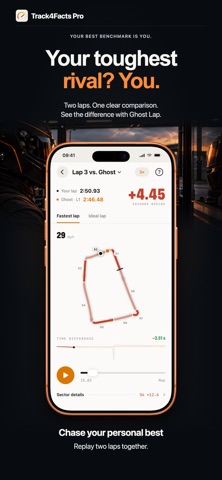
Track4Facts PRO turns your iPhone into a GPS driving recorder for sprint, distance, lap and sector times. Compare drives with maps, charts and sensor analysis. Video Studio in the full version lets you film your drive and overlay recorded driving data. Download for free and measure 0–100 km/h or 0–60 mph. Unlock the full version with a one-time purchase. No subscription. Previous buyers of the paid app keep the full version, including Video Studio. FREE FEATURES • GPS speedometer and drive recording with speed, distance, duration, altitude and stops • 0–100 km/h or 0–60 mph sprint timing, depending on your unit settings • iPhone sensor fusion for suitable standard sprints • Background driving data recording, Live Activity on the Lock Screen and Dynamic Island • Maps, drive summaries and history • One vehicle profile in the garage • Sprint start/stop via Siri, Shortcuts and the Action button on supported iPhones • Apple Watch remote control and optional heart rate recording • Import existing Track4Facts backups FULL VERSION — ONE-TIME PURCHASE • Video Studio: film drives, overlay driving data, design and export clips • Custom sprint ranges from a standstill or rolling start • Sprint comparisons across drives and vehicles with overlaid speed curves • Distance timing with splits, finish speed and custom targets • Automatic lap and sector timing with live delta to your best lap • Draw tracks, record them with a mapping lap or import GPX and GeoJSON • Edit track points, driving direction, start/finish and sectors • Lap comparisons, corner analysis, braking and deceleration profiles • Theoretical best time, lap consistency and ghost lap replay • G-circle, cornering dynamics and vibration analysis • Interactive 3D track, elevation profile, drive replay and measurement charts • GPX, waypoint CSV and motion CSV export • Full backups, multiple vehicle profiles and external GPS • Lap timing start/stop via Siri, Shortcuts and the Action button VIDEO STUDIO — YOUR DRIVE WITH DRIVING DATA Film sprint, distance and lap sessions. Overlay relevant driving data: speed, route, G-forces, lap and sector times or saved best sprint and distance times. Customize the position, size and design of the displays. Select clips and export them as landscape or portrait MP4 files to save and share. Recording up to 4K, higher frame rates, slow motion and an additional driver camera depend on your device and settings. Audio is optional. Recorded Apple Watch heart rate can be overlaid with separate consent. Camera recording requires the app in the foreground. GPS + IPHONE SENSORS Sensor fusion adds motion data to suitable standard sprints. The iPhone must be securely mounted. Fusion is used only after checks pass; GPS remains available for comparison. Retrospective ≈ estimates are not confirmed best times. Motion data is stored at a nominal 50 Hz. APPLE WATCH AND EXTERNAL GPS Follow live data and control sprint recording from your wrist. Optional Race Training records heart rate with permission and saves a workout in Apple Health. Heart rate data in backups or CSV requires separate consent. External GPS: Dual XGPS150/XGPS150A, XGPS160 SkyPro and Dragy Lite (10, 20 or 25 Hz). More data points do not guarantee greater accuracy. RESULTS AND SAFETY GPS and sensor fusion provide estimates without guaranteed timing accuracy. Track4Facts PRO is not a calibrated measuring instrument. Each drive retains its measurement configuration. Take performance measurements only on private, closed or expressly authorized tracks and areas. Mount your phone securely, set it up before driving and do not operate it while driving. Observe laws, safety rules and the rights of people filmed. Only import permitted track data and comply with license terms.
What's new · 10.01
New: Video Studio – your drive with the data behind it. Combine your driving video with the data actually recorded: speed, G-forces, route and times. You decide which displays appear in the video and how they look. Two perspectives with one iPhone: record the road and the driver simultaneously using the rear and front cameras – on supported devices with compatible settings. Choose your best moments and export them as MP4 in portrait or landscape. Recording up to 4K and slow motion are available depending on your device and settings. You can overlay Apple Watch heart rate data with separate consent. Filming is optional. All measurement features remain available without video. Included in PRO.
Details