

My Photo Keyboard Themes
Instaberry Technologies Private Limited · Lifestyle
Independent analytics for this App Store listing. AppTracker is not affiliated with Instaberry Technologies Private Limited.
Chart standing · US
What changed · US
Listing changes AppTracker has observed for this app in this storefront — new versions, price moves, rating shifts, and store copy.
New: 32 keyboard fonts! Turn any photo into your keyboard, pick from 47 themes, and type in fancy styles that match your keys. Private — never stores what you type.
In-app purchases · US
No in-app purchases.
Screenshots



About
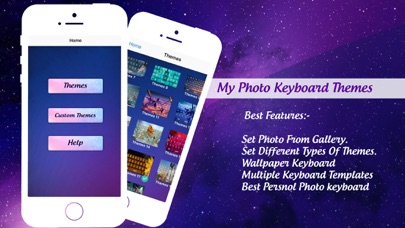
Turn your favourite photo into your keyboard — and make every message look like you. My Photo Keyboard Themes is a fast, beautiful custom keyboard for iPhone and iPad. Pick a photo from your gallery, crop it to fit, add blur or darken it, choose a key style and a font — done. Your keyboard now looks like nothing else. YOUR PHOTO AS YOUR KEYBOARD - Use any picture from your gallery as the keyboard background - Pinch and drag to crop it perfectly - Blur, darken, brightness and saturation controls - Glass, frosted, dark, light, outline or text-only keys - Save as many photo themes as you like 47 READY-MADE THEMES - Gradient, Neon, Glass, Cute and Classic collections - Glowing neon keys, frosted glass, pastel and dark themes - Live preview before you apply 32 KEYBOARD FONTS - Change the font on your keys: cute, handwriting, bold, elegant, retro and fun - Pacifico, Dancing Script, Bebas Neue, Pixel, Typewriter and many more - Works with every theme — even your photo themes - Type in matching style: your messages come out in Script, Bold or Typewriter letters to match your keys THEME STUDIO - Design every detail: key colours, opacity, borders, glow and shadows - Gradient backgrounds with up to 4 colours in any direction - Rounded or square keys — set the corner roundness you like FANCY TEXT IN ANY APP - Type in Bold, Script, Gothic, Bubbles, Small Caps and more, right from the keyboard - Styled text works in messages, captions, bios and comments - Fancy Text converter in the app to copy styled text in one tap A REAL, SMART KEYBOARD - Word suggestions and autocorrect (backspace to undo a correction) - Emoji keyboard with recents - Key pop-ups, hold a key for accents (é, ñ, ü…), key sounds and haptics - Swipe the space bar to move the cursor - Uses your iOS Text Replacements - Full-width layout on iPhone and iPad, portrait and landscape PRIVATE BY DESIGN The keyboard never saves or sends anything you type. It has no ads and no analytics inside the keyboard. "Allow Full Access" is only used so the keyboard can show the photo, theme and font you choose in the app. SET UP IN 30 SECONDS 1. Open My Photo Keyboard Themes. 2. Follow the guide: Settings → General → Keyboard → Keyboards → Add New Keyboard → My Photo Keyboard. 3. Turn on Allow Full Access to use your photo themes and fonts. 4. In any app, tap the globe key to switch to your new keyboard. The app checks each step for you, so you always know what to do next. PRO (OPTIONAL ONE-TIME PURCHASE) Remove all ads and unlock every VIP theme and font — pay once, keep it forever. VIP items can also be unlocked for free by watching a short video. Terms of Use: https://www.apple.com/legal/internet-services/itunes/dev/stdeula/ Privacy Policy: https://instaberryofficial.blogspot.com/
What's new · 1.1
New: 32 keyboard fonts! Turn any photo into your keyboard, pick from 47 themes, and type in fancy styles that match your keys. Private — never stores what you type.
Details