

Internet Quality
Rastislav Cervenak · Utilities
Independent analytics for this App Store listing. AppTracker is not affiliated with Rastislav Cervenak.
Chart standing · US
What changed · US
Listing changes AppTracker has observed for this app in this storefront — new versions, price moves, rating shifts, and store copy.
Internet Quality 3.0 puts your room scans in a new light. NEW · A living scan Start a scan and the signal bursts into your room. Each spot lights up as you walk, with a gentle tap as it lands, and the map of your room builds itself live while you scan. NEW · Explore your scan in 3D Switch any saved scan between a 2D heatmap and an interactive 3D map. Rotate, zoom and pan with your fingers to find the strong and weak spots, with walls and doors drawn the way your room really is. NEW · Share your scan Turn a scan into a clean image for a post or a story and share it in a tap. IMPROVED Speed tests are out of beta, with a smoother live chart. The dashboard uses less battery over long sessions. Plus smaller fixes and polish.
Price & rating history · US
Reconstructed from the listing changes AppTracker has observed in this storefront. A field is charted once it has changed more than once, and each line starts at the value it moved from.
Average rating · ★ 4.33 now · 4 changes on record
Ratings breakdown · US
The star breakdown behind this app's rating in this storefront.
In-app purchases · US
What this app sells inside itself, grouped by kind and priced for this storefront.
Screenshots


About
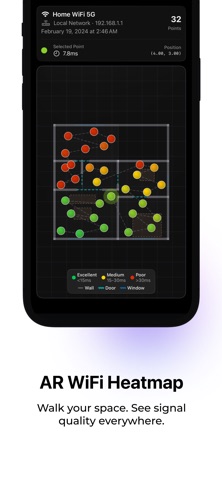
Internet Quality helps you understand your WiFi. Rebuilt from the ground up with a stunning Liquid Glass design for iOS 26. • Real-time local and internet network performance with live quality scores • Rolling history charts so you can track your connection over time • AR WiFi heatmap: walk through your space and see exactly where your signal is strong or weak • Save and revisit your AR scans anytime • WiFi speed test to measure your real upload and download throughput • Detailed network diagnostics: SSID, gateway IP, and connection type • Customizable dashboard: pick your scan interval, toggle charts, choose score display • Adaptive layout for both iPhone and iPad
What's new · 3.0.0
Internet Quality 3.0 puts your room scans in a new light. NEW · A living scan Start a scan and the signal bursts into your room. Each spot lights up as you walk, with a gentle tap as it lands, and the map of your room builds itself live while you scan. NEW · Explore your scan in 3D Switch any saved scan between a 2D heatmap and an interactive 3D map. Rotate, zoom and pan with your fingers to find the strong and weak spots, with walls and doors drawn the way your room really is. NEW · Share your scan Turn a scan into a clean image for a post or a story and share it in a tap. IMPROVED Speed tests are out of beta, with a smoother live chart. The dashboard uses less battery over long sessions. Plus smaller fixes and polish.
Details