

OffScreen: Screen Time Control
MD Studio · Health & Fitness
Independent analytics for this App Store listing. AppTracker is not affiliated with MD Studio.
Chart standing · US
What changed · US
Listing changes AppTracker has observed for this app in this storefront — new versions, price moves, rating shifts, and store copy.
A clearer view of your time. - See more of your screen time and focus trends with the new extra-large widget size. - Enjoy refreshed controls and a more consistent look in light and dark mode. - Keep track of your focus progress in the Dynamic Island, even in landscape. - Start and stop focus sessions with Siri, and find your focus tags in Spotlight. Thanks for focusing with OffScreen. We hope you enjoy the update and the little details we’ve refined.
Ratings breakdown · US
The star breakdown behind this app's rating in this storefront.
In-app purchases · US
What this app sells inside itself, grouped by kind and priced for this storefront.
Screenshots






About
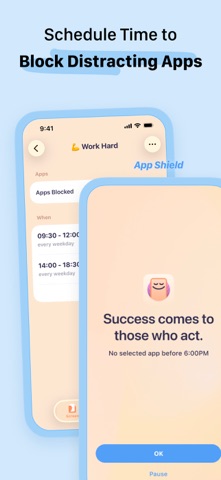
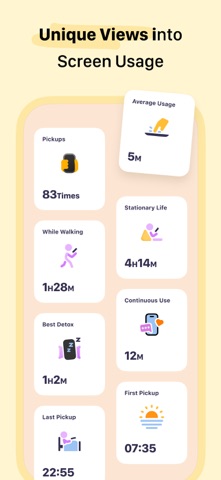
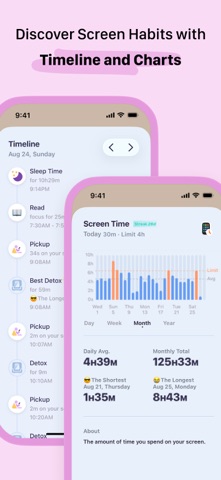
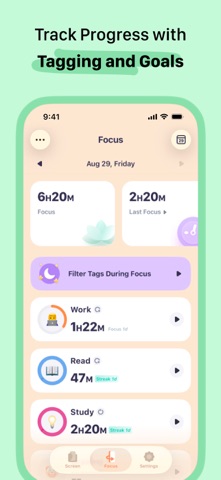
OffScreen helps you track phone usage and keeps you stay focused. With OffScreen, you can: - Track screen time • Set up your screen time goal, and get daily insight. • See screen time activities: Pickups, Average Usage, While Walking, Stationary Life, Last Pickup, First Pickup, Best Break, and Sleep Time • Read sleep data from the Health app • Show data on your favorite watch face - OFF Time • Set disable time for social apps and enjoy OFF time - Focus Mode • Supports three modes: Pomodoro, countdown, and time accumulation • Support lock screen and flip screen focus • Supports live activity and StandBy • If you need to use your phone to look up a dictionary or use other applications during the concentration process, you can set a concentration app whitelist • Categories your focus sessions by tag • Pause at any time when you need the phone to help you study or search while you're in focus mode • Focus on the watch - Visualize and share your data. • View data in week/month/year view. • Well-designed share card is ready for you. - Breaking digital detox challenges • Screen time challenge • Pick up challenge • Sleep challenge - Sync sleep time and focus mindfulness time on Apple HealthKit. --------- To collect the walking time data, this app tracks your location in the background and can affect battery life. * Subscription payments will be charged to your iTunes account at confirmation of your purchase. * Subscriptions will automatically renew and payment will be charged to your iTunes account unless auto-renew is turned off at least 24 hours prior to the end of the current Privacy Policy: https://miidii.super.site/miidii-tech/privacy-policy Terms Of Use: https://miidii.super.site/miidii-tech/terms-of-use
What's new · 3.21.1
A clearer view of your time. - See more of your screen time and focus trends with the new extra-large widget size. - Enjoy refreshed controls and a more consistent look in light and dark mode. - Keep track of your focus progress in the Dynamic Island, even in landscape. - Start and stop focus sessions with Siri, and find your focus tags in Spotlight. Thanks for focusing with OffScreen. We hope you enjoy the update and the little details we’ve refined.
Details